A postback URL (S2S postback) lets networks fire conversion data back to your tracker without cookies adn tracker to send conversion information to the ad network. Learn how postback tracking works and how to set it up in CPV Lab.
Are you tired of running affiliate marketing campaigns blindly? Do you want to track your conversions and optimize your campaigns for maximum profit?
If so, you need to start using Postback URLs!
But wait, what is a Postback URL?
If you never used it, you may fear that some geek talking is coming next.
Don’t worry, I’m here to explain it to you in a way that won’t make your head spin. 🙂
What is a Postback URL?
Simply put, a Postback URL is a URL that is called by an affiliate network or tracking platform to notify you of a conversion.
See? Easy! But let’s explain it a little more.
When a visitor completes a conversion – filling out a lead form, making a purchase, completing a trial signup – the affiliate network sends an HTTP request to your Postback URL. That request carries information about the conversion: the offer ID, the payout, and most importantly, the sub ID that ties the conversion back to the specific click that started the journey.
That signal lands in your affiliate marketing tracker. CPV Lab receives it, matches it to the original click, and records the conversion in your reports.
And then – this is the part most guides leave out – your tracker can fire another postback back to your traffic source. So your ad network learns which clicks led to actual conversions, and its algorithm can optimize toward finding more buyers like that one.
That second signal is optional in theory. In practice, if you are not sending it, you are losing some good money there.
Why should you care about Postback URLs?
Well, without them, you wouldn’t be able to track your conversions and optimize your campaigns effectively.
You might be able to see that sales happened in your affiliate network dashboard. But you cannot see which traffic source sent the buyer. Which ad creative they clicked. Which landing page they came from. Which zone or placement drove the conversion.
All of that attribution lives in your tracker – but only if the Postback URL is working correctly.
By using Postback URLs, you can see which offers are performing well, which traffic sources are converting, and which creatives are resonating with your audience.
Armed with this data, you can make informed decisions about where to allocate your budget and which campaigns to scale up or shut down.
And this is where an affiliate marketing tracker like CPV Lab or CPV One can help you out. The tracker has already the Postback URL setup for all major traffic sources and affiliate networks – you just select yours and copy the URL.
And what is even better: if you are using a special Affiliate Network or you collaborate directly with a brand, you can simply add it as an offer source in CPV Lab and you can use the Postback URL in 2 clicks.
Now, I know what you’re thinking:
“But Julia, setting up a Postback URL sounds like a lot of work! Can’t I just rely on the affiliate network’s tracking system?”
Sure, you could do that, but do you really want to leave your profits to chance?
By setting up your own Postback URL, you have complete control over your tracking and can ensure that you’re getting accurate data.
Plus, it’s not as hard as you might think!
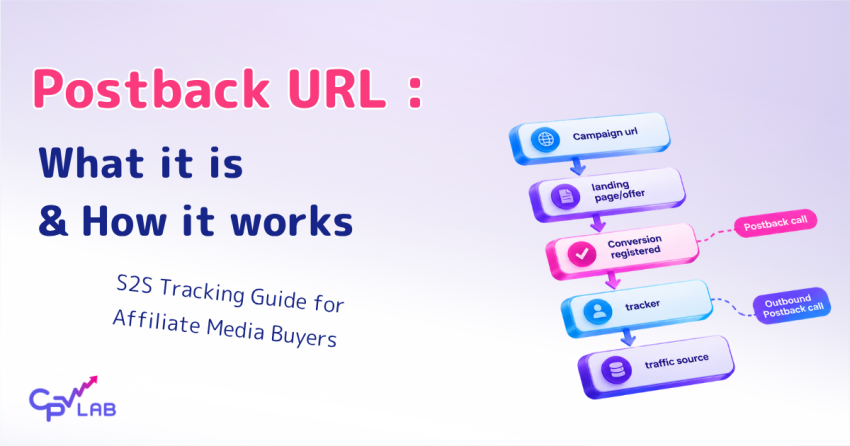
How Does It Work? The Full Flow
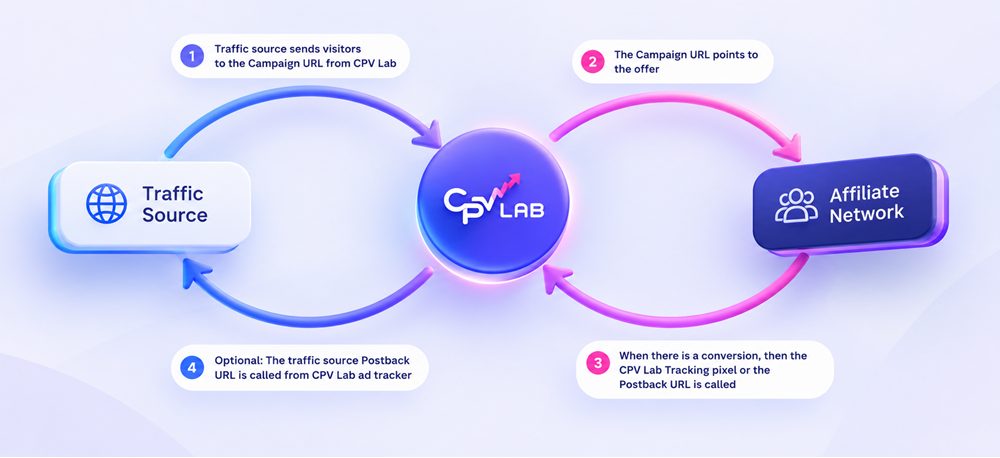
Here is the complete picture of what happens from the moment someone clicks your ad to the moment your traffic source receives the conversion signal.
Step 1 – Visitor clicks your ad
Your traffic source (e.g. Meta, RichAds, Newsbreak, push network) sends the visitor to your CPV Lab campaign URL. CPV Lab records the click and assigns it a unique click ID.
Step 2 – CPV Lab redirects to the offer
CPV Lab sends the visitor to your landign page or directly to your affiliate offer URL – with the click ID appended as a sub parameter. MaxBounty, ClickDealer, or ClickBank receives that click ID and stores it.
Step 3 – Visitor converts
The visitor completes the offer goal. The affiliate network records the conversion alongside the click ID from Step 2.
Step 4 – Affiliate network fires your CPV Lab Postback URL
The network calls your CPV Lab Postback URL, passing back the click ID and the payout. CPV Lab receives it, matches the click ID to the original visitor session, and records the conversion.
Step 5 – CPV Lab fires back to your traffic source
CPV Lab now knows which visitor converted and where they came from. It fires a postback to your traffic source – or sends the event via Conversions API (CAPI) if you are running Meta, TikTok, ChatGPT Ads or Google. Your ad platform learns which audience, placement, or zone drove the result and optimizes toward finding more buyers like that one.
How to setup a Postback URL?
Setting this up in CPV Lab takes about five minutes once you know the steps.
To set up a Postback URL, you’ll need to log into your tracking platform and get your Postback URL.
You’ll then need to enter the URL provided by your affiliate ad tracking software (such as CPVLab or CPV One or others) in your affiliate network (such as Maxweb, MaxBounty, GoldenGoose, etc) and make sure the parameters that you want to track are correctly setup.
Here are the steps:
Step 1 – Add the click ID token to your offer URL
Before anything else, you need to make sure the affiliate network can pass the click ID back to CPV Lab on conversion. You do this by adding CPV Lab’s sub ID token to the offer URL inside your campaign.
Each network uses a different parameter name:
| Network | Add to offer URL |
|---|---|
| MaxBounty | &s2={!subid!} |
| ClickDealer | &s2={!subid!} |
| ClickBank | &tid={!subid!} |
CPV Lab replaces `{!subid!}` with a unique ID for every click. The network stores it, then returns it when the conversion fires.
Step 2 – Copy your CPV Lab Postback URL
The ad tracker will provide you with the exact Postback URL format. All you have to do is copy and paste it in your affiliate network.
You can find it for each affiliate network you use under the “Offer Sources” tab or in your campaign setup page.

It will look like this (using your actual tracking domain):
MaxBounty:
https://your-tracking-domain.com/adclick.php?subid=#S2#&revenue=#RATE#ClickDealer:
https://your-tracking-domain.com/adclick.php?subid=#s2#&revenue=#price#&txid=#tid#&custom1=#currency#ClickBank:
https://your-tracking-domain.com/adclick.php?subid={tid}&revenue={affiliate_earnings}&status={event_type}&txid={order_id}&custom1={vendor}
The tokens in `##` or `{}` are the network’s own placeholders – they fill them with real values when they fire the postback to CPV Lab.
Step 3 – Paste the Postback URL into your affiliate network
Finally, you’ll need to copy the Postback URL and paste it into the appropriate field in your affiliate network’s settings.
Each network has different menus, but they are similar. For example:
- MaxBounty: Account settings > Global Postback
- ClickBank: Affiliate account > Custom Postback / Tracking Pixels (select event types: purchase, upsell)
- ClickDealer: Profile > Postback URL settings
We have full step-by-step setup guides with screenshots for MaxBounty, ClickBank, ClickDealer and others.
Step 4 – Set up the outbound postback (CPV Lab to your traffic source)
In CPV Lab’s traffic source settings, find your ad network and check its outbound postback URL. Look for any `REPLACE` placeholders – more on that in the next section.
If you are running Meta, TikTok, ChatGPT Ads or Google Ads, use the CAPI integration inside CPV Lab instead.
Step 5 – Run a test conversion before you scale
Before putting real budget behind a campaign, run a test click through your tracking link and trigger a test conversion. Check the CPV Lab postback log to confirm both signals processed correctly – the one coming in from the affiliate network and the one going out to your traffic source.
And voila! You’re now ready to start tracking your conversions like a PRO. Just sit back, relax, and watch the conversions roll in.
Well, maybe don’t relax too much – you still have campaigns to optimize!
Three Things That Break Postback Tracking Most Often
We see the same issues come up repeatedly in support. These are the three that cause the most confusion.
1 – The REPLACE placeholder nobody notices
When you set up an outbound postback URL in CPV Lab – the URL CPV Lab fires to your ad network when a conversion happens – some networks require values specific to your account. CPV Lab marks these with the literal word REPLACE.
For example:
http://xml.ad-maven.com/conversion?id=REPLACE&c={!tscode!}&value={!revenue!}`REPLACE` is not a token that gets filled automatically. It is a signal to you: go into your Admaven account, find your real offer ID and affiliate ID, and type them in before saving.
If you save without editing those values, CPV Lab fires the postback on every conversion – but AdMaven receives invalid data. The signal reaches them, but it cannot be attributed to your account or campaign. Your algorithm learns nothing.
Every time you add a new traffic source, scan the outbound postback URL for REPLACE before saving.
2 – Missing revenue on multi-conversion offers
One of our users had a ClickBank campaign that looked fine on the surface – 4 conversions recorded in CPV Lab, but revenue was showing $47 when he knew he had made more than $150 that day. The conversion count was right. The revenue was wrong.
The issue: he was running a ClickBank offer with a $47 front-end product and two upsells at $37 and $67. Three of those four conversions were upsell purchases from the same visitor session. Without a transaction ID, CPV Lab could only store one revenue value per click ID – the last one it received.
The fix is in the ClickBank postback URL. Look at the full format:
https://your-tracking-domain.com/adclick.php?subid={tid}&revenue={affiliate_earnings}&txid={order_id}The `txid={order_id}` parameter gives each individual transaction a unique ID. With that in place, CPV Lab stores every conversion separately – the front-end sale, the first upsell, the second upsell – each with its own revenue figure. The total adds up correctly.
If you are running any offer where the same visitor can convert more than once, check that `txid` is included in the postback URL you gave the affiliate network.
3 – Postback fires but conversions still do not appear
This one is the most frustrating because everything looks set up correctly, but the conversions are not in your reports.
We had a user who had been running MaxBounty campaigns for two weeks, could see commissions building in his MaxBounty dashboard, but CPV Lab was showing zero conversions. The postback URL was in MaxBounty. The campaign was live. Nothing was coming through.
We pulled up the CPV Lab postback log together. No incoming entries from MaxBounty at all.
The problem: he had copied the offer URL from MaxBounty before adding the click ID parameter – and MaxBounty’s link already ended with a parameter. So the URL in his offer had `?aff_sub=&s2={!subid!}` – the aff_sub field was blank, and MaxBounty was storing an empty value instead of the click ID. On conversion, MaxBounty fired the postback with an empty subid. CPV Lab received nothing it could match.
The postback log is your first stop when conversions are missing.
If there are no incoming entries, the affiliate network is not firing the URL – or it is firing with an empty subid that CPV Lab (or CPV One) cannot log. If there are entries but no conversion is being recorded, a click ID mismatch is the likely cause.
How does postback tracking work?
Affiliate marketers are always looking for ways to improve their campaigns and increase profits. And the Postback URL has been incredibly helpful for affiliate marketers using CPV Lab tracker.
As mentioned already, a Postback URL is a piece of code that allows you to track conversions in real-time.
Examples:
Here are 2 real-life exampleds of how to use a Postback URL to optimize an affiliate campaign.
Example 1
The client was promoting a fitness product on a popular social media platform.
He had created multiple ad sets with different targeting options, but wasn’t sure which ones were driving the most conversions.
We set up a Postback URL in CPV Lab tracking platform and added it to the offer’s conversion page.
Simply put: when a conversion was happening, the Postback URL was called and the conversion was sent to the tracker.
Another case was when the offer promoted was from an affiliate network.
This allowed us to see which ad sets were generating the most clicks and conversions. So, the client could optimize the campaign accordingly.
Example 2:
The affiliate was promoting an offer for a weight loss supplement on a popular affiliate network (Maxweb). Initially, he was using the default tracking provided by the network, but he wasn’t getting all the results he wanted.
That’s when he decided to implement a Postback URL together with an affiliate marketing tracker. He set up the Postback URL to trigger when a sale was made, and then used it to track the performance of his campaign.
In this way, he was able to see all the metrics in the tracker: cost, revenue, engagement. And he could identify which traffic sources were converting the best and adjust his campaign accordingly.
But what if you don’t have any CPA networks to work with?
If you are new to CPA marketing, you might be wondering how to find and join CPA networks that offer the best offers and payouts for your niche. CPA networks are the intermediaries between advertisers and affiliates, and they provide you with the offers, tracking, and payments for your campaigns.
However, getting approved by CPA networks is not always easy. CPA networks have strict criteria and requirements for accepting new affiliates, and they want to make sure that you are trustworthy, professional, and capable of driving quality traffic and conversions.
That’s why you need to learn how to apply and get approved by CPA networks, and avoid the common mistakes and pitfalls that can get you rejected.
Fortunately, there is a comprehensive guide that can help you with that. It’s called the CPA Network Approval Guide, and it’s written by the experts at CPV Lab Pro Blog. This guide covers everything you need to know about CPA networks, from choosing the best ones for your niche, to preparing and submitting your application, to following up and building a relationship with your network manager.
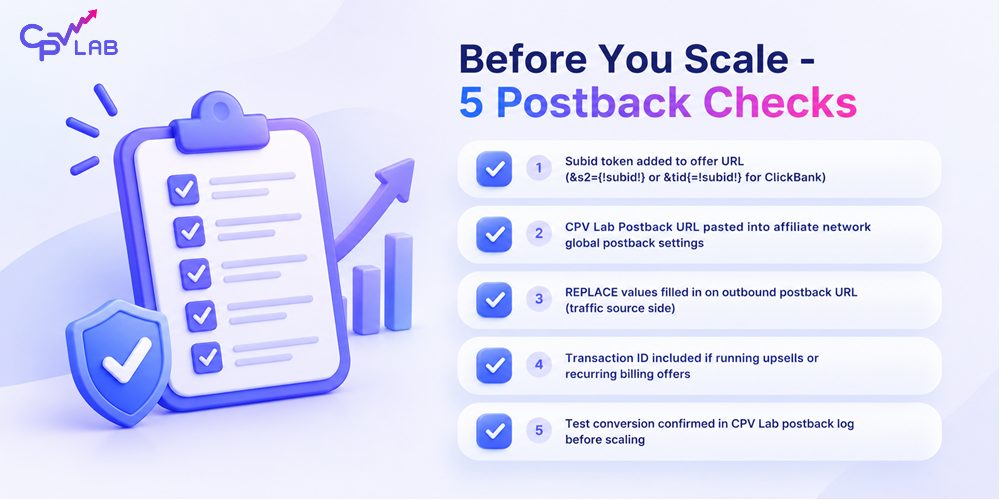
Too long, didn’t read? Here are the key takeaways:
Postback URLs have become a critical tool for digital marketers.
By eliminating the need for a “thank you” page and not relying on cookies, postback URLs offer a new way to track conversion data across marketing ecosystems.
You can use Tracking Pixels, but they are not as reliable as S2S Postback URL.
A Postback URL is a server-to-server call – no cookies, no pixel, no browser required. The signal goes directly from the affiliate network’s server to your tracker.
For affiliate networks, offering postback URL tracking capabilities to affiliates and publishers can bring numerous benefits. The most important advantage is that by enabling affiliates to measure their traffic accurately, the network can attract better traffic, enhance performance, and ultimately win together with the affiliate.
Add the subid token to your offer URL before anything else. Without it, there is no click ID to pass back, and no conversion can be attributed.
Check for REPLACE in your outbound postback URLs. If those placeholders are not filled with your real account values, your ad network receives invalid data.
For multi-conversion offers (upsells, recurring billing), include the transaction ID parameter. Without it, CPV Lab can only store the last revenue value per click.
In conclusion, Postback URLs are an essential tool for any affiliate marketer or media buyer who wants to take their campaigns to the next level.
By using Postback URLs, you can track your conversions, optimize your campaigns, and maximize your profits.
So what are you waiting for?
Start setting up your Postback URLs today and watch your ROI go wild!
Want to stay up-to-date on the fast-paced marketing industry?
CPV Lab affiliate marketing ad tracker offers a complete toolkit for tracking and analyzing all your affiliate campaigns from one single place.
And all starts with a Free 14 days Trial!
Cloud or Self-hosted ad tracker? your choice!
Frequently asked questions
Postback URL frequent questions are answered below.
How can Postback URLs help me track conversions?
If you’re running a marketing campaign, it’s essential to understand which ads or promotions are driving the most conversions. Postback URLs are a type of link that you can add to your thank-you or confirmation page to send conversion information back to your marketing tracker. With this data, you can track campaign performance and identify patterns to optimize your strategies.
Postback URLs are useful because they work even if visitors use ad blockers or if your thank-you page isn’t functioning correctly. The tool provides valuable insights for affiliate marketers and marketing agencies to make data-driven decisions and achieve better results.
Do I need to have technical knowledge to implement Postback URLs?
While implementing Postback URLs can be complex depending on the tracking platform and campaign setup, you don’t need advanced technical knowledge in general.
Most affiliate networks and tracking platforms offer clear instructions.
CPV Lab, for example, provides an intuitive interface and a support team to help.
To set up Postback URLs in CPV Lab, go to the “Campaigns” tab, select the campaign, and go to the Postback URL and follow the instructions. Once set up, you can optimize campaigns based on real-time data, such as identifying which traffic sources generate the most conversions.
Can Postback URLs be used to track offline conversions?
While Postback URLs are typically used to track online conversions, they can also be used to track offline conversions in some cases.
For example, if you have a phone number on your landing page and want to track phone call conversions, you can use a Postback URL to send conversion data back to your CPV Lab tracking platform when doing follow-ups.
So if your setup involves phone call follow-ups, then you can still track these conversions in CPV Lab and have accurate reports that help you optimize campaigns and audiences.
How do Postback URLs differ from pixel tracking?
Pixel tracking and Postback URLs are two methods used to track conversions in digital marketing, but they differ in their approach. Pixel tracking involves placing a tracking pixel on a web page, while Postback URLs involve sending a notification directly from the conversion source to the tracking platform.
Pixel tracking relies on cookies to track user behavior, while Postback URLs bypass the need for cookies, making them more reliable in some cases.
However, setting up Postback URLs may require more technical knowledge than pixel tracking. Overall, both methods have their advantages and disadvantages.
Are Postback URLs secure and reliable?
Yes, Postback URLs are generally considered to be secure and reliable. They allow for direct communication between the conversion source and the tracking platform, without relying on potentially unreliable cookies or third-party tracking scripts.
However, it’s important to ensure your Postback URLs are configured and secured correctly to prevent unauthorized access or data breaches.
At CPV Lab, we offer a secure and reliable Postback URL feature that uses HTTPS protocol to ensure secure communication. We provide comprehensive documentation and support to help you set up and configure your Postback URLs securely.

Author: Julia Draghici
Julia is the CEO of CPV Lab and CPV One ad trackers. She has 15+ years experience in the software industry, from development to management. For more than 8 years she is helping marketers get the best out of their marketing campaigns by using a performant ad tracker. Passionate about entrepreneurship, business and performance marketing, Julia loves helping people!