Want to learn how to build profitable campaigns even with a tight budget? In this walkthrough, I’ll show you how I used CPV Lab Pro to track and optimize a real affiliate campaign on Zeropark.
This case study is perfect if you’re just starting with ad tracking or want to understand how to use a conversion tracker for better results.
You’ll see:
- How I choose affiliate offers
- How I set up click tracking
- How I test and optimize traffic using data from the CPV Lab dashboard
👉 Full video breakdowns included below.
Follow along: Tutorial
In this video series, I’m walking you through the exact process I used to launch, track, and optimize multiple campaigns using Zeropark traffic.
Each campaign was based on a specific affiliate offer, with targeting built around the nature of that offer. You’ll see my setup, the data, what worked, what didn’t, and what I’d change going forward.
This follow-along was published on PowerhouseAffiliate where there are more details.
Introduction – Video 1: Finding Affiliate Offers
In this video I’m going to go through each of the offers that I’m going to be promoting. On average II test between 3-5 offers before finding something that is working. In this video you can see the details of the offers I decided to use.
Whether you’re new to affiliate marketing or already managing large budgets, CPV Lab Pro gives you the tools to grow. Beginners appreciate the clear setup process, while experienced media buyers can take full advantage of the detailed reports, custom tokens, and advanced A/B testing features.
There’s no need to code or manage separate scripts, everything happens in one place: tracking, optimization, and postback handling.
Video 2: Campaign Setup + Targeting
In this video, I go through the full setup of each campaign and explain how I chose the targeting for each offer. The targeting was aligned with the offer type, user intent, and traffic behavior.
I’ll start by setting up the campaigns inside CPV Lab, and then I’ll use the Campaign URL to launch the traffic in Zeropark.
Since Zeropark is already a predefined traffic source in the CPV Lab Traffic Source Catalog, the setup is fast and simple.
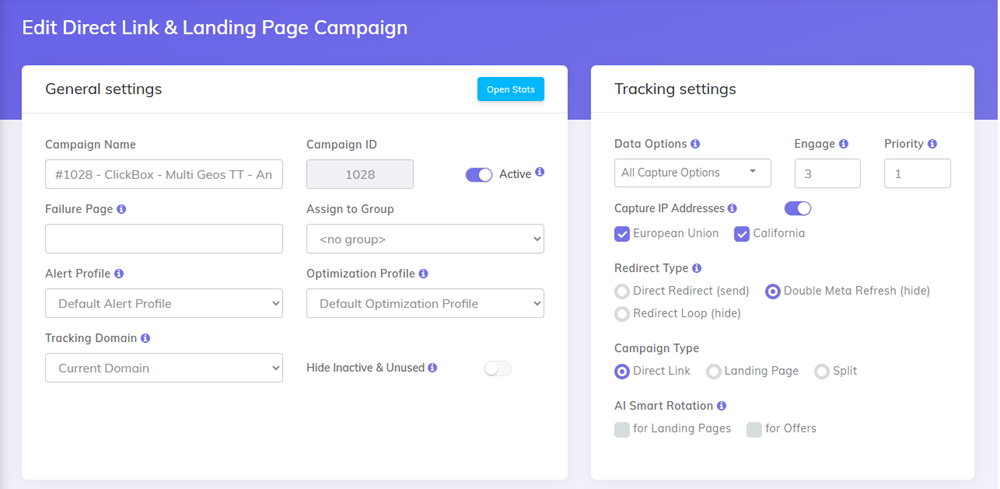
Step 1: General Campaign Settings in CPV Lab
In the CPV Lab dashboard, I create a new campaign using the “Direct Link and Landing Page“ type.
Then I:
- Give the campaign a clear name
- Choose my custom tracking domain
- Enable the Data Options I want to track (device, browser, ISP, etc.)
Step2: Select Zeropark as the traffic source
I imported Zeropark from the CPV Lab Traffic Sources Catalog earlier.
Now, I just select it from the dropdown inside the campaign.
To make sure I see accurate reports inside CPV Lab, I also activate all the Zeropark tokens (macros) that will be passed with each click. These include:
- Campaign ID
- Zone ID
- Keyword
- Cost
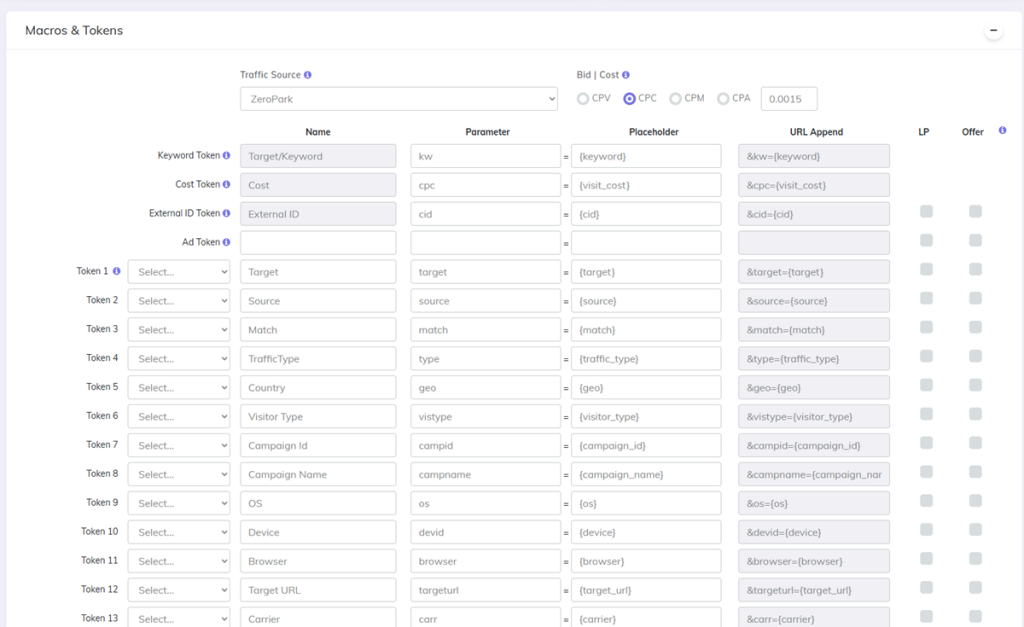
This ensures full tracking and attribution across all Zeropark campaigns.
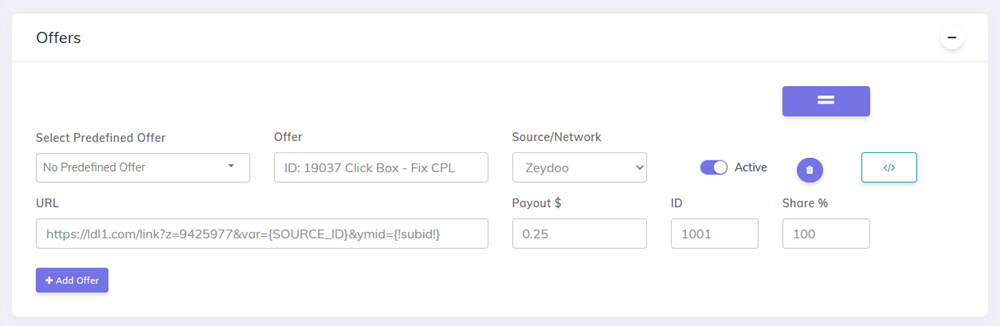
Step 3: Add Offers (No Landing Page)
For this campaign, I’m direct linking to the offers, no landing page is used.
I add all the offers I want to test in the Offers section. CPV Lab will rotate them automatically based on the share I assign.
For this test, I’m using offers from Traffic Company and Zeydoo, since they’re easy to access and quick to set up.
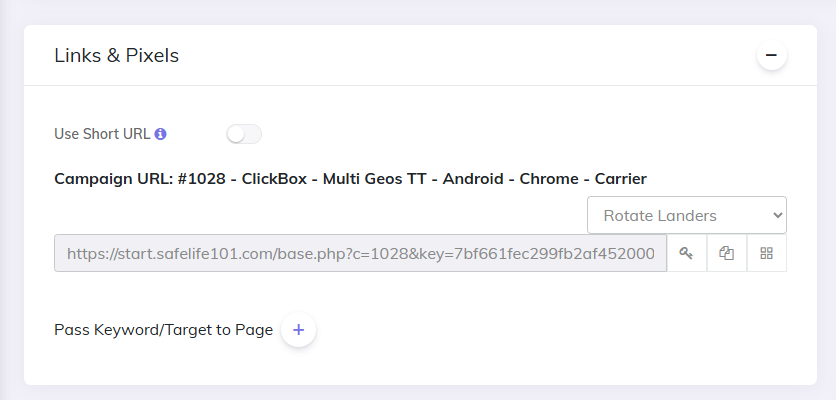
Step 4: Get the tracking link
Once the setup is done, I hit Save Campaign in CPV Lab.
I copy the Campaign URL, this is my tracking link, which I’ll paste inside Zeropark when creating the ad campaigns.
This link includes all the tracking parameters and will collect every click, cost, and conversion.
Now let’s jump into Zeropark and set up the campaign on their platform.
When you’re using Zeropark, you need to understand how each click and zone performs. CPV Lab helps you analyze this by pulling in traffic tokens from Zeropark like {zoneid}, {campaign_id}, {source}, and more.
You’ll see which zones convert, which ones waste your budget, and exactly how each offer performs across traffic segments. All in real time, directly in your dashboard.
Video 3: Performance Breakdown
This is where I show you the numbers.
How much I spent, how many clicks and conversions I got, and how each offer performed. You’ll also see traffic flow, CTRs, and early signs of what could be scaled.
This step is critical for understanding what is actually working, not just what looks good on the surface.
Why CPV Lab Is Essential for Accurate Metrics
It’s important to understand one key thing:
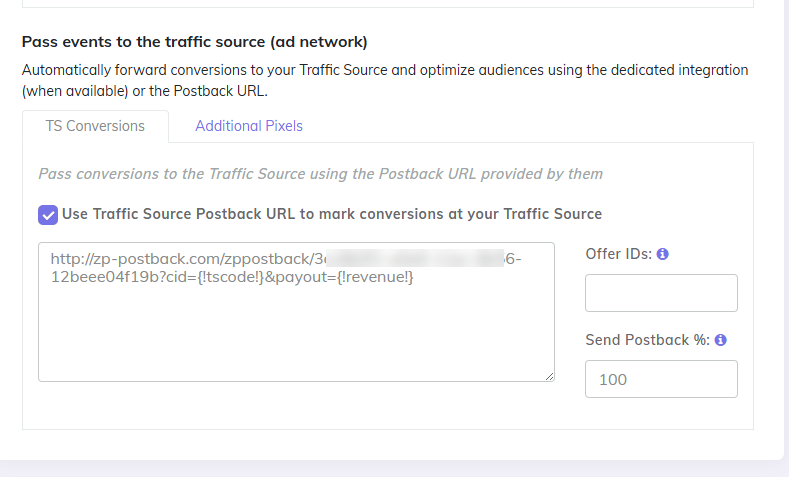
Zeropark cannot properly optimize traffic unless it receives conversion data back from your tracker.
Zeropark only sees part of the picture, clicks and costs.
The conversion data comes from CPV Lab.
By setting up the Postback URL in CPV Lab, conversion information is sent back to Zeropark in real time. This allows:
- Zeropark’s algorithm to optimize traffic based on actual conversions
- Accurate reporting inside the Zeropark dashboard
- Smarter traffic allocation to better-performing zones and targets
Without postback tracking, Zeropark is essentially optimizing blind.
For more detailed metrics and comparing the performance, I usually use the tracker dashboard.
Video 4: Troubleshooting & Campaign Adjustments
In this video, I dig deeper into the performance data and break down the issues I ran into. I explain why certain campaigns didn’t scale, and why ad costs made it harder to hit the profit margins I usually aim for.
I analyze what the data tells us.
This is the process I’ve used to create multiple profitable campaigns, but because Zeropark’s ad pricing is higher than the other platforms I’ve used previously I would need to promote higher paying affiliate offers to see a decent profit from it.
Final Thoughts: Why I Paused the Campaign
Instead of continuing to run the campaign I decided to stop the campaign and try and move on to a new offer that payed more.
Zeropark’s CPM pricing is noticeably higher than what I’ve seen on other platforms. That means I’d need to pair it with higher-payout affiliate offers to reach my normal profit targets.
Even though one of the offers was converting well, the cost of traffic made it hard to reach my minimum daily profit goal of $20. So instead of continuing to run the test, I paused the campaign and moved on to new offers with stronger payout potential.
If you’re running Zeropark campaigns, make sure you’re pairing it with the right offer. And as always, track everything and make sure you setup your Postback URL correctly to send conversion information to your ad network.
CPV Lab: Built for Beginners & Pro Media Buyers
Whether you’re just starting out or you’ve launched thousands of campaigns, CPV Lab gives you full control over your tracking and attribution. You can track every click, optimize your campaigns in real time, and test multiple offers or landing pages in one dashboard.
No fluff, no noise, just the data that matters. If you’re serious about performance, start testing with CPV Lab today.
Track Your Zeropark Campaigns Properly
Zeropark’s traffic can be fully analyzed using CPV Lab’s tracking tokens and detailed reports. You’ll be able to see exactly which zones, creatives, and targeting rules bring results, and where to cut spend.
With built-in postback tracking, token mapping, and multivariate testing, CPV Lab gives you the full picture.
No guessing. Just clear insights to optimize faster.
If you’re searching for:
- how to track Zeropark campaigns
- Zeropark traffic performance
- postback setup for Zeropark
- best conversion tracker for push or domain redirect traffic
- A/B testing tools for affiliate campaigns
…this post gives you the breakdown.

Guest Author: Patrick Hill
Patrick is an affiliate marketer with 8+ years marketing experience. He was certified at Meclabs Research Institute in 2019 for value proposition development and a Photoshop designer. He has experience working as a technical support manager at a CPA network, and loves to make graphic design and programming easy for average people.