
How Conversion Tracking Works in CPV Lab | CPV One
When someone clicks your ad and buys something - or fills out a form, or calls a number - how does CPV Lab know?
That's what conversion tracking solves. And in CPV Lab (opens new window) | CPV One (opens new window), it works in two directions.
The Two Directions of Conversion Data
This is the single most important thing to understand before you set up any pixel or postback.
YOUR AD
   ↓
visitor clicks
   ↓
CPV Lab records the click (assigns a unique SubID)
   ↓
visitor lands on your page or offer
   ↓
visitor converts
   ↓
━━━━━━━━━━━━━━━━━━━━━━━━━━━━━━━━━━━━━━━━━━━━━━━
DIRECTION 1: Conversion data flows INTO CPV Lab
  ← affiliate network or your page fires a pixel
    or postback URL back to CPV Lab
━━━━━━━━━━━━━━━━━━━━━━━━━━━━━━━━━━━━━━━━━━━━━━━
CPV Lab records the conversion in your report
━━━━━━━━━━━━━━━━━━━━━━━━━━━━━━━━━━━━━━━━━━━━━━━
DIRECTION 2: Conversion data flows OUT of CPV Lab
  → CPV Lab fires a postback to your ad network
    (Google, TikTok, Facebook, PropellerAds, etc.)
━━━━━━━━━━━━━━━━━━━━━━━━━━━━━━━━━━━━━━━━━━━━━━━
Ad network receives the signal and optimizes your campaign
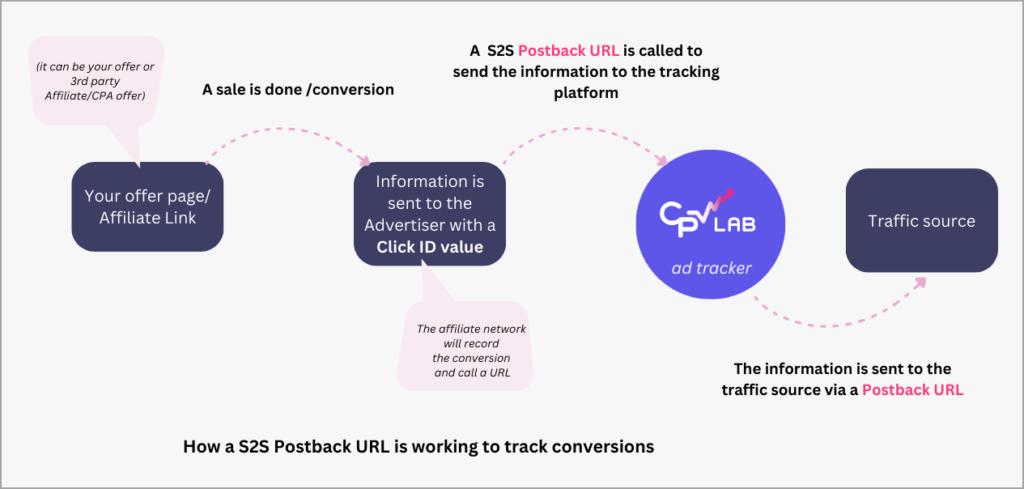
Most users need both directions set up. But they are separate steps, and they use different tools.
Direction 1 - Getting Conversion Data INTO CPV Lab
When a visitor converts, something needs to tell CPV Lab | CPV One about it. That something is either a tracking pixel or a postback URL.
What is a Postback URL?
A postback URL (also called an S2S pixel or server-to-server postback) works differently.
Instead of firing in the visitor's browser, the conversion data is sent directly from the affiliate network's server to CPV Lab's server - without the visitor's browser being involved at all.
Use a postback URL when:
- You are promoting offers on an affiliate or CPA network
- Your network supports S2S postback integration (most do)
- You want more reliable tracking - postbacks are not affected by ad blockers or browser restrictions
Example - postback URL:
https://cpv-track-domain.com/adclick.php?subid=NETWORK_SUBID_TOKEN&revenue=NETWORK_REVENUE_TOKEN
👤 Affiliate media buyer: This is usually your method. You paste the CPV Lab postback URL into your affiliate network's settings. When a visitor converts, the network fires it automatically - no page code needed.
What is a Tracking Pixel?
A tracking pixel is a small piece of code - an image tag, iframe, or script - that you place on a webpage. When the page loads in the visitor's browser, the pixel fires and sends the conversion data to CPV Lab.
Use a tracking pixel when:
- You own the conversion page (your own thank-you page, order confirmation, or lead form)
- Your affiliate network supports pixel placement in their interface
- You need to fire multiple third-party pixels at once (use the iframe pixel)
Example - image pixel:
<img src="https://cpv-track-domain.com/adclick.php" width="1" height="1" border="0" />
TIP
🏪 Advertiser / ecommerce brand: This is usually your method. Place the pixel on your order confirmation or thank-you page. When a customer lands there after buying, the pixel fires and CPV Lab records the sale.
Pixel vs. Postback - Quick Comparison
| Tracking Pixel | Postback URL (S2S) | |
|---|---|---|
| How it fires | In the visitor's browser | Server to server, no browser needed |
| Who uses it | Advertisers, ecommerce brands | Affiliate media buyers |
| Where to place it | On your thank-you or confirmation page | In your affiliate network's settings |
| Affected by ad blockers? | Sometimes | No |
| Requires page access? | Yes | No |
| Revenue tracking | Yes, via revenue parameter | Yes, via revenue parameter |
💡 Not sure which one to use? If you own the page where the conversion happens - use a pixel. If you're sending traffic to someone else's offer through a network - use a postback URL.
Direction 2 - Sending Conversion Data OUT of CPV Lab
Once CPV Lab knows about a conversion, it can tell your ad network about it too. This is called a traffic source postback URL (or outbound postback).
This is what lets ad platforms like Google Ads, TikTok Ads, Facebook Ads, or push, native networks see your conversions in their own dashboards - and use that data to optimize your campaigns automatically.
You need this when:
- Your traffic source supports conversion tracking via postback or S2S
- You want the ad platform to optimize for conversions, not just clicks
- You want to see cost and conversion data in both CPV Lab and your ad platform
💡 Most traffic sources imported from the CPV Lab catalog already have the postback URL pre-configured. You just need to enable it in the campaign setup and add your account ID.
Which Pages Do You Need?
Use this to go straight to what you need.
I want to receive conversions from my affiliate network or my own page: → Receiving Conversions - Pixels and Postback URLs
I want to send conversion data to my ad platform or traffic source: → Sending Conversion Data to Ad Platforms
I want to track revenue, fire different pixels per offer, or capture lead data from forms: → Advanced: Revenue, Offer Pixels, and Extra Tokens
Where to Find Your Pixels and Postback URLs in CPV Lab
All pixel and postback options for a campaign are in one place:
- Go to Campaigns and open any campaign.
- On the campaign setup page go to the Links & Pixels section.
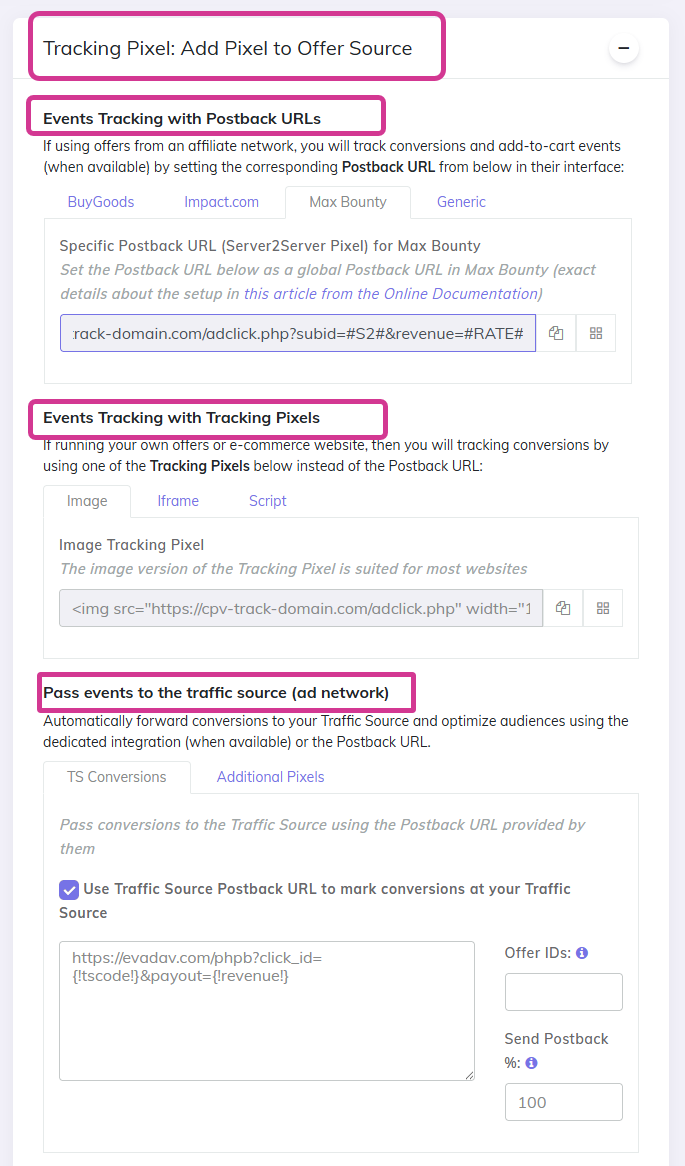
You will see:
- Postback URL - for pasting into your affiliate network's S2S settings
- Image Pixel - for placing on your own pages
- Iframe Pixel - for placing on your own pages when you also need to fire third-party pixels
- Script Pixel - for placing on your own pages when you need a JavaScript tag
- Traffic Source Postback URL - for sending conversions back to your ad network
- Additional Pixels - for firing extra third-party pixels or postbacks on conversion
A Note on SSL (HTTPS)
Some affiliate networks and ad platforms require that your tracking pixel or postback URL starts with https:// - not http://.
⚙️ CPV Lab (self-hosted) users: Make sure you have an SSL certificate installed on your tracking domain. See the SSL Certificate setup guide.
☁️ CPV One users: Your tracking domain is already on HTTPS. No action needed.
Ready to Set Up?
Start with the page that matches what you are trying to do:
- Receive conversions from a network or your own page → Receiving Conversions: Pixels and Postback URLs
- Send conversions to your ad platform → Sending Conversion Data to Ad Platforms
- Advanced configuration → Advanced: Revenue, Offer Pixels, and Extra Tokens