This is a real setup story.
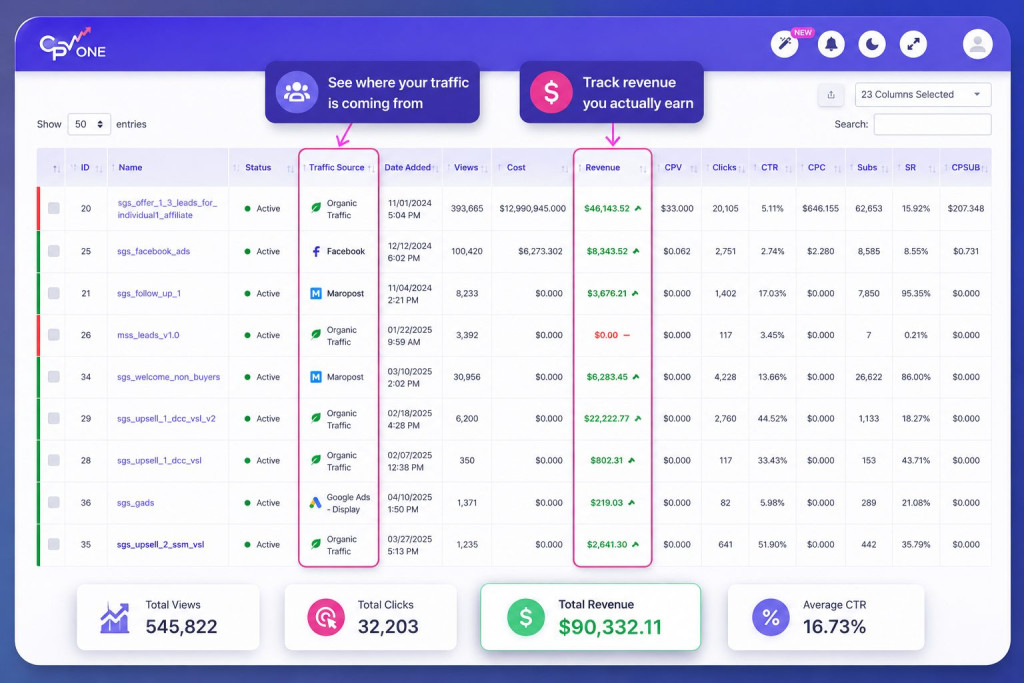
Facebook ads, Maropost email, organic traffic, affiliates, and upsells: all tracked in one CPV One dashboard. No more guessing which source was making money.
The client: a ClickBank vendor running a Multi-Channel operation
This case study is based on a real ClickBank vendor who came to CPV One looking for one thing: a way to see everything in one place.
- They were selling multiple ClickBank offers across different domains.
- They had an active affiliate program with affiliates sending traffic from various sources.
- They were running their own Facebook ad campaigns, spending thousands per month.
- They were sending email sequences through Maropost.
- They had organic traffic arriving from search and direct visits.
- And they were testing VSL funnels with upsell offers after the main purchase.
In other words: they were running a serious business. And their data was a mess.
“We’ve just set up the Facebook campaigns, but seems like the data only goes to one campaign for both. Is there any steps I missed?” – From their first support conversation with the CPV One team
That’s where the story starts.
Not with a perfect setup, but with the honest confusion that every serious ClickBank vendor runs into when they try to track everything at once.
The situation: five traffic sources. Zero unified view
Before CPV One, here is what their tracking looked like. They had to log into five separate platforms to understand what was happening with their business:
Showing ad spend in SGD. Showing conversions based on pixel data only. No connection to ClickBank sales.
Email clicks tracked inside the platform. No visibility on which emails led to ClickBank purchases.
Showing total sales and affiliate payouts. But no breakdown by traffic source, ad, or email campaign.
Affiliates sending traffic, sales happening — but which affiliate was driving which sales? Unclear.
The result? Numbers that never matched.
A Facebook campaign showing $9K in spend, CPV One showing $3K, and nobody sure which was right. (It was a currency conversion issue, as it turned out. But without a unified dashboard, how would you even know where to look?)
Plus: upsell revenue was invisible. When a buyer purchased the main offer and then took an upsell, the extra revenue wasn’t being attributed to the traffic source or affiliate that brought them. Real money, invisible data.
The solution: One tracking code. Every traffic source. All in CPV One.
Here is what the CPV One setup looks like for a vendor running this type of operation. It is simpler than it sounds.
The key insight the support team gave them early on: you don’t need to change your tracking code every time you add a traffic source. You set up one base code (the organic campaign code) on your landing page.
Then each paid or email source gets its own campaign in CPV One, identified by a parameter in the URL. The page code handles everything else.
Once this structure was in place, every visitor, regardless of how they arrived, was tracked in the right campaign. And every ClickBank sale, including upsells, was attributed back to the visitor who bought.
The details: Five real problems. Five real fixes.
Here is exactly what came up during setup — and how each issue was resolved. These aren’t hypothetical scenarios. They came directly from the support conversations with this vendor.
“FB shows around 9K, while CPV Lab only shows 3K+. Is there something we might have missed?”
What was happening: Two things at once. First, the Facebook ad account was running in SGD (Singapore dollars), while CPV One was set to display in USD. CPV One was automatically converting the currency — but the vendor was comparing SGD numbers from Facebook to USD numbers in CPV One. Second, the timezone was set to New York, while Facebook was showing data in Singapore time — a 12-hour difference that made daily stats look misaligned.
Fix: Set the CPV One timezone to match the Facebook ad account timezone. CPV One’s automatic currency conversion was already working correctly — the numbers just needed to be compared on the same basis.
“We’ve successfully received payments but we’re not seeing any conversions in the CPVLabs stats.”
What was happening: The conversion was actually being tracked — but in the organic campaign (the default), not in the Maropost campaign. The reason: the visitor had arrived via the organic campaign tracking code, so that’s where the conversion was recorded. The Maropost campaign URL wasn’t being used to redirect visitors to the page.
Fix: Make sure the Maropost campaign URL (not the direct page URL) is used as the click link in Maropost emails. This ensures visitors are identified as coming from Maropost before landing on the page.
“Seems like the data only goes to campaign 51 for both campaigns. Is there any step I missed?”
What was happening: Both Facebook campaigns were sending traffic to the same landing page, but only one campaign had the correct clpcid parameter set in the Facebook ad URL parameters. The second campaign was missing its identifier, so all traffic defaulted to the organic campaign — which then attributed everything to campaign 51.
Fix: Add the correct URL parameters to each Facebook ad, including the campaign-specific clpcid value. CPV One then correctly separates traffic and costs between the two campaigns.
“Is there a way to include upsell conversions in the same campaign stats, perhaps as a separate field or metric?”
What was happening: Upsells were actually being tracked — the total revenue per visitor in CPV One already included both the main offer amount and any upsell amounts combined. But the vendor expected to see them as separate line items, which made it look like upsells weren’t being recorded.
Upsells from ClickBank are tracked automatically via the postback URL. Revenue shown per visitor = main offer + all upsells combined. A dedicated upsell column is on the product roadmap.
“We’re building a new interactive video with a single URL — no reload or URL change — and optin will count on successful form submission. Is it possible to track events from SPA pages?”
What was happening: The vendor was building a modern React SPA (single-page application) deployed on AWS Amplify. Standard tracking pixels that rely on page reloads don’t work in SPA environments. They needed a way to fire tracking events from JavaScript on form submission, not on page load.
Fix: CPV One’s tracking code is standard JavaScript — it works in React apps. For SPA opt-in events, a small custom JavaScript snippet reads the visitor’s subID from the cookie and fires the subscriber pixel on form submission. The support team provided the exact code snippet. Setup took under an hour.
The Meta Angle: Sending richer signals to Meta CAPI
Once the core tracking was working, the next step was connecting Facebook CAPI, so every conversion tracked in CPV One also feeds back to Meta’s algorithm automatically.
This is where Extra Tokens come in. When a customer buys the ClickBank offer, any data captured in the funnel, email address, phone number, name, city, order value, can be stored in CPV One’s Extra Token fields and forwarded automatically to Meta and TikTok via their Conversion APIs.
Every time a conversion happens, CPV One sends these enriched signals to Meta — without any extra work after the initial setup.
Result: higher Event Match Quality score, better audience targeting, lower CPMs over time. Users report up to +30% conversion rate improvement after enabling enriched CAPI signals.
For a vendor spending thousands per month on Facebook ads to their ClickBank offer, this is not a small thing. Better signal quality means Meta shows your ads to more people who look like your actual buyers, not just people who looked at your page.
The results: What clean tracking actually looks like
After setup, here is what this vendor ended up with:
- ✓ Facebook ad spend synced automatically from Meta API — no manual cost imports
- ✓ Currency conversion handled automatically (SGD → USD) with correct rate at time of click
- ✓ Each Maropost email sequence tracked as its own campaign — revenue attributed to specific emails
- ✓ Affiliate hop ID captured as an extra token — every affiliate tracked by ID alongside paid and organic traffic
- ✓ React SPA on AWS Amplify fully tracked — opt-in events firing correctly via JavaScript
- ✓ Upsell revenue included in per-visitor revenue — total order value visible at visitor level
- ✓ A/B test between Offer V1 and Offer V2 running inside the same campaign — winner identified without changing the page URL
- ✓ Facebook CAPI receiving enriched conversion data — Event Match Quality improving week over week
The most important shift: they stopped looking at five platforms to understand their business. Now they check CPV One first, and it tells them the full story.
Are You Running the Same Setup?
If you’re a ClickBank vendor and any of this sounds familiar, you’re not alone. This is how most serious ClickBank operations look. Multiple offers. Multiple traffic sources. Email sequences. An affiliate program. VSL funnels with upsells.
The problem isn’t that you’re running too many things. The problem is that none of the individual platforms — Facebook, Maropost, ClickBank — talk to each other by default. Each one shows you a partial picture. CPV One is the layer that connects them all.
Here’s what the setup looks like at a high level for a vendor in this situation:
- 1 One tracking code on your landing page — handles all traffic sources from a single snippet
- 2 One campaign per traffic source — organic, Facebook, Maropost (each email sequence), affiliates
- 3 ClickBank postback URL set with vtid parameter — connects ClickBank sales to CPV One visitors automatically
- 4 Facebook CAPI connected via Pixel ID and API token — conversions fed back to Meta in real time
- 5 Extra Tokens configured to capture and forward customer data — enriches CAPI signals automatically
That’s the full setup. Most vendors complete it within a day. The CPV One team reviews your configuration and helps you get your first campaign live on a free onboarding call.

Author: Julia Draghici
Julia is the CEO of CPV Lab and CPV One ad trackers. She has 15+ years experience in the software industry, from development to management. For more than 8 years she is helping marketers get the best out of their marketing campaigns by using a performant ad tracker. Passionate about entrepreneurship, business and performance marketing, Julia loves helping people!