Telegram ads are getting a lot of attention right now. More traffic sources are opening up Telegram as an ad placement, and Propeller Ads is one of the first major networks to make it easy to run campaigns there.
But affiliates launch a Telegram campaign, get some conversions, and have no idea which landing page, which offer URL, or which audience segment actually drove the results.
Without tracking, you are just spending money and hoping.
In this article, we are going to walk you through a real Telegram ads campaign – from finding the offer to setting up tracking in CPV Lab to reading the data on the other side.
This is not theory. These are real steps, real numbers, and real lessons from an actual test campaign.
Why Tracking Telegram Ads Is Different
Before we get into the campaign, it helps to understand why Telegram ads need proper tracking setup – and why it is easy to get it wrong.
Telegram ads do not work like Facebook or Google ads.
There is no native conversion tracking built into the platform the way Meta Pixel works. What you get from Propeller Ads is click data.
What happens after the click – which landing page the visitor saw, whether they converted, which offer URL they went to – that is invisible to Propeller Ads.
This is exactly where a performance marketing tracker like CPV Lab or CPV One comes in.
With CPV Lab connected to your campaign, you can see:
- Which landing page variation got the most clicks and conversions
- Which offer URL performed best (important when rotating multiple links)
- Whether conversions are coming from Wi-Fi or mobile data
- Your cost per conversion broken down by every variable you are testing
Without this data, optimizing a Telegram campaign is guesswork.
With it, you know exactly where to put your budget.
Step 1 – Finding the Right Offer for Telegram Traffic
The first decision in any campaign is matching the offer to the traffic source.
For this test, our user used Golden Goose as the affiliate network and selected a Bangladesh offer.
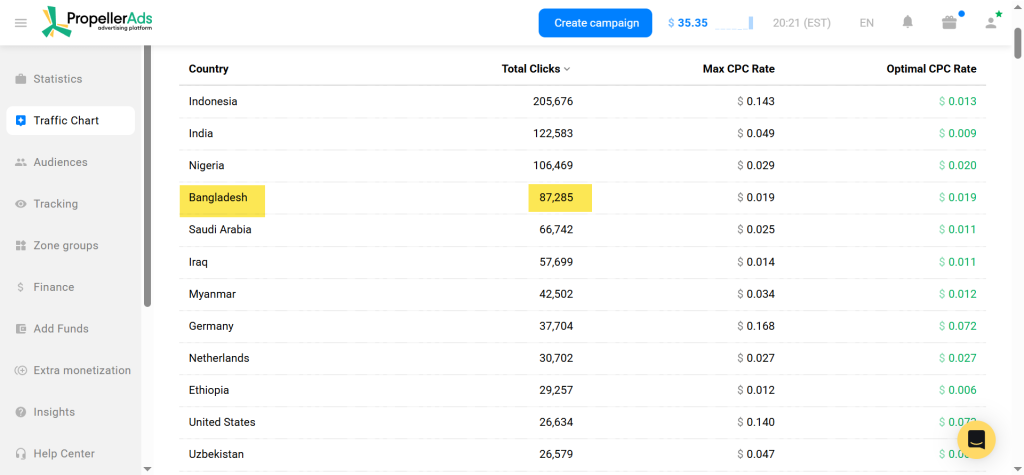
The reasoning was straightforward: Telegram ad traffic on Propeller Ads is heavily concentrated in Bangladesh.
Running an offer that matches the dominant traffic GEO is a basic but important step that many affiliates skip.
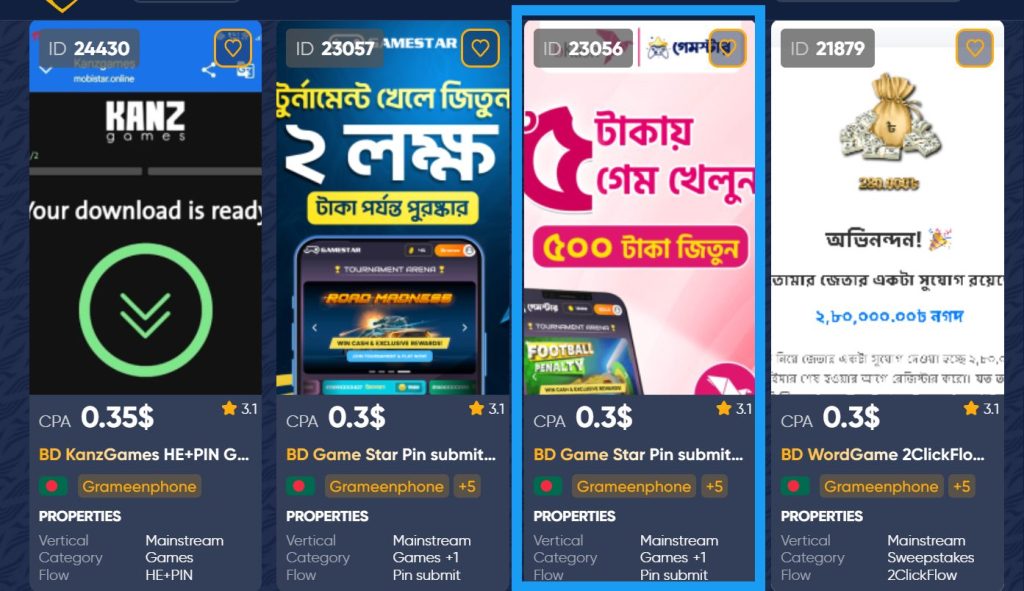
What to look for when picking an offer for Telegram traffic:
- GEO match – check where Propeller Ads sends the most Telegram traffic and find an offer for that country
- Simple conversion flow – sweepstakes, app installs, and simple lead gen offers tend to work well with cold Telegram traffic
- Low friction – the simpler the action you ask the visitor to take, the better your conversion rate will be on untested traffic
Step 2 – Setting Up Your Tracking Campaign in CPV Lab
This is the part most affiliates rush through. Do not rush through it.
Your tracking setup determines what data you can actually use later.
Set up the campaign in CPV Lab before touching Propeller Ads. This is the right order. You need your tracking URLs ready before you create the ad campaign.
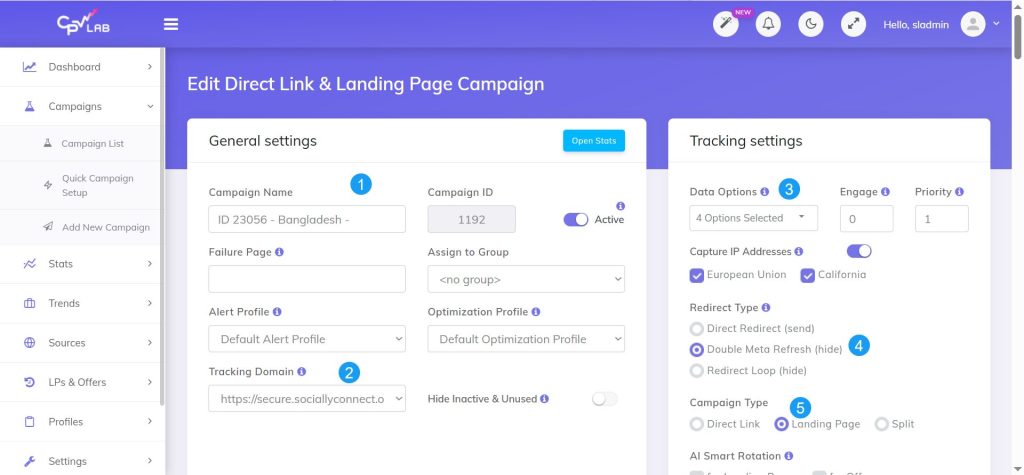
Here is what was set up:
General settings and tracking settings – campaign name, traffic source (Propeller Ads), and the basic tracking configuration.
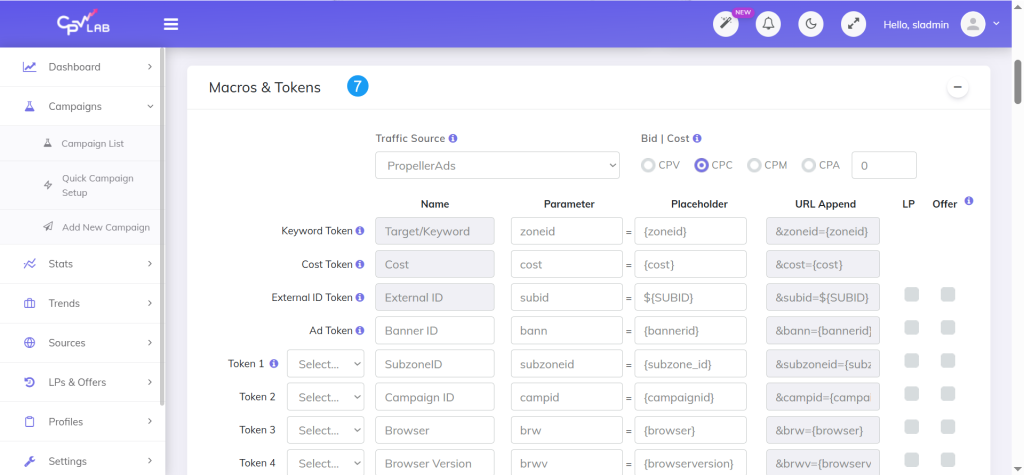
Macros and tokens – these are the parameters that tell CPV Lab which ad, placement, or creative drove each click. For Propeller Ads, you add their tracking tokens here so the data flows back correctly.
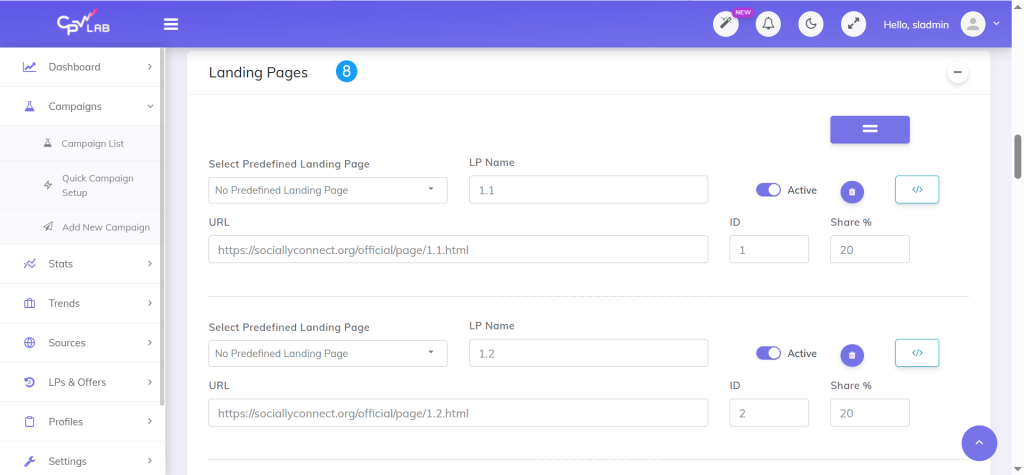
Landing pages – For this test the user tested 5 landing page variations written in Bengali. This is smart. Running landing pages in the local language almost always improves engagement and conversion rates compared to English pages in non-English speaking GEOs.
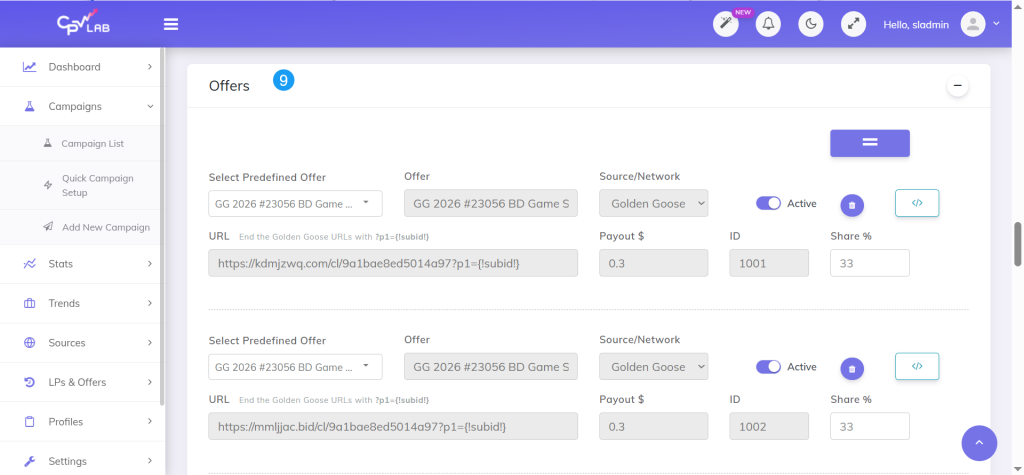
Offers – instead of using a single offer URL, our user added multiple offer links for the same Golden Goose offer and set them to rotate.
This is a technique worth knowing about. Affiliate offer links sometimes get flagged by networks or ad platforms. By rotating multiple URLs for the same offer, you can identify which link performs best and protect yourself if one gets flagged.
Once everything was saved, CPV Lab generated the campaign tracking URL – this is the URL that goes into Propeller Ads as the target URL.
Step 3 – Setting Up the Propeller Ads Campaign
With the CPV Lab tracking URL ready, our user moved to Propeller Ads to create the campaign.
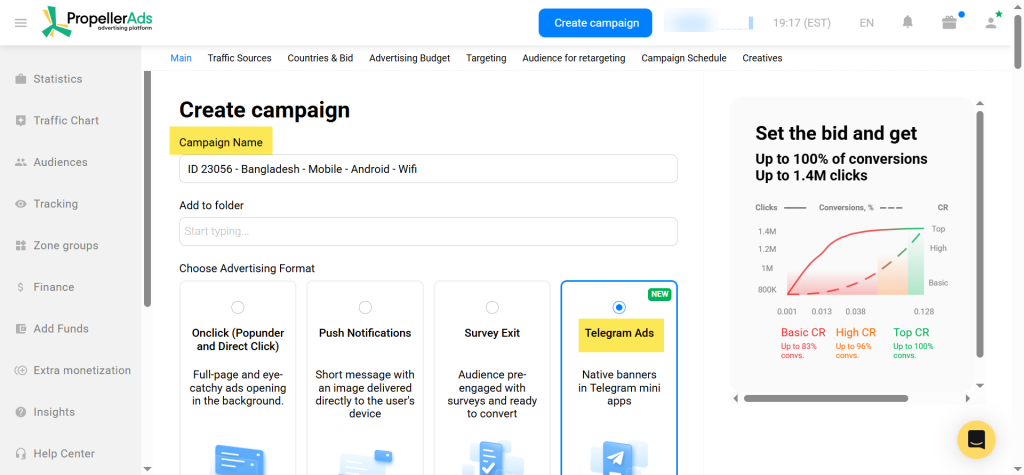
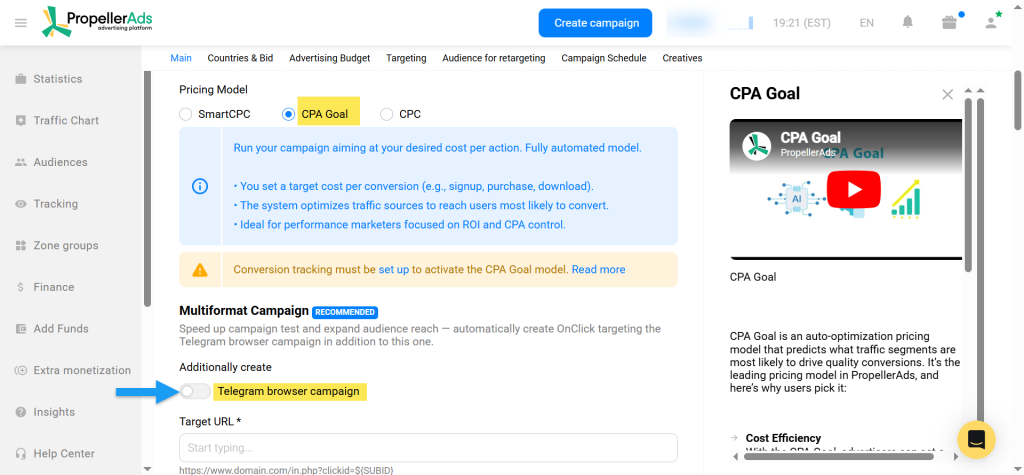
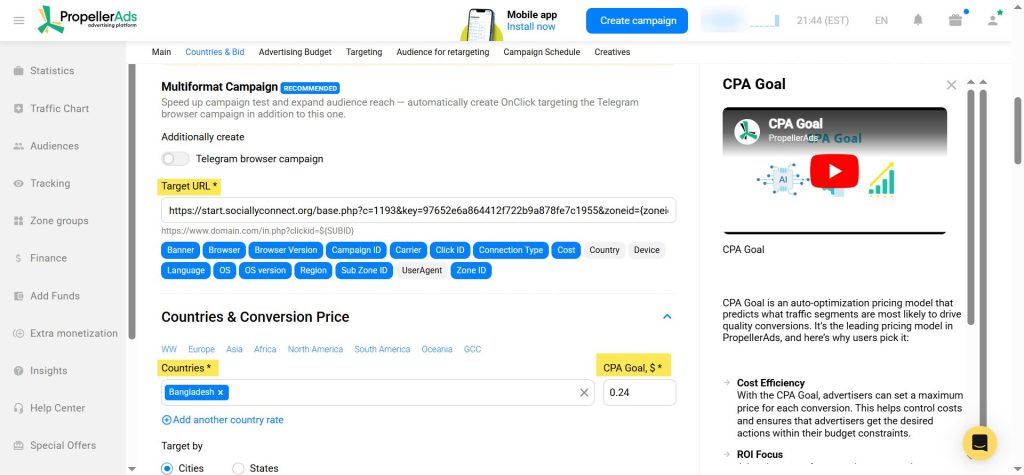
Key settings used:
| Setting | Value | Why |
|---|---|---|
| Ad type | Telegram Ads | Specifically targeting Telegram placements |
| Pricing model | CPA Goal | Lets the algorithm optimize toward conversions |
| Telegram browser campaign | Off | Separating browser and Telegram app traffic for cleaner data |
| Target URL | CPV Lab campaign URL | All clicks flow through the tracker first |
| Country | Bangladesh | Matching the offer GEO to the traffic GEO |
| CPA Goal | $0.24 | Set to match the offer payout |
| Daily budget | $20 | Conservative test budget for a low payout offer |
| Platform | Mobile | Telegram traffic is predominantly mobile |
| Browser language | English | Default setting for this test |
Step 4 – Using Propeller Ads Auto Creatives
This is where the campaign had an interesting twist.
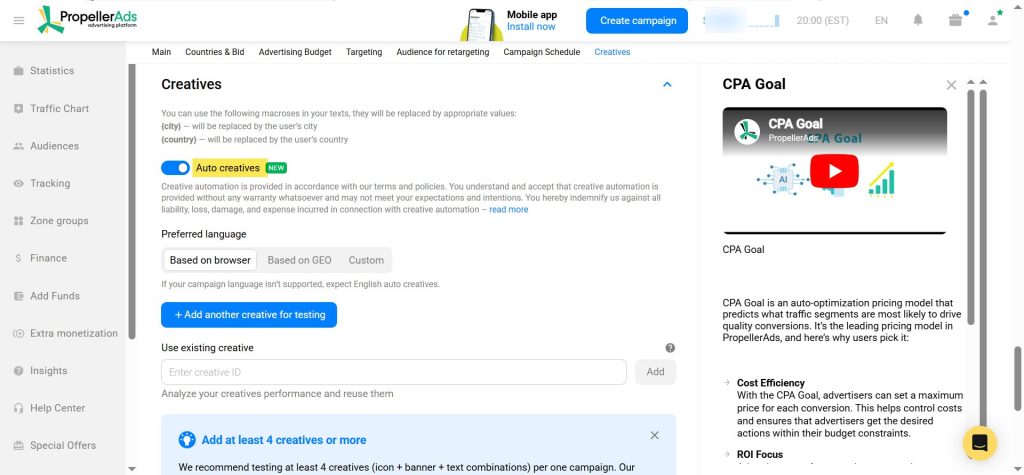
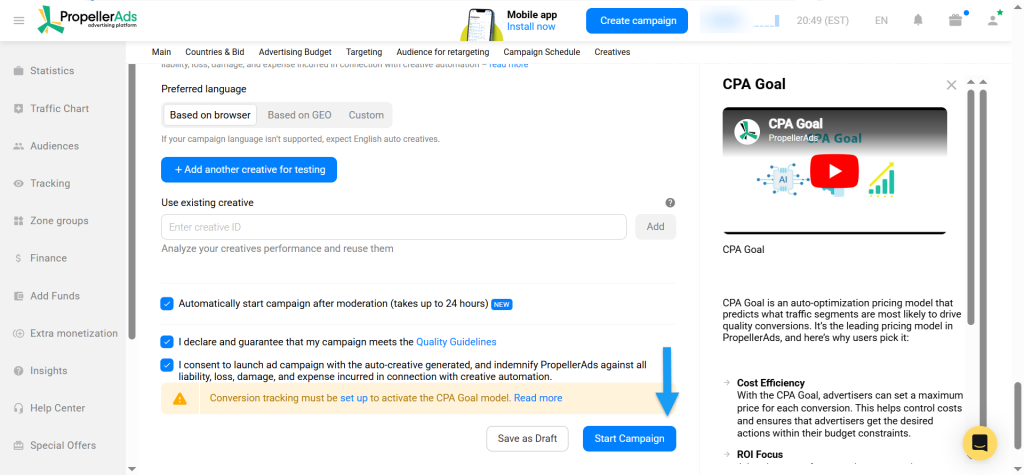
Instead of manually creating ad creatives, our user used Propeller Ads’ Auto Creatives feature.
Auto Creatives uses AI to generate ad images and copy automatically. You set the preferred language and the algorithm builds the creatives for you.
How did the AI creatives look?
Honestly, pretty good. The visual quality was solid and the ads looked professional.
The main limitation was that Bengali was not available as a language option, so the creatives were generated in English – which is not ideal for a Bangladesh campaign targeting local users.
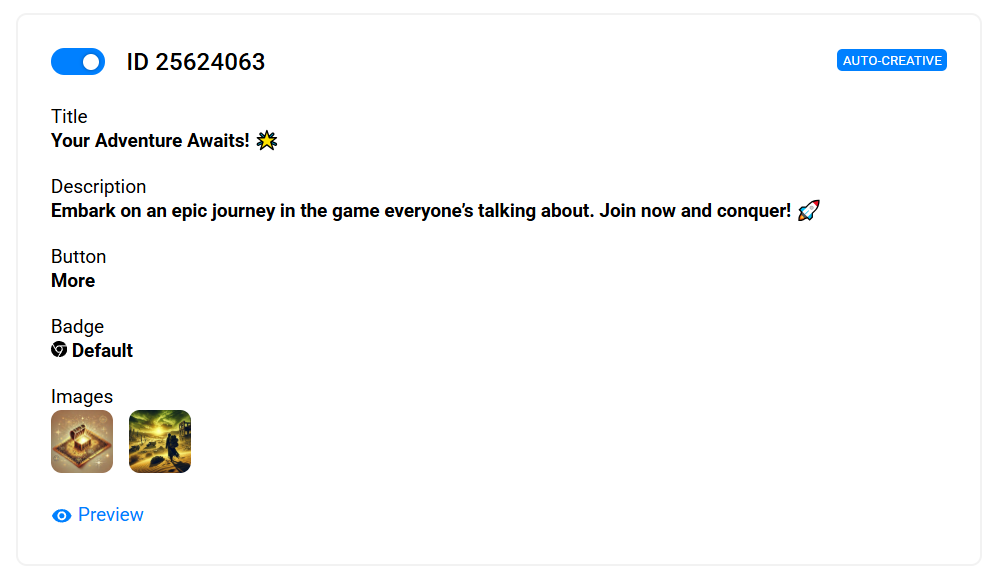
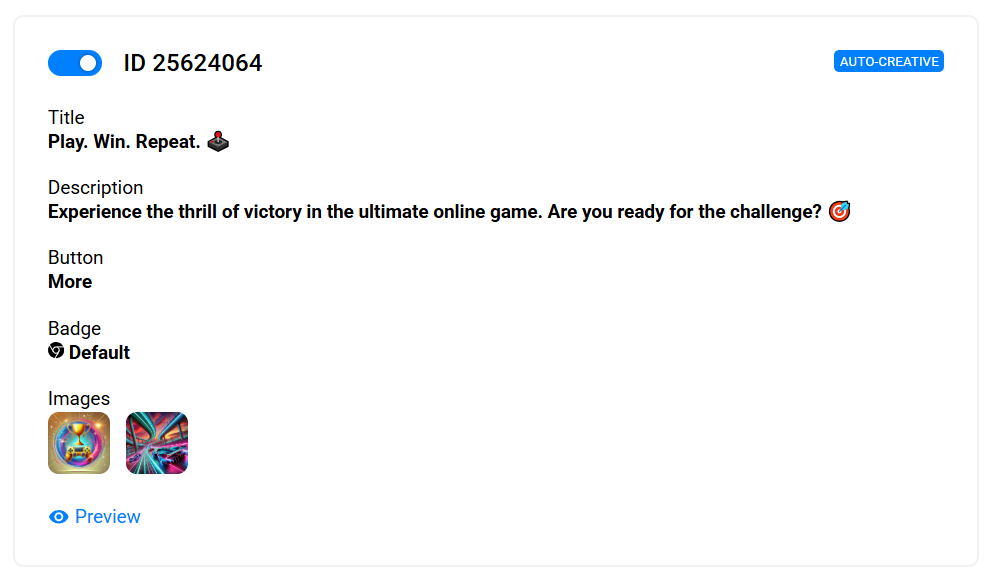
The takeaway on Auto Creatives: It is a useful feature for quickly launching a campaign and testing whether the offer and traffic source combination works before investing time in custom creatives. But for non-English GEOs, you will want to create manual creatives in the local language for your serious scaling campaigns.
Step 5 – Reading the Data in CPV Lab
After the campaign started running, CPV Lab started collecting data.
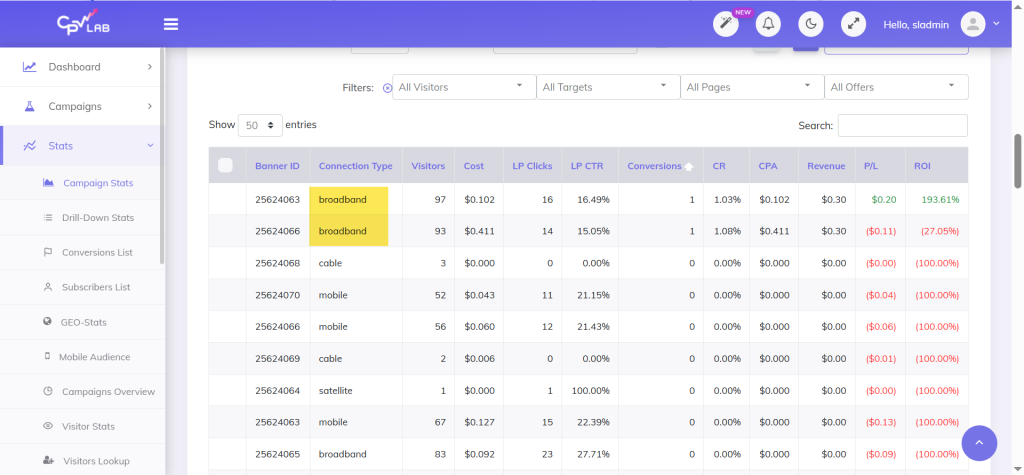
What the early results showed:
- Total spend: $3.71
- Conversions: a few early conversions recorded
- Conversion source: all conversions came from Wi-Fi traffic, not mobile data
That last data point is important. CPV Lab showed that Wi-Fi users were converting but mobile data users were not – at least in this early sample.
This is exactly the kind of insight that is invisible if you are not tracking properly. Without CPV Lab, our user would have seen “some conversions” in Propeller Ads and had no idea where they came from. With CPV Lab, he knows Wi-Fi is the segment to focus on.
What to do with this data:
- Once you have enough volume, segment Wi-Fi and mobile data into separate campaigns
- Allocate more budget to the segment that is converting
- Test whether the Bengali landing pages are performing differently from each other – CPV Lab will show you split test results per landing page variation
What Went Wrong – And What to Do About It
Honest campaign breakdowns include the mistakes. Here is what did not work perfectly in this test:
The CPA Goal was set too low.
Setting the CPA Goal to $0.24 on a low payout offer caused the traffic volume to slow down significantly. The Propeller Ads algorithm could not hit the CPA goal fast enough, so it throttled the campaign delivery.
This is a common mistake with low payout offers on CPA Goal campaigns. The algorithm needs room to work.
What to do instead:
- On low payout offers, consider starting with CPM or CPC pricing to gather data faster before switching to CPA Goal
- If you use CPA Goal, set it slightly higher than your actual target CPA to give the algorithm more room to deliver traffic
- Remember: you typically need to spend 30-40x the offer payout before you have enough data to optimize properly
The Bigger Picture – Why Tracking Makes the Difference
This test was small. $3.71 in spend is not enough to draw final conclusions.
But here is what the tracking setup made possible even at this early stage:
- Know which traffic segment is converting (Wi-Fi)
- Know which offer URLs are getting clicks (rotation tracking)
- You have a baseline to compare against when you scale or adjusts the CPA Goal
- You can pick up exactly where you left off when you create a new campaign
Without CPV Lab, none of that information exists. You just have a number from Propeller Ads that says “you got X clicks and Y conversions.” That is not enough to make good decisions.
Whether you use CPV Lab (self-hosted, full data ownership) or CPV One (cloud-hosted, ready in minutes), having a tracker connected to every campaign you run is not optional if you want to scale.
What Comes Next
The user can continue this campaign with a few adjustments:
- New campaign with a higher CPA Goal to get more traffic volume
- Testing manual Bengali creatives alongside the Auto Creatives
- Segmenting Wi-Fi and mobile data traffic once volume allows
- Running until 30-40x payout is spent before making final optimization decisions
If the campaign gets profitable, there will be a follow-up post with the full results.
Conclusion
Propeller Ads Telegram ads are a real traffic source worth testing in 2026.
The Auto Creatives feature works well as a starting point, especially for quick tests. The language limitation for non-English GEOs is something to be aware of.
But the bigger lesson here is not about Propeller Ads or Telegram. It is about tracking.
Every campaign you run – on any traffic source, in any GEO, for any offer – needs proper tracking from day one. Not after you see results. Not when you decide to scale. From day one.
Because the data you collect in the first $20 of spend is the foundation for every optimization decision that comes after it.
If you are not tracking yet, start today. CPV One gets you set up in minutes with no server required. CPV Lab gives you full self-hosted control if you want to own your data completely.
Either way – stop running campaigns blind.
Written based on a case from Patrick Hill – affiliate marketer and performance marketing specialist.
Questions about tracking setup? Contact CPV Lab Support – we will help you get your first campaign configured.
Frequently Asked Questions
How do you track Telegram ads from Propeller Ads?
You set up a campaign in a performance marketing tracker like CPV Lab or CPV One first, then use the generated tracking URL as your Target URL in Propeller Ads. Every click goes through your tracker before reaching your landing page, giving you full visibility on clicks, conversions, and performance by segment.
Does Propeller Ads have built-in conversion tracking for Telegram ads?
Propeller Ads provides click data and basic campaign stats, but it does not show you landing page performance, offer URL rotation results, or conversions, unless you send them that information. For that level of data you need a dedicated tracker like CPV Lab or CPV One.
What is the best GEO for Telegram ads on Propeller Ads?
Based on current traffic volume, Bangladesh is one of the top countries for Telegram ad traffic on Propeller Ads. Other strong GEOs include Southeast Asian and South Asian countries with high Telegram usage. Always match your offer GEO to the traffic GEO for best results.
What is Propeller Ads Auto Creatives?
Auto Creatives is a feature in Propeller Ads that uses AI to generate ad images and copy automatically. You set a preferred language and the algorithm creates the creatives for you. It works well for quick tests but has limited language support for non-English GEOs.
How much should I spend before optimizing a Telegram ads campaign?
A common rule in affiliate marketing is to spend 30-40x the offer payout before making serious optimization decisions. For a $0.24 payout offer, that means spending roughly $7-10 before drawing conclusions. For higher payout offers, the budget threshold is higher.
Can I use CPV One instead of CPV Lab to track Propeller Ads campaigns?
Yes. CPV One works the same way as CPV Lab for tracking Propeller Ads campaigns. The setup process is identical – create your campaign, copy the tracking URL, paste it into Propeller Ads as the Target URL. CPV One is cloud-hosted so there is no server to manage. Start a free trial at cpvone.com.
What tokens should I use for Propeller Ads in CPV Lab?
Propeller Ads provides tracking macros that already predefined in a template in CPV Lab | CPV One. These capture campaign ID, zone ID, creative ID, and other variables. Check the CPV Lab documentation for the full list of Propeller Ads tokens and where to place them.