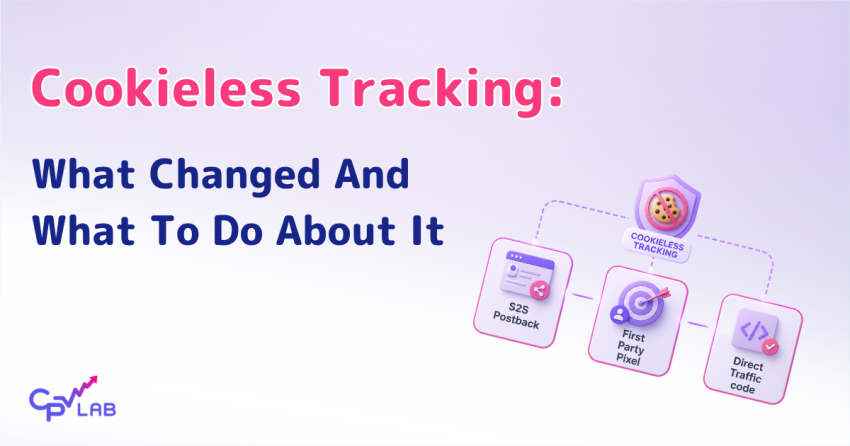
Tracking used to be simple. Drop a pixel on the thank-you page, set up a cookie, and the platform did the rest. Then Safari started limiting cookie lifetimes. Then Chrome enforced SameSite. Then iOS 14.5 prompted iPhone users to opt out of ad tracking. Then Chrome began testing third-party cookie restrictions, while later shifting toward user choice instead of a full browser-wide phaseout. Affiliate marketers running paid traffic lost a meaningful share of their conversion data without changing a single ad.
Cookieless tracking for affiliate marketing is the response.
It is not one method but a collection of techniques that capture conversion data without depending on third-party cookies set in a visitor’s browser.
The right combination depends on your traffic source, your offer, and whether you control the conversion page.
This guide walks through what actually changed, the three cookieless methods that work in 2026, and how to decide which one fits your campaign.
What weakened third-party cookies (and why it matters for affiliates)
Third-party cookies were the default tracking mechanism for over two decades.
A series of browser and OS changes between 2017 and 2024 made them unreliable for ad attribution. Safari ITP, iOS 14.5 ATT, and Chrome’s third-party cookie restrictions each removed a piece of the tracking infrastructure that affiliate marketers depended on, even though Chrome later moved toward user choice instead of a full deprecation.
None of these changes happened overnight. Each one rolled out over the years, and each one closed a slightly different door.
| When | Change | Impact on tracking |
| 2017 | Safari Intelligent Tracking Prevention launched | Cross-site tracking and cookie access are limited for domains classified as trackers |
| 2020 | Chrome 80 enforces SameSite cookie attribute | Tracking pixels need code changes to keep firing |
| 2021 | iOS 14.5 App Tracking Transparency | Most iPhone users opt out of IDFA tracking |
| 2024+ | Chrome tests third-party cookie restrictions, then moves toward user-choice controls | Pixel-only setups become less reliable as restrictions and consent choices grow |
Safari Intelligent Tracking Prevention started limiting cross-site tracking in 2017.
Later updates added stricter rules for several cookie and script-based tracking patterns, including shorter lifetimes for first-party cookies set through JavaScript.
The exact limits depend on the cookie type, how it was set, link decoration, and other conditions, and they have changed across multiple ITP versions. iOS 14.5 added App Tracking Transparency, which prompts users to opt in to IDFA tracking.
Many iPhone users decline that prompt, which reduces access to IDFA-based attribution for Facebook, TikTok, and Google ad campaigns running on iOS.
Chrome’s path on third-party cookies has been a moving target. Google announced phaseout plans in 2020, restricted cookies for one percent of Chrome users in early 2024, then reversed course in July 2024 and confirmed in April 2025 that it would maintain user choice rather than roll out a browser-wide deprecation.
The direction of travel is still toward less reliance on third-party cookies, but the specifics depend on user settings, consent choices, browser policies, and ad blockers rather than a single deprecation date.
For affiliate marketers, the practical effect is broken reports. Conversions still happen. Sales still close. But the link between the click and the conversion, the data that lets you optimize a campaign, is the part that breaks.
Third party cookies still work, but you need to consider these limitations.
The three tracking methods that work without cookies
Three cookieless tracking methods cover almost every campaign type affiliate marketers run: server-to-server postbacks, first-party pixels on a custom tracking domain, and a direct traffic code embedded in the landing page.
Each handles a different scenario, and serious affiliate marketers usually run at least two of them in parallel.
| Method | Where it tracks | Best for | Setup difficulty |
| S2S postback | Server to server, after conversion | Affiliate offers, all paid traffic | Easy in CPV Lab and CPV One |
| First-party pixel | Visitor’s browser, on a domain you own | Your own funnels, e-commerce, and lead forms | Moderate, requires custom domain |
| Direct Traffic Code | Landing page, no redirect needed | Google Ads, Facebook Ads, Microsoft Ads | Easy, paste code in landing page |
None of these methods is a magic fix. Each requires a correct setup, and each has limits.
What they share is independence from third-party cookies. The conversion data they capture survives Safari ITP, iOS ATT, and Chrome’s privacy roadmap because none of them depend on a cookie set on a domain that is not yours.
CPV Lab and CPV One natively includes all three methods. The tracker features page includes a section on cookieless tracking, which provides a complete breakdown of the feature.
S2S postback: how it works and when to use it

Server-to-server postback is the cleanest cookieless tracking method for affiliate offers.
The affiliate network sends conversion data directly to your tracking server when a sale happens. No cookies in the visitor’s browser. No pixel waiting on a thank-you page. The conversion signal travels between the network’s server and CPV Lab or CPV One, completely outside the browser.
The flow is simple.
- A visitor clicks your affiliate link.
- Your tracker generates a unique click ID and redirects the visitor to the offer with the click ID attached.
- When the visitor converts, the affiliate network records the click ID against the conversion.
- The network’s server then fires an HTTP request to your tracker’s postback URL, sending the click ID and revenue back.
- CPV Lab matches the click ID to the original click and marks the conversion.
This is the right choice for almost any affiliate offer running through a network. It works across iOS, Android, and desktop when the click ID is captured and passed back correctly. In mobile app flows, it also depends on the network or app event setup. It handles redirect-friendly traffic sources like push, pop, native, and most affiliate ecosystems.
S2S postback gets a full walkthrough in the Postback URL Tracking: The Complete Guide for Affiliate Marketers. The short version: the network calls your campaign’s postback URL when a conversion fires, and you verify it landed in the log.
First-party pixel: how it works and when to use it
A first-party pixel is the same kind of tracking pixel you might already use, with one critical difference: it lives on a domain you own, on the same root as your landing page.
When the tracking subdomain shares the same registrable domain as the landing page, the browser generally treats it as first-party storage, although consent rules, Safari ITP, ad blockers, and privacy tools can still limit it.
Setting up a first-party pixel in CPV Lab or CPV One uses a custom tracking domain. Instead of the default tracker domain (which may be flagged by ad blockers and treated as third-party by some browsers), you point a subdomain of your landing page domain at your tracker.
If your landing page is at landing-page-domain.com, you use a subdomain like go.landing-page-domain.com.
Why a custom tracking domain matters
The custom tracking domain is the move that turns ordinary tracking into first-party tracking. Without it, the tracker uses a separate root domain, which browsers and ad blockers treat as third-party.
With a subdomain of your landing page for tracking, the tracker shares the same root, which gives you first-party cookie behavior across browsers.
- First-party cookies are generally treated more favorably than third-party cookies across major browsers
- First-party cookies survive longer than third-party ones, although ITP and similar rules can still apply in some scenarios
- Tracking links on a custom subdomain are less likely to be flagged by ad blockers
- A same-root tracking subdomain can also make tracking links look cleaner and may be required or preferred by some traffic sources, including Google Ads parallel tracking
The configuration steps live in the docs: custom tracking domains for CPV Lab and custom tracking domains for CPV One.
First-party pixels work well for tracking conversions where you control the thank-you page: your own ecommerce funnels, your own lead-generation forms, your own digital product sales.
For traditional affiliate offers running through a network, because the thank-you page lives on the network’s domain rather than yours, which means a first-party pixel cannot fire there, then, for those offers, S2S postback is the better tool for tracking conversions.
But even in this scenario, using a custom tracking domain is recommended to make sure the visitor ID is passed correctly to the affiliate network.
Direct Traffic Code: how it works and when to use it
The Direct Traffic Code is a piece of CPV Lab and CPV One code you place directly in your landing page. It tracks the visit without requiring the visitor to go through a redirect first.
This matters for traffic sources like Google Ads, Meta Ads, and Microsoft Ads, which do not accept the standard redirect flow or require parallel tracking. Direct Traffic Code is the recommended setup for these campaigns.
Most tracking flows route the visitor through a campaign URL first, then redirect to the landing page.
CPV Lab uses this pattern by default. Google Ads requires parallel tracking on most campaign types. Microsoft Ads commonly uses a similar no-redirect setup.
For Meta Ads (Facebook Ads), a regular redirect campaign can work in some cases, but the recommended setup is the no-redirect technique for better performance and lower risk of ad rejection.
In each of these cases, the visitor is sent directly to the landing page from the ad click.
The Direct Traffic Code solves this: the visitor lands on the page directly, and a small script records the visit, the traffic source tokens, and the click ID.
Visitor is tracked when he gets on your landing page.
When to use Direct Traffic Code
Google Ads campaigns. Google Ads requires parallel tracking on most campaign types (Search, Shopping, Display, Video, and Performance Max), which means the visitor goes from the ad to the landing page directly while tracking runs separately. The Direct Traffic Code on the landing page handles the tracking after the visitor arrives.
Meta Ads (Facebook Ads) campaigns. Meta Ads can be sensitive to intermediate redirects, and CPV Lab recommends the no-redirect setup for better performance and lower ad rejection risk. Direct Traffic Code lets the visitor land on the page directly while CPV Lab still captures the click data.
Microsoft Ads (Bing Ads) campaigns. Microsoft Ads commonly uses a parallel-tracking-style setup, similar to Google. CPV Lab and CPV One both document a dedicated Microsoft Ads campaign setup that uses Direct Traffic Code on the landing page.
How it differs from a regular pixel
A regular tracking pixel fires on the thank-you page after a conversion happens. The Direct Traffic Code fires on the landing page when the visitor arrives. Both can run in the same campaign.
The Direct Traffic Code captures the click and traffic source data; the conversion is recorded later through whichever method fits your offer (S2S postback for affiliate offers, pixel for your own thank-you pages).
Setup details for both platforms are in the docs: Google Ads campaign setup, Microsoft Ads campaign setup, and the Direct Traffic feature documentation.
Which cookieless tracking method is right for your campaign type?
The decision depends on two things: the traffic source you are buying from, and whether you control the conversion page.
S2S postback wins for any affiliate offer running through a network.
Direct Traffic Code is the recommended setup for Google Ads, Facebook Ads, and Microsoft Ads campaigns where redirects are restricted, discouraged, or replaced by parallel tracking.
First-party pixels work best for your own funnels with thank-you pages you control.
| Your campaign type | Recommended method | Why |
| Affiliate offer with redirect-friendly traffic source | S2S postback | The network handles tracking, no browser involvement |
| Google Ads to a landing page | Direct Traffic Code on landing page | Google Ads requires parallel tracking on most campaign types |
| Facebook Ads to a landing page | Direct Traffic Code plus Facebook CAPI | Facebook restricts redirects; CAPI improves delivery |
| Microsoft Ads campaigns | Direct Traffic Code on landing page | Microsoft Ads commonly uses a parallel-tracking-style setup |
| Your own e-commerce funnel | First-party pixel on custom subdomain | You control the thank-you page |
| iOS-heavy mobile traffic | S2S postback as primary signal | ATT restrictions limit pixel accuracy |
Most affiliate marketers running multiple campaigns end up using all three methods.
A media buyer running native ads to affiliate offers uses S2S postback for the conversion side.
The same buyer running Google Ads to a self-owned funnel uses Direct Traffic Code on the landing page, plus a first-party pixel on the thank-you page or S2S postback to get the conversion.
The same buyer testing Facebook Ads adds Facebook CAPI on top to keep the algorithm fed with conversion data.
How cookieless tracking for affiliate marketing comes together in CPV Lab
Across all three methods, one move does the most work: a custom tracking domain on a subdomain of your landing page.
It shifts browser-side tracking from a third-party context to a first-party one, which is one of the strongest practical accuracy improvements available to you.
From there, each campaign uses the method that fits it: S2S postback for affiliate offers, Direct Traffic Code for Google, Meta, and Microsoft Ads, and a first-party pixel for funnels you own.
The configuration itself (DNS records, where each field lives, testing before you go live) is documented step by step, so we keep it out of the way here.
The custom tracking domain setup is at custom tracking domains, and the campaign-level options that affect cookieless tracking are covered in the CPV Lab best practices guide.
What cookieless tracking for affiliate marketing means for your Facebook and TikTok CAPI signals
Cookieless tracking for affiliate marketing and CAPI work together rather than separately.
Once your tracking captures conversion data without depending on third-party cookies, CPV Lab and CPV One can forward that conversion data to Facebook’s Conversions API and TikTok’s CAPI as enriched server events.
This is what helps Meta (Facebook) and TikTok algorithms keep optimizing accurately when their pixels miss conversions due to ad blockers, iOS restrictions, or consent rejections.
The Facebook Pixel was already losing data to ad blockers and iOS ATT before Chrome started restricting third-party cookies. CAPI is Meta’s server-side path for sending conversion events from your server or tracking system to Meta, which helps reduce loss from browser limits, ad blockers, iOS restrictions, and consent-based tracking gaps.
The recommended setup uses both the Facebook Pixel on the landing page and CAPI together rather than CAPI alone, because each catches conversions the other can miss. The same logic applies to TikTok CAPI, Google Ads server-side conversion upload, and the Microsoft Ads equivalent.
The takeaway for cookieless tracking for affiliate marketing specifically: a working postback or first-party pixel feeds CAPI.
The conversion data your tracker captures without third-party cookies is the same data that CAPI sends to Facebook.
There is no separate tracking layer for CAPI; it sits on top of whichever cookieless method you have already configured.
Frequently asked questions
What is cookieless tracking in affiliate marketing?
Cookieless tracking in affiliate marketing is a collection of techniques for capturing conversion data without depending on third-party cookies set in the visitor’s browser. The three main methods are server-to-server postbacks, first-party pixels on a custom tracking domain, and a Direct Traffic Code embedded in the landing page. Each handles a different campaign scenario.
Are first-party cookies affected by Chrome’s third-party cookie restrictions?
No. The restrictions Chrome has tested only target third-party cookies, which are set on a domain different from the one the visitor is on. First-party cookies, set on the same root domain as the page the visitor is viewing, continue to work in Chrome from a browser-policy perspective. That said, consent rules, user settings, browser extensions, and privacy tools can still limit tracking even when the browser engine permits it. This is why custom tracking domains matter: they turn what would otherwise be third-party tracking into first-party tracking, which is generally treated more favorably even when other privacy layers are active.
Does Safari ITP block all tracking?
No, but it limits cookie-based tracking significantly. Safari Intelligent Tracking Prevention restricts third-party cookies and applies shorter lifetimes to several first-party cookie patterns, including those set through JavaScript and those used with link decoration. The exact limits depend on the cookie type and how it was set, and they have changed across multiple ITP versions. Server-to-server postbacks are not affected because no browser cookie is involved. Direct Traffic Code on a same-site landing page is generally less affected than third-party pixels, but Safari ITP can still cap some JavaScript-set first-party storage patterns.
Do I need a custom tracking domain for cookieless tracking?
Yes. Without a custom tracking domain on the same root as your landing page, the pixel uses the default tracker domain, which most browsers treat as third-party. For S2S postback tracking, a custom tracking domain is recommended also.
Can I use CPV Lab with Google Ads or Facebook Ads?
Yes. Both CPV Lab and CPV One support Google Ads, Facebook Ads, and Microsoft Ads through the Direct Traffic Code feature. Place the Direct Traffic Code on your landing page, set up a custom tracking subdomain on the same root as your landing page, and the tracker captures clicks and traffic source data without redirects.
How does cookieless tracking in affiliate marketing affect my Facebook CAPI setup?
Cookieless tracking makes CAPI more reliable, not less. Once your tracker captures conversion data through S2S postback or first-party pixel, CPV Lab and CPV One forward that data to Facebook’s Conversions API. The cookieless method handles capture; CAPI handles delivery to Facebook. Both are server-side, which is why the combination works under privacy restrictions that break browser-based tracking.
Will my old pixel-only tracking stop working entirely?
Not entirely, but it is likely to become less reliable over time. Pixel tracking still works on browsers that allow third-party cookies, on visitors who have not enabled tracking prevention features, and in contexts where the pixel actually loads before the visitor leaves the thank-you page. For an accurate picture of conversion data, the pixel needs to be paired with at least one cookieless method as a backup.