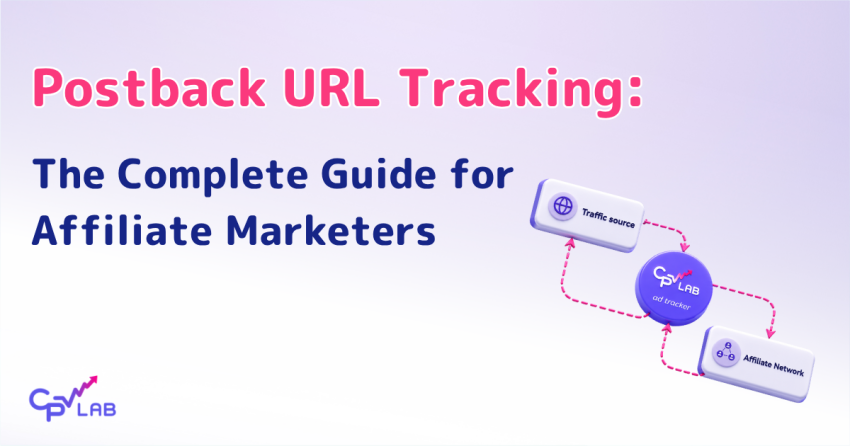
Conversion tracking is harder than it used to be. Cookies get blocked. Pixels fail to load on mobile. iOS App Tracking Transparency strips conversion data from a meaningful share of ad accounts. The result is broken attribution, and ad spend optimized against the wrong signals.
Postback URL tracking solves this at the protocol level. Instead of relying on a browser to load a tracking pixel, your affiliate network sends conversion data server to server, straight from its system to your tracking software. The conversion signal does not rely on a browser pixel, third-party cookie, or thank-you page script.
This guide walks through what a postback URL is, how the conversion tracking flow works end to end, how to set one up in CPV Lab and CPV One, the mistakes that quietly break tracking in production, how to verify the setup before launching paid traffic, and how to forward conversion data onto Facebook CAPI for stronger ad delivery. By the end, you should have a working postback, verified in your tracker, ready for traffic.
What is a postback URL?
A postback URL is a URL called by a system to inform a second system about an event.
In affiliate marketing, the most known postback URl is the server-to-server tracking link that your affiliate network calls when a conversion happens, sending the click ID and revenue back to your tracker so the conversion attributes to the original click.
No browser involvement, no cookies, no pixel loading on a thank-you page.
You will also see it called an S2S pixel, a server-to-server postback, or simply a conversion postback. Different names, identical mechanism.
When a sale, lead, or signup completes, the affiliate network’s server fires an HTTP request to a URL you configured in their dashboard. The request carries the unique click ID generated when the visitor first arrived through your affiliate link, plus optional fields like revenue, currency, and transaction ID.
Because the call happens server-to-server, the server-side conversion call is not blocked by the visitor’s ad blocker, although a blocked tracking domain can still break the earlier click handoff.
Postback URLs do not depend on cookies set in the browser, and they work the same way inside mobile apps as on desktop browsers. That is why many serious affiliate marketers prefer postback URL affiliate tracking and why most major affiliate networks now support S2S postbacks as a baseline for partner integration with any tracking software, including CPV Lab and CPV One.
How postback tracking works, step by step
- A click generates a unique click ID
- the ID travels through your affiliate link to the offer
- the affiliate network records it against any conversion that follows
- when a conversion fires, the network’s server calls your tracking software with the same click ID attached.
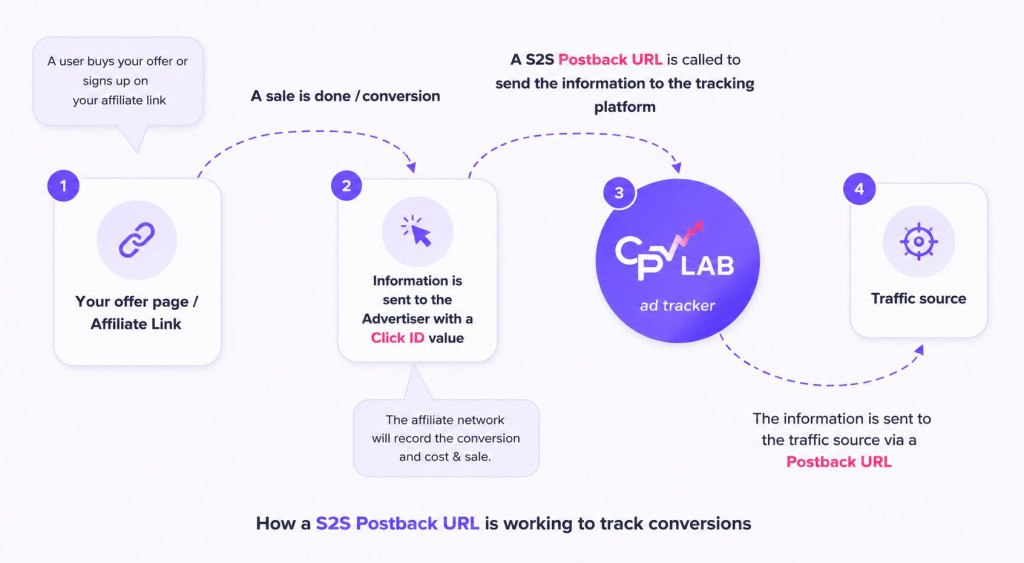
The full flow runs across three servers in seconds.
Here is the sequence in detail.
- The click. A visitor clicks your ad. CPV Lab or CPV One generates a unique click ID and stores it with the traffic source, campaign, landing page, and any tokens you configured.
- The redirect. Your tracker redirects the visitor to the offer URL with the click ID appended as a parameter. The parameter name depends on the affiliate network: subid, subid2, s2, ctid, and others all show up. When the network is imported from the CPV Lab or CPV One catalog, the mapping is handled automatically.
- The conversion. The visitor completes the action on the offer page. The affiliate network records the conversion with the click ID stored against it.
- The postback fires. The network’s server calls one of the postback URLs you configured in their dashboard, swapping placeholder tokens for the real click ID and payout values.
- The match. Your tracking software receives the request, looks up the click ID, finds the original click record, and marks it as converted. The conversion appears in your reports, the revenue updates, and any traffic source postback URLs you configured fire next.
- The roundback. CPV Lab will send information about conversion back to the ad network to optimize the campaign
The whole chain takes milliseconds. Because it runs over the affiliate network’s server rather than the visitor’s browser, it does not matter what the visitor’s device is doing, whether their cookies were blocked, or whether they switched devices between click and purchase.
Postback vs. pixel tracking: Which should you use?
Use postback URLs whenever your affiliate network supports them.
Use pixels for your own offers, e-commerce sites, or thank-you pages you control directly.
For affiliate offers running through a network, the server-to-server postback delivers more accurate conversion tracking and survives the ad blockers and iOS tracking restrictions that break pixel tracking.
The difference comes down to where the conversion signal originates. A pixel needs the visitor’s browser to load an image or run a script on the thank-you page. A postback runs from the affiliate network’s server with no browser involved at all.
| Aspect | Pixel tracking | Postback URL |
|---|---|---|
| Where it fires | Browser, on the thank-you page | Network’s server, on conversion |
| Cookies required | Yes | No |
| Affected by ad blockers | Yes | No |
| Works inside mobile apps | Limited | Yes |
| Best for | Your own offers, e-commerce | Affiliate offers, paid media |
For a deeper comparison, including pros and cons by campaign type, see the existing CPV Lab guide on pixel vs. postback URL tracking.
Many serious media buyers and affiliate marketers run both methods: postback URLs as the primary signal and pixels as a backup on offers where they control the thank-you page.
You can check this overview to understand better the difference between pixels, postbacks and when to send information with a postback url and when to receive information with a postback url.
The hybrid setup also catches discrepancies between the two conversion data sources, which is useful for spotting tracking issues before they affect optimization decisions.
How to set up a postback URL in CPV Lab
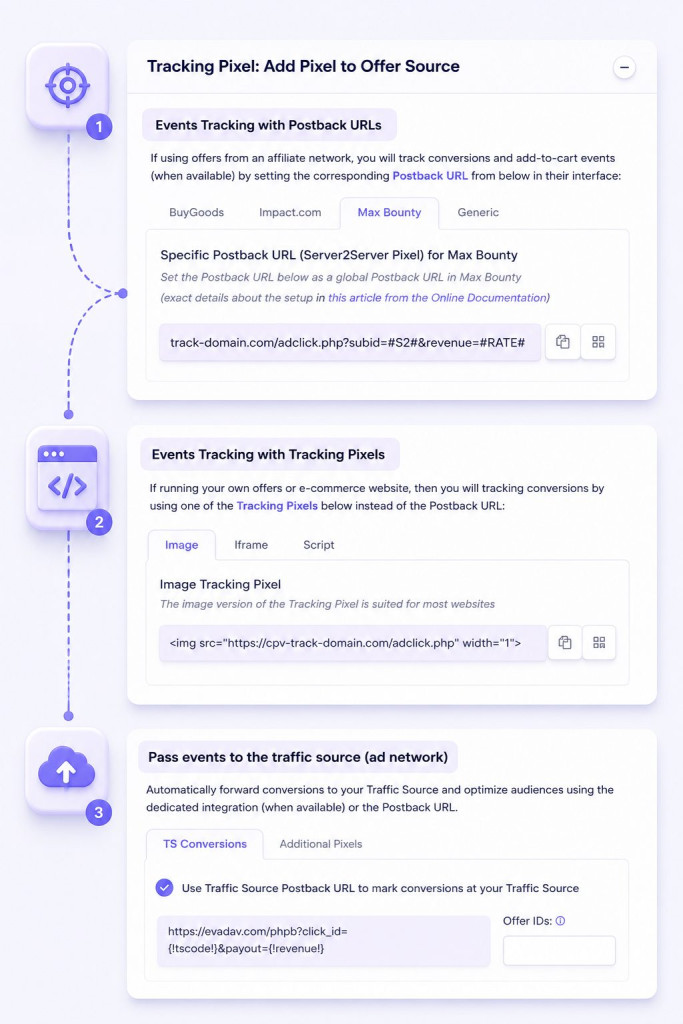
CPV Lab generates the postback URL automatically when you create a campaign.
You copy it from the Links and Pixels section of the campaign setup page and paste it into your affiliate network’s global postback or S2S settings. There is no code to write.
Step 1: Create or open the campaign
Add your traffic source and offer in CPV Lab or CPV One.
When entering the offer URL, end it with the SubID parameter the affiliate network expects, populated with the {!subid!} macro.
Examples:
- For MaxWeb, that is ?subid2={!subid!}.
- For MaxBounty, it is ?s2={!subid!}
- For ClickBank, select ClickBank as the Offer Source and use &tid={!subid!} on the offer UR.
The right format for each affiliate network is set in the Offer Sources page in your tracker's settings.Step 2: Copy the postback URL
Look for the textbox labeled “Specific Postback URL for [your network name]” in the Links and Pixels section. When the affiliate network is imported from the CPV Lab or CPV One catalog, the URL is pre-filled with the right parameters and the right SubID token format. It looks like this:
https://your-tracking-domain.com/adclick.php?subid=NETWORK_SUBID_TOKEN&revenue=NETWORK_PAYOUT_TOKENThe capitalized placeholders are tokens the network replaces with actual values when a conversion fires.
Step 3: Paste it into your network
Log in to the affiliate network and find the global postback or S2S setting. Most affiliate networks support a single global URL that fires for every conversion across all your campaigns. Some also support per-offer postback URLs if you want to track different offers in different campaigns. Save the URL. Most networks display a confirmation message.
Step 4: Confirm parameter alignment
This is where most setups break.
The offer URL (your affiliate link or your offer page) needs the affiliate network’s SubID parameter populated with {!subid!}.
The network’s postback URL needs to send that SubID back in a parameter your tracker recognizes.
When both ends match, the conversion data attributes correctly.
When they do not, the postback fires with an empty or mismatched SubID, and the conversion data floats free without attribution.
| CPV Lab parameter | Common network names | Purpose |
|---|---|---|
| subid | subid, subid2, s2, aff_sub, tid, ctid | Matches conversion to original click |
| revenue | payout, commission, amount | Conversion value |
| transaction_id | transaction_id, conv_id, sale_id | Unique conversion identifier |
| status | status, conversion_status | Approved, pending, rejected |
For network-specific setup walkthroughs, see the CPV Lab postback URL documentation and the guide on receiving conversions in the tracker or to the traffic source.
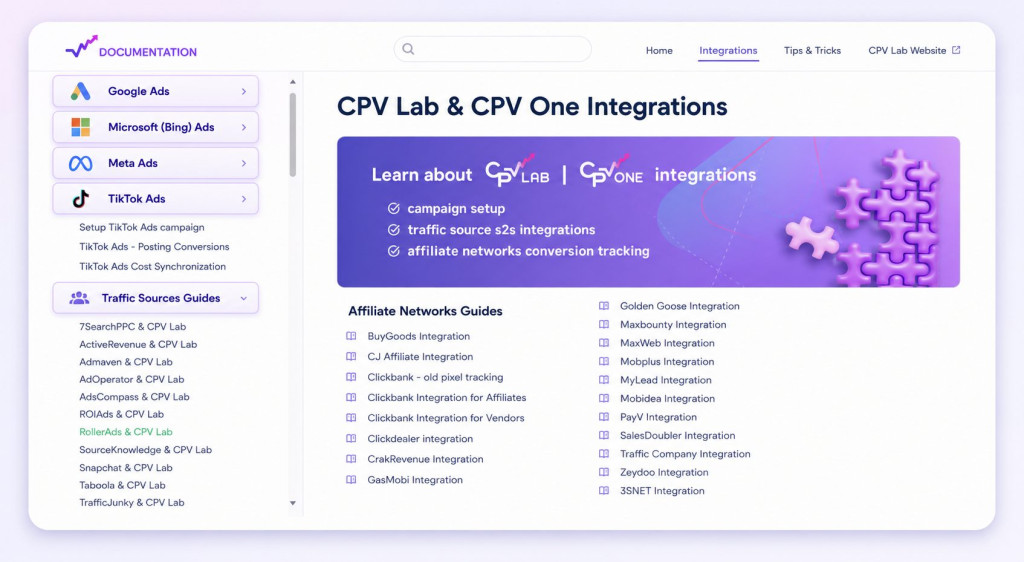
Skip the manual setup
CPV Lab and CPV One includes catalog integrations for every major affiliate network and traffic source, with the right tokens pre-filled.
→ See the integration catalog
Common postback setup mistakes and how to fix them
Most postback failures come from one of five problems:
- a SubID parameter mismatch
- a missing SubID macro on the offer URL
- the wrong Offer Source on the offer
- an ad blocker on the tracking domain
- a firewall blocking inbound network calls.
Each one has a fast diagnosis.
The SubID parameter does not match
The affiliate network’s postback URL needs to send a SubID that your tracker recognizes.
If you pasted the URL manually for a custom affiliate network, double-check the network’s token (often {subid}, {aff_sub}, {s2}, or similar) sits in the right place.
If you imported from the CPV Lab or CPV One catalog, this is handled automatically, so re-import rather than edit manually.
The offer URL is missing the SubID macro
The offer URL needs to end with the SubID parameter the affiliate network expects, populated with {!subid!}. If the macro is missing, the network has no way to send the click ID back, and the postback URL fires with an empty value that CPV Lab cannot match to any click.
The Offer Source is not selected on the offer
Each offer in your tracker needs to be linked to its offer source (the affiliate network or in-house for your own offers). This tells CPV Lab or CPV One which SubID parameter format to expect.
An ad blocker is breaking the tracking domain
Default tracker domains can be flagged by some ad blockers, which can break the click handoff before any conversion data ever reaches the affiliate network. Use a custom tracking subdomain that matches your landing page domain. This can reduce blocking risk by making the chain look like first-party traffic.
A firewall is blocking inbound calls
Some self-hosted CPV Lab installations sit behind firewalls that reject incoming requests from network servers. CPV One, being cloud-hosted, does not face this issue. If your tests show no postback URL firing at all and the affiliate network confirms the call was made, check your server logs for blocked requests from the network’s IP range and whitelist them.
How to verify your postback is firing correctly
CPV Lab and CPV One include a Postback Log page that records every postback URL call, both incoming from affiliate networks and outgoing to traffic sources.
Run a test conversion, open the log, and confirm the call shows up with the right SubID and revenue. If anything is missing, the log tells you which step in the chain failed.
Run a test conversion before you launch real traffic.
- Open your campaign URL in an incognito browser to generate a fresh test click
- Convert manually on the offer using the affiliate network’s test mode or calling the Postback URL from the tracker (check here how to test)
- Open the Postback Log in CPV Lab or CPV One and filter by your campaign
- Confirm the entry appears with the SubID, revenue (if the network passes payout or your test value), and the timestamp matching your test
The Postback Log is documented in detail in the CPV Lab Postback Log Page guide.
For a real-world walkthrough showing verification inside an active campaign, see the Golden Goose campaign tracking case study.
Advanced: passing conversion data to CAPI
Once your postback URL is firing, the same conversion data can flow on to supported traffic sources.
The normal flow is:
- User converts on the affiliate link
- The Affiliate Networks records the conversion
- The Affiliate network calls a postback URL S2S to inform the tracker about the conversion
- CPV Lab will record the conversion
- CPV Lab will call a postback URL or a CAPI to send conversions to the traffic source
Most traffic sources accept a Postback URL, like Taboola, Newsbreak, MGID, Outbrain, PropellerAds, RichAds, Oddbytes, etc.
But there are traffic sources, such as Facebook, TikTok, Snapchat, Quora, Bing Ads and Google Ads who don’t accept classic Postback URL, but have a special setup to receive conversions.
CPV Lab and CPV One can forward conversion data to traffic sources through Traffic Source Postback URLs or special setups like CAPI.
For Facebook specifically, both CPV Lab and CPV One include a dedicated Facebook Conversions API integration, which is configured separately from the standard Traffic Source Postback URL.
For Facebook, the Conversions API receives your real conversion data even when the pixel fails, which it does often after iOS 14, ad blockers, and consent rejections. Meta’s algorithm uses these server events to optimize delivery.
Match Quality scores improve when you pass enriched signals (email, phone, and custom parameters) alongside the conversion event, and your tracker can extract these from your offer’s conversion data and pass them through to CAPI.
The Meta CAPI integration in CPV Lab and CPV One is set up inside the campaign setup page in the Facebook-specific section. You add the API Access Token, Pixel ID, Event Name, and Amount. Once configured, your tracker sends conversion details to Facebook through CAPI after receiving the conversion from the affiliate network.
CAPI events may appear quickly in Facebook’s Test Events tool, but CPV Lab notes that Facebook reporting can take up to 15 minutes to show in Recent Activities. From there, you can verify event_name, value, and event_time match the conversion data you sent.
The full walkthrough lives in the CPV Lab Facebook Conversions API integration documentation, and the next cornerstone in this cluster, What Is Conversion API (CAPI) and Why Do You Need It, covers how this fits with TikTok, Google Ads, and Microsoft Ads in the same depth.
Frequently asked questions
What is a postback URL in affiliate marketing?
A postback URL is a link called when a event is happening to inform another system about that event.
It works in 2 ways in affiliate marketing:
- A server-to-server tracking link that an affiliate network calls when a conversion happens, sending the click ID and revenue back to your tracking software. Different affiliate networks call it a postback URL, S2S pixel, or server postback, but the mechanism is identical: the network’s server fires an HTTP request to your tracker, and your tracker matches the click ID to the original visitor for accurate conversion data.
- The tracker calls a different Postback URL and informs the traffic source about the conversion. The traffic source receives the information and their algorithm can optimize the targeting.
Is a postback URL the same as an S2S pixel?
Yes. “Postback URL,” “S2S pixel,” and “server-to-server postback” all describe the same conversion tracking method: a server-side call from one platform to another to record an event (usually a conversion). Terminology varies between networks but the underlying flow is identical.
Do I need a postback URL if I am already using a pixel?
For affiliate offers running through a network, yes. Pixel tracking depends on the visitor’s browser loading a tracking image or script on the thank-you page, where affiliates usually don’t have access to.
Pixel tracking works best when you own the offer and have access to the thank you page.
Server-to-server (S2S) conversion tracking fires in the background, so it catches conversion even if you don’t have access to the thank you page. Many CPV Lab and CPV One users run both for redundancy on offers where they own the thank-you page.
What information does a postback URL send?
At minimum, the click ID (SubID) so the tracking software can match the conversion to the original click. Most affiliate networks also send revenue, transaction ID, offer ID, and event type (sale, lead, or signup). Both CPV Lab and CPV One support all of these through their token system, plus custom tokens for any extra conversion data you want to pass through.
Can a postback URL track offline conversions?
Yes, if you have a way to connect the offline conversion back to the original click. For phone leads that convert on a follow-up call, you can fire a postback to your tracker manually from your CRM with the click’s SubID. The same conversion tracking mechanism works for any offline event tied to a click ID, including sales closed by an account manager days or weeks later.
Can I use the same postback URL for multiple affiliate networks?
The base endpoint accepts conversion data from any affiliate network because the click ID is unique per visitor. But each network uses different parameter names, so the URL structure differs slightly per integration. CPV Lab and CPV One generate network-specific postback URLs on the campaign setup page when you import from the catalog. Best practice is to use the network-specific URLs your tracker generates rather than forcing one URL to work everywhere.
How long does a postback take to fire?
Milliseconds in real-time mode. Some affiliate networks (particularly in higher-risk verticals like sweepstakes and dating) delay the call until the conversion is approved through a manual review. That can take hours or days. If your reports show conversion data hours behind your network’s dashboard, check whether your network operates in approval mode rather than real-time.
Why are some postbacks firing but not showing as conversions?
The call is reaching your tracker but the SubID is not matching any stored click. This usually means the SubID macro on the offer URL is missing or wrong, the click expired before the conversion fired, or the affiliate network is sending the SubID in a parameter that the tracking software does not expect. The Postback Log shows the raw call so you can compare the SubID it sent against the SubIDs in your Visitor Stats.

Author: Alex @ CPV Lab
Alex is an account manager at CPV Lab and CPV One, with more than 5 years of experience in supporting affiliate marketers in running their campaigns, tracking and optimizing them correctly with CPV Lab.