If you run paid traffic in Europe, Google CSS is one of the most underused opportunities in affiliate marketing right now.
It is not new. It has been around since 2017. But most affiliate media buyers either do not know it exists, or they assume it is only for big ecommerce brands.
It is not. And this guide is going to show you exactly how it works – and whether it is the right channel for you.
Important: Google CSS is only available in 21 European countries. If you are running campaigns outside the EU, this channel does not apply to you – yet. But if you have EU traffic or EU-based merchants, keep reading.
What Is Google CSS?
CSS stands for Comparison Shopping Service.
In 2017, the EU fined Google €2.42 billion for using its dominance to favor its own Google Shopping service over competitors. As part of the ruling, Google was required to open its Shopping ad inventory to third-party comparison shopping services.
That created an opportunity. Certified CSS partners can now buy Google Shopping ad inventory directly – and pass that advantage on to the affiliates and merchants they work with.
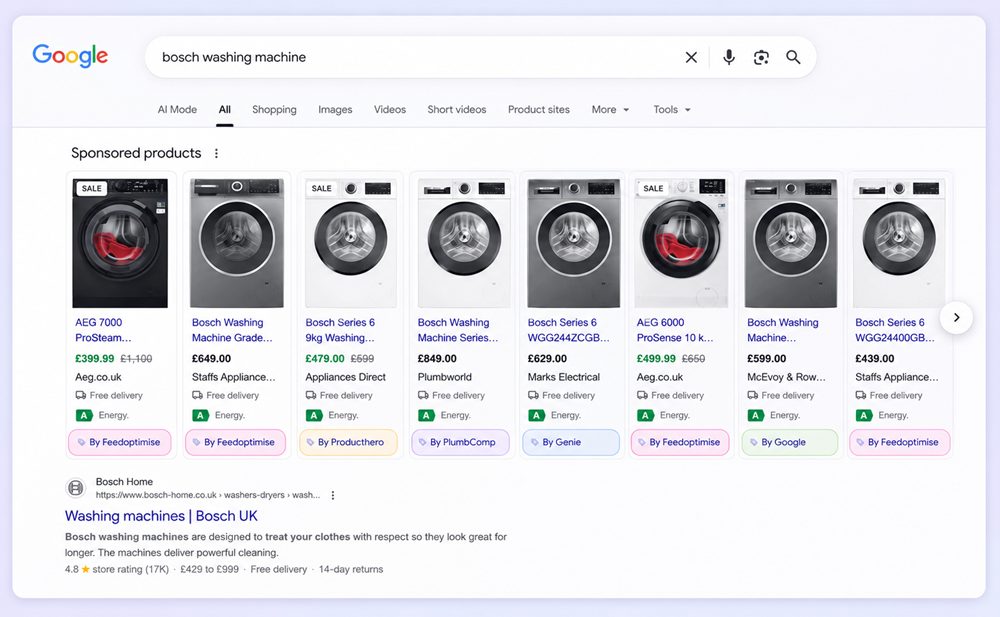
When you run a CSS campaign, your product ads appear in the exact same Google Shopping carousel as regular ads. The only visual difference is a small label at the bottom of each ad that says “By [CSS Partner Name]” instead of “By Google.”
The user clicks. They go directly to the merchant’s website. The CSS partner earns their commission. The merchant gets the sale.
The 20% Bidding Advantage – What It Actually Means
Here is the part that gets media buyers interested.
When you run Google Shopping ads the standard way, approximately 20% of your CPC goes to Google’s own Shopping entity. When you run through a CSS partner, that 20% stays in the auction as bidding power instead.
In simple terms: a €0.80 bid through a CSS partner can compete with a €1.00 bid through standard Google Shopping.
Important: This is a theoretical advantage, not a guaranteed discount. The actual benefit depends on how competitive each auction is. But across a portfolio of products and campaigns, it adds up.
Where CSS Ads Appear
CSS ads appear in the same placements as regular Google Shopping ads:
- The “Sponsored products” carousel at the top of Google search results
- The right sidebar on desktop searches
- The Shopping tab mixed with organic results
- The horizontal scrolling carousel on mobile
There is no visual difference in placement between a CSS ad and a standard Shopping ad. The only thing that distinguishes them is the “By [CSS Name]” attribution at the bottom of each product card.
Who Can Run CSS Campaigns?
There are three ways to access CSS as an affiliate media buyer:
1. Partner with an existing CSS provider Companies like Genie (UK), Kelkoo (international), Feedoptimise, and Producthero are certified CSS partners. You work with them to run your campaigns through their CSS infrastructure. This is the fastest way to get started.
2. Become a certified CSS yourself You can apply to become a certified CSS partner directly through Google. This gives you full control but requires more setup, a monthly fee (typically €25-100/month), and meeting Google’s technical requirements.
3. Work through an affiliate network with CSS support Some affiliate networks have built CSS infrastructure or have CSS partner relationships. This is often the simplest entry point for affiliates already working with those networks.
What Offers Work Best With CSS?
CSS works for physical products that can be listed in a Google Shopping feed. If there is no product feed, there is no CSS campaign.
Best fit for CSS:
| Category | Examples | Why it works |
|---|---|---|
| Electronics | Phones, laptops, tablets | High value, high intent searches |
| Home appliances | Vacuums, washing machines, kitchen | Clear product specs, easy to feed |
| Fashion and apparel | Clothing, shoes, accessories | High volume, price comparison behavior |
| Home and garden | Tools, furniture, garden equipment | Homeowner audience, considered purchases |
| Beauty and cosmetics | Skincare, makeup | Repeat purchase potential |
| Sports equipment | Gym, outdoor, cycling | Seasonal peaks, enthusiast buyers |
What does NOT work with CSS:
- Services (travel, insurance, finance) – no physical product to list
- Digital products without a physical SKU
- Subscription-only products with no standalone item
- Products requiring customization before purchase
The rule of thumb: If you can put it in a shopping cart and ship it, it probably works for CSS. If it requires a form, a consultation, or a subscription signup, it does not.
The Affiliate Networks That Support CSS
Not every affiliate network is set up for CSS campaigns. Here are the main ones that work well:
AWIN One of the largest affiliate networks globally, with dedicated CSS affiliate partnerships. Partners like Kelkoo and Twenga run their CSS operations through AWIN. Strong cross-border capabilities across the EU.
CJ Affiliate (Commission Junction) Large merchant base with international CSS support. Enterprise-level tracking and reporting. Good for affiliates managing multiple merchants simultaneously.
2Performant Strong focus on Romania and Eastern Europe. Well-suited for EU affiliates targeting those markets. CPA model with good CSS infrastructure for ecommerce offers.
The key thing to look for in any network: does the merchant approve CSS traffic? Not all do. Always check before setting up your feed and campaign.
What a CSS Ad Actually Looks Like
To make this concrete, here is a real-world example.
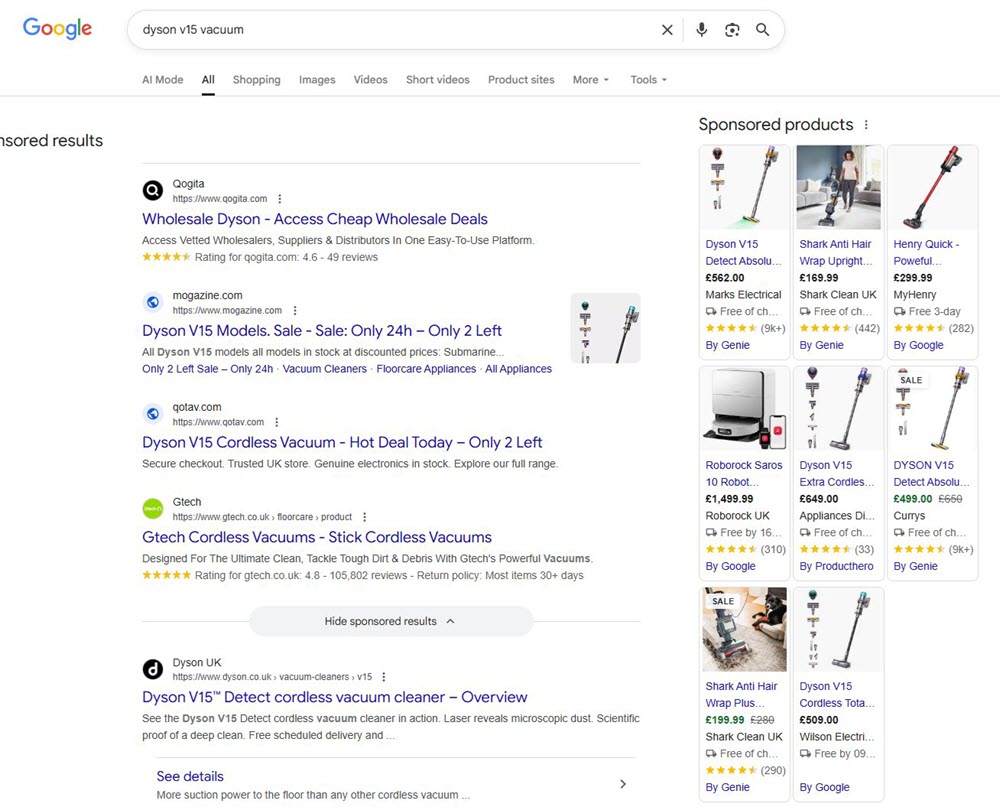
Imagine you search for “Dyson V15 vacuum” on Google in the UK. The sponsored products section at the top of the page shows multiple product cards. Several of them say “By Genie” at the bottom – Genie being a UK-based CSS partner.
Those Genie ads represent multiple different retailers: Marks Electrical at £562, Currys at £499, and others. When a user clicks one of those ads, they go directly to that retailer’s website. Genie earns a commission. The retailer gets the sale.
Genie is not selling the vacuum. They are connecting buyers to sellers – through Google’s Shopping inventory, using their CSS certification.
That is the model. And a skilled affiliate media buyer can replicate it.
Is CSS Right for You?
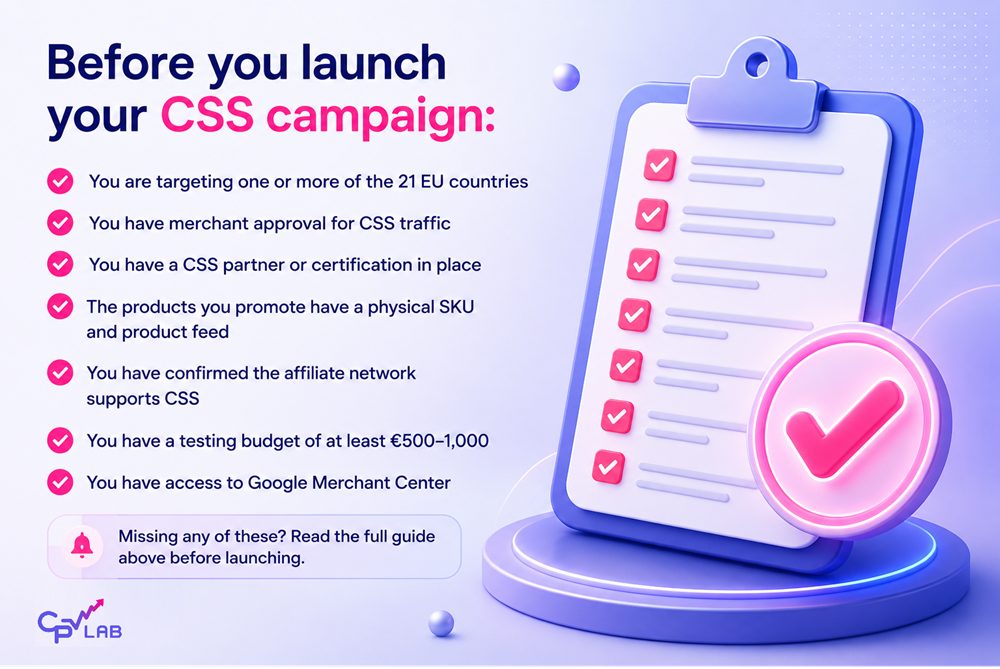
CSS is a good fit if you:
- Already run Google Ads or Google Shopping campaigns and want more bidding efficiency
- Work with EU-based ecommerce merchants or affiliate networks
- Have experience with product feeds or are willing to learn feed management
- Can commit a real testing budget (more on this in Part 2)
- Want a performance-based model where you earn on completed sales
CSS is probably not right for you if:
- You only run traffic outside the EU
- You focus on service-based, finance, or lead gen verticals
- You have no experience with Google Ads at all – there is a learning curve
- You want fast results – CSS takes time to optimize
And if you want to track every click and conversion at the product level, you will need a performance marketing tracker like CPV Lab or CPV One alongside your CSS setup.
Frequently Asked Questions
❓ What is Google CSS in affiliate marketing? Google CSS (Comparison Shopping Service) allows certified third-party partners to place product ads in Google’s Shopping carousel. Affiliates can run CSS campaigns by partnering with a certified CSS provider or becoming certified themselves, earning commissions on sales generated through those ads. It is available in 21 European countries.
❓ What is the 20% bidding advantage in Google CSS? In standard Google Shopping, approximately 20% of your CPC goes to Google’s Shopping entity. When you run through a CSS partner, that 20% stays in the auction as additional bidding power. This means a €0.80 bid through CSS can compete with a €1.00 bid through standard Google Shopping. The actual benefit varies by auction.
❓ Which countries support Google CSS campaigns? Google CSS is available in 21 European countries: Austria, Belgium, Czech Republic, Denmark, Finland, France, Germany, Greece, Hungary, Ireland, Italy, Netherlands, Norway, Poland, Portugal, Romania, Slovakia, Spain, Sweden, Switzerland, and the UK.
❓ Can solo affiliates run Google CSS campaigns? Yes. You can either partner with an existing CSS provider (like Genie or Kelkoo) or become a certified CSS partner yourself. Working with an existing CSS is faster to start. Becoming certified gives you more control but requires more setup and a monthly fee.
❓ What affiliate networks work best for CSS campaigns? AWIN, CJ Affiliate, and 2Performant are the most widely used networks for CSS campaigns in the EU. The key requirement is that the merchant must approve CSS traffic – always confirm this before building your feed.
❓ What kind of products work best for Google CSS? Physical products that can be listed in a Google Shopping feed work best: electronics, home appliances, fashion, beauty, sports equipment, and home goods. Services, digital products, and subscription-only products do not work with CSS.