You have a new offer to test.
You need a landing page. Maybe a pre-sell page. Maybe a simple optin form. Maybe a product page.
Old way: open your page builder, drag and drop for an hour, fix the mobile layout, argue with the CSS, ask a developer to add the tracking code.
New way: type what you want. Get a page in two minutes. Add your tracking link. Go live.
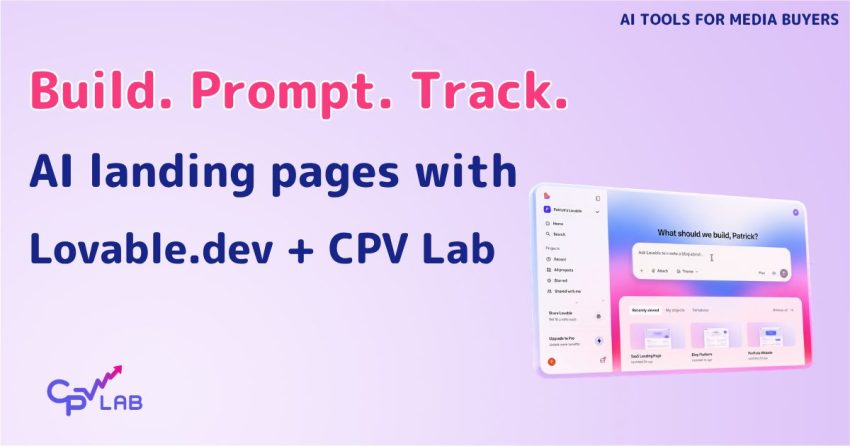
That is what Lovable.dev makes possible. And in this article, I am going to show you exactly how to use it – with real prompt examples for three verticals, tips on how to get better pages faster, and how to connect everything to CPV Lab (or CPV One) so your tracking is solid from day one.
No fluff. Just things you can do today.
What Is Lovable.dev – And Why Should Media Buyers Care?
Lovable.dev is an AI website builder. You describe the page you want in plain text, and it writes the code and builds the page for you.
The output is real HTML, CSS, and JavaScript. Not a locked template. Not a proprietary drag and drop editor. Actual code you own and can edit.
That matters for media buyers for one reason: you can add anything to it. Custom scripts, tracking pixels, redirect links, A/B testing tools. If you can add it to a normal HTML page, you can add it to a Lovable page.
And because it is AI, making changes is as simple as typing “change the headline to this” or “add a section with three bullet points above the CTA button.”
In short: Lovable gives you the speed of an AI tool with the flexibility of a hand-coded page. For testing offers quickly, it is hard to beat.
Who Is This Actually Useful For?
Not every media buyer needs this. But if you recognize yourself in any of these situations, keep reading:
| Situation | Why Lovable Helps |
|---|---|
| You run multiple offers and need fresh landing pages fast | Build a new page in minutes instead of hours |
| You are testing different angles on the same offer | Spin up variations quickly without touching a page builder |
| You work with brands or clients who need quick landing page prototypes | Show a working page in a client meeting, not a mockup |
| You want to cut costs on simple landing pages | No monthly fee for a page builder on every project |
| You are an agency running campaigns for multiple clients | Build client-specific pages fast, track each one separately in CPV Lab |
| You are a brand owner who runs paid, organic, email campaigns | You need a landing page or to test different layouts for your website |
The Three Verticals Where This Works Really Well
Let’s get specific. Here are three real use cases with actual prompts you can use or adapt.
1. Nutra – Weight Loss Pre-Sell Page
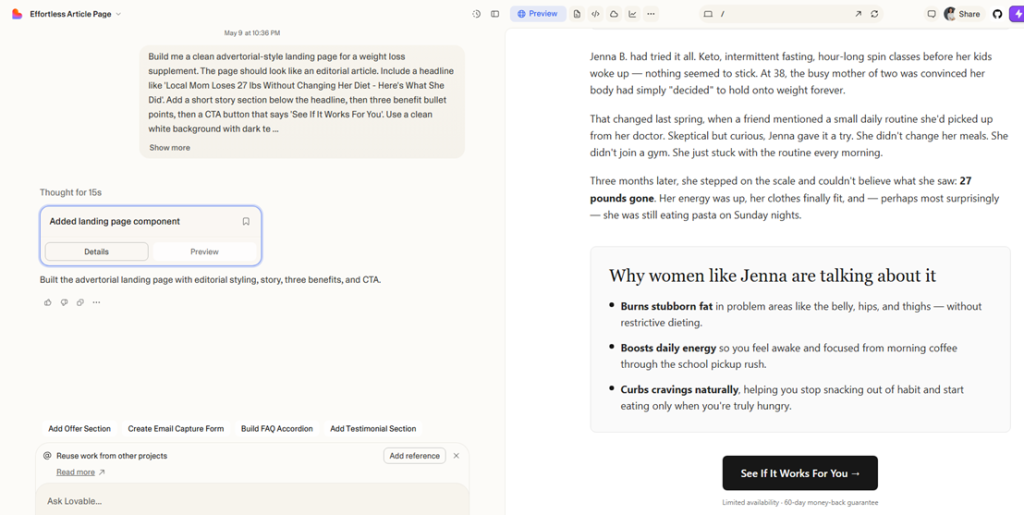
The goal: Warm up cold traffic before sending them to a weight loss offer. An advertorial-style page that tells a story and builds trust before the click.
The prompt to use in Lovable:
“Build me a clean advertorial-style landing page for a weight loss supplement. The page should look like an editorial article. Include a headline like ‘Local Mom Loses 27 lbs Without Changing Her Diet – Here’s What She Did’. Add a short story section below the headline, then three benefit bullet points, then a CTA button that says ‘See If It Works For You’. Use a clean white background with dark text. Mobile friendly.”
What you get: A pre-sell page that looks like an article, loads fast, and is ready for your tracking links in under three minutes.
How to improve it with follow-up prompts:
- “Make the headline bigger and add a subheadline below it”
- “Add a before/after image placeholder below the story section”
- “Change the CTA button color to green and make it larger”
- “Add a disclaimer text at the bottom in small grey font”
2. Lead Generation – Finance Email Optin
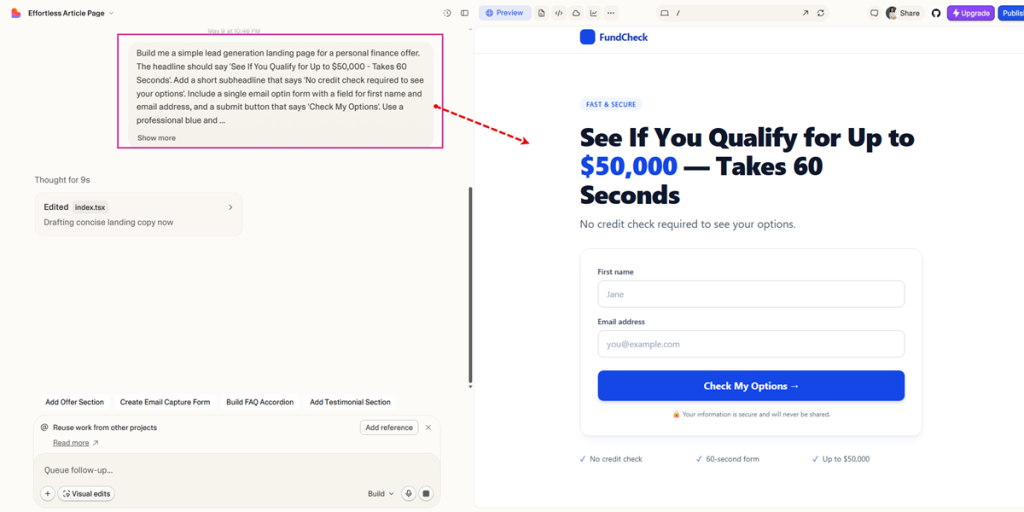
The goal: Capture email addresses from people interested in a finance offer (debt consolidation, personal loans, insurance, etc.).
The prompt to use in Lovable:
“Build me a simple lead generation landing page for a personal finance offer. The headline should say ‘See If You Qualify for Up to $50,000 – Takes 60 Seconds’. Add a short subheadline that says ‘No credit check required to see your options’. Include a single email optin form with a field for first name and email address, and a submit button that says ‘Check My Options’. Use a professional blue and white color scheme. Keep the page short and focused – no footer, no navigation menu.”
What you get: A clean, distraction-free optin page that focuses on one action – submitting the form.
How to improve it with follow-up prompts:
- “Add three trust badges below the form – ‘SSL Secured’, ‘256-bit Encryption’, ‘No Spam Ever'”
- “Add a short line below the button that says ‘Join 142,000 people who checked their options this month'”
- “Make the form section stand out with a light grey background box around it”
- “Add a small padlock icon next to the submit button”
3. E-commerce – Direct Product Offer Page
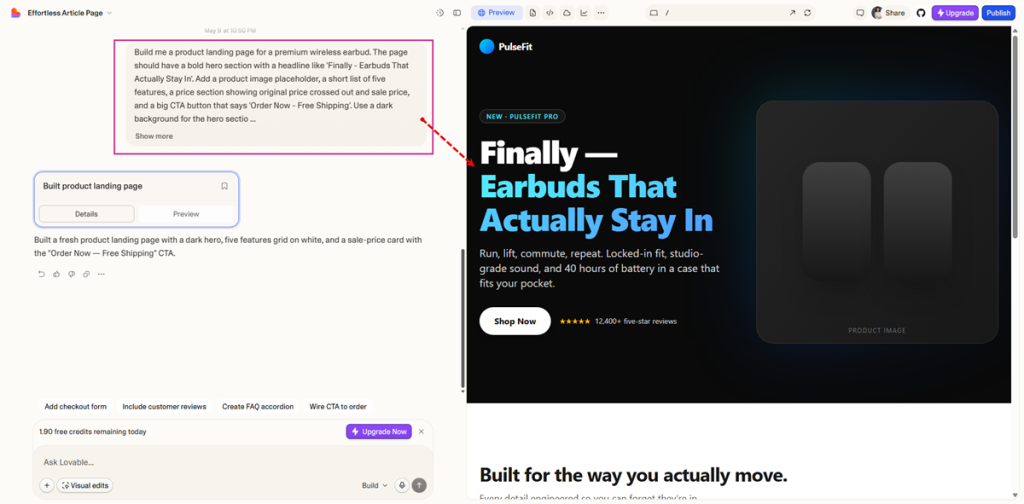
The goal: Send traffic directly to a product page that builds desire and pushes to a buy now button linked to your offer URL.
The prompt to use in Lovable:
“Build me a product landing page for a premium wireless earbud. The page should have a bold hero section with a headline like ‘Finally – Earbuds That Actually Stay In’. Add a product image placeholder, a short list of five features, a price section showing original price crossed out and sale price, and a big CTA button that says ‘Order Now – Free Shipping’. Use a dark background for the hero section and white for the rest. Clean and modern design.”
What you get: A product page that looks like a real brand page, with a clear buying flow and a single CTA.
How to improve it with follow-up prompts:
- “Add a countdown timer below the price that says ‘Offer ends in’ with a 24-hour timer”
- “Add a section with three customer review cards below the features list”
- “Add a money back guarantee badge near the CTA button”
- “Make the sale price red and larger than the original price”
How to Get Better Pages Faster – Prompting Tips
The quality of your Lovable page depends a lot on how you prompt it. Here are the things that make a real difference:
| Tip | Example |
|---|---|
| Tell it the goal of the page | “This is a pre-sell page, not a product page” |
| Describe the audience | “The visitor is a 35-55 year old woman interested in weight loss” |
| Specify what NOT to include | “No navigation menu, no footer links, no social media icons” |
| Give it a real headline | “Use this exact headline: [your headline]” |
| Tell it the color scheme | “Use dark navy background with white text and orange CTA buttons” |
| Ask for mobile-first | “Make sure the page looks great on mobile first” |
| Be specific about the CTA | “One CTA button only, above the fold and again at the bottom” |
Pro tip: Treat Lovable like a junior designer who is very fast but needs clear direction. The more specific you are, the less back and forth you need.
Changing Things After the Page Is Built
This is where Lovable really shines for media buyers. You do not need to rebuild the page every time you want to test a new angle. Just chat with it.
Examples of changes you can make by typing:
- “Change the headline to: ‘Doctor Reveals the Real Reason You Can’t Lose Weight'”
- “Replace the hero background color with a dark green”
- “Add a new section above the CTA with three testimonials”
- “Remove the image in the middle section”
- “Make the page shorter – remove everything below the first CTA button”
Each change takes about 30 seconds. That means you can test 5 different headline angles in the time it used to take to build one page.
Connecting Your Lovable Page to CPV Lab
A fast landing page with no tracking is just a pretty page. You need to know what is happening – which clicks converted, which traffic source performed, what your cost per conversion is.
Here is how the CPV Lab integration works at a high level:
You need two things from CPV Lab (or CPV One):
- Your tracking link (Step 1) – This goes on your CTA button. When a visitor clicks it, CPV Lab records the click and sends them to your offer.
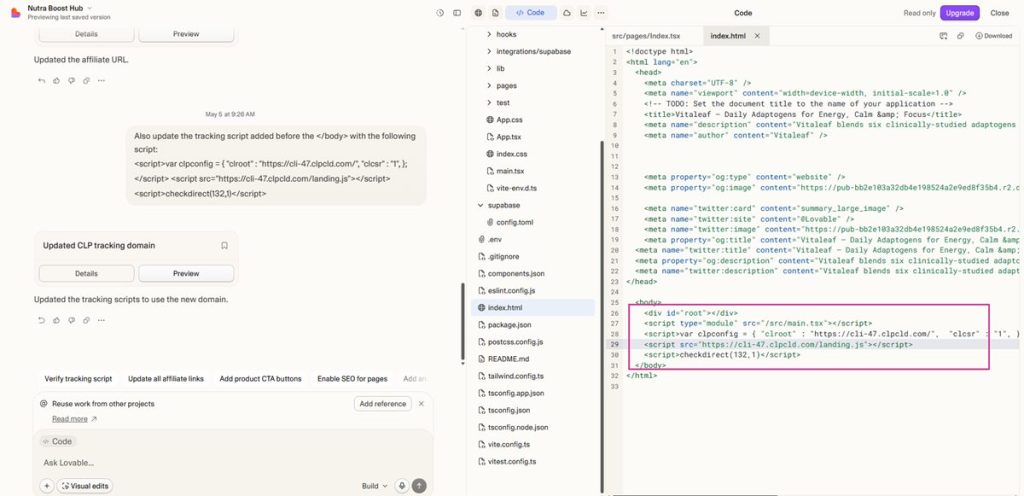
- Your tracking code (Step 2) – This is a small JavaScript snippet that goes just above the
</body>tag on your page. It fires when someone lands on your page and records the visit.
Adding them to your Lovable page is simple:
For the tracking link, just tell Lovable in the chat:
“Replace the href on the main CTA button with this URL: [your CPV Lab Step 1 link]” OR “Replace {AFFILIATE_URL} with [your CPV Lab Step 1 link]”
For the tracking pixel, tell Lovable:
“Add the following code before the </bod> in the index page: [paste your Step 2 code]”
Done. Your page is now fully tracked.
What Your Data Looks Like After Traffic Runs
Once you have traffic running, CPV Lab shows you exactly what is happening on your campaign. You can see:
- Total clicks vs unique clicks
- Conversions and conversion rate
- Revenue, cost, and profit per campaign
- Performance broken down by traffic source, creative, GEO, device, and more
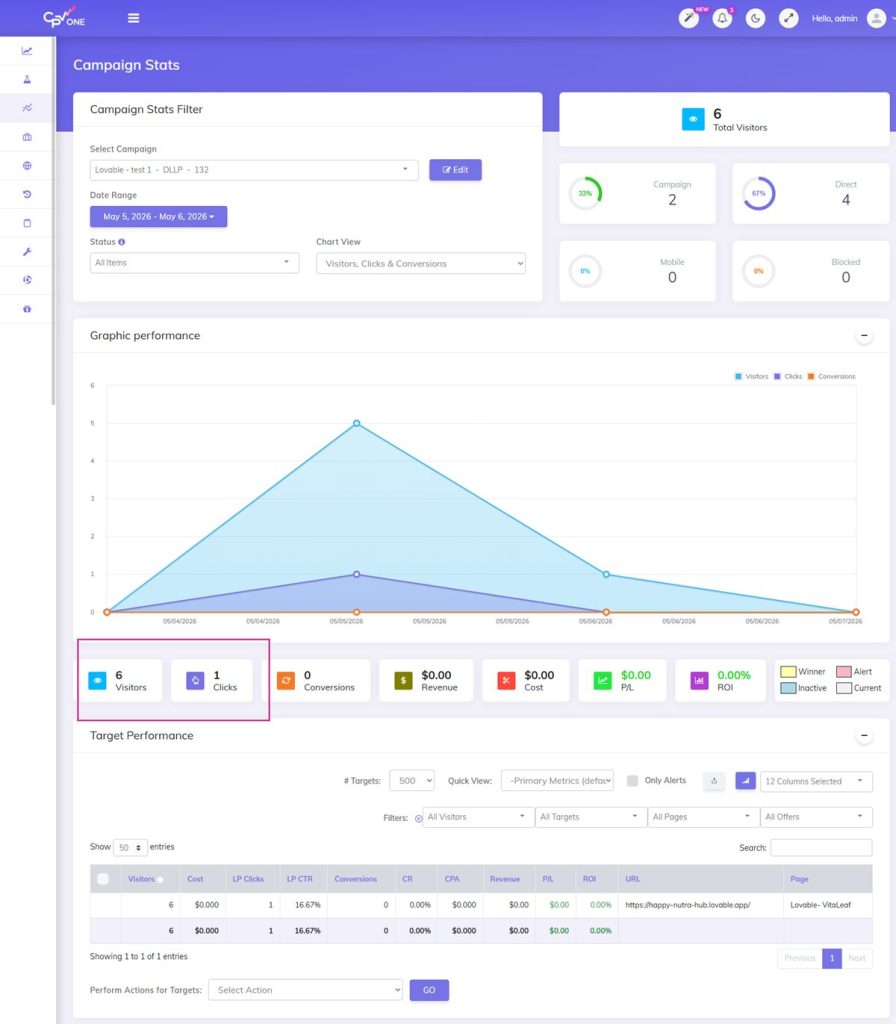
This is the difference between running traffic and running a real campaign. One gives you spend. The other gives you data you can act on.
The Full Setup Guide
We put together a complete step by step tutorial for connecting Lovable to CPV Lab. It covers both methods:
- Method 1 – Lovable chat interface (easiest, no GitHub needed, done in under 10 minutes)
- Method 2 – GitHub and VS Code (more control, better for developers)
Each step has screenshots and code examples.
What About Other Verticals and Use Cases?
The three examples above are just a starting point. Lovable works well for any vertical where you need a simple, fast landing page:
- Dating/social apps – simple optin pages or app download pages
- Insurance lead gen – quote request forms
- Software/SaaS trials – free trial signup pages
- Travel deals – offer pages with urgency elements
- Gaming/casino – bonus offer pages (where allowed)
The prompting approach is the same for all of them. Describe your audience, your goal, your headline, and what you do not want on the page. Lovable handles the rest.
And because CPV Lab tracks all traffic sources – Google Ads, Facebook, native, push, pop, direct buy – your tracking setup works the same regardless of the vertical or traffic source.
The Bottom Line
AI is not replacing media buyers. But it is removing the bottlenecks that slow them down.
Building a landing page used to be one of those bottlenecks. With Lovable, it is not anymore.
You can now spend that time on what actually moves the needle – reading your data, optimizing your campaigns, finding better offers, scaling what works.
That is the real value here. Not the AI. The time it gives you back.
Questions about tracking setup? Contact CPV Lab Support – we will help you get it working.
Frequently Asked Questions
What is an AI landing page builder? An AI landing page builder creates a web page for you based on a text description. You type what you want and the AI writes the code and builds the page. Lovable.dev is one example. The output is real HTML code you can edit and publish.
Can I use Lovable.dev for affiliate marketing landing pages? Yes. Lovable builds standard HTML pages that you can customize with any tracking links, pixels, or scripts. It works well for pre-sell pages, optin forms, product pages, and advertorials.
How do I add CPV Lab tracking to a Lovable page? You add your CPV Lab tracking link to your CTA button and your tracking pixel just above the closing body tag. You can do both directly in the Lovable chat interface without any coding. Full steps here: Lovable + CPV Lab Tutorial
Does Lovable.dev work with other trackers besides CPV Lab? Yes. Any tracker that uses a JavaScript pixel and a redirect tracking link will work with Lovable pages. The setup process is the same.
How long does it take to build a landing page with Lovable? The initial page generation takes 1-3 minutes. Adding your tracking and making adjustments takes another 5-10 minutes. You can have a fully tracked landing page live in under 30 minutes from scratch.
Can I use this for Google Ads campaigns? Yes. Lovable pages are standard HTML pages hosted on a public URL. You can use that URL as your Final URL in Google Ads. For tracking, use CPV Lab’s direct tracking method (JavaScript pixel) since Google Ads does not allow redirect links. More on that here: Understanding Click Loss in Google Ads
Can agencies use this for client campaigns? Yes. You can build separate Lovable pages for each client and track each one as a separate campaign in CPV Lab. This gives you clean data separation and full visibility per client.