Skip to content
Menu
CPV Tracker Blog
  • Affiliate Marketing
    • Learn Affiliate Marketing
    • Tracking
      • Postback URL
      • Custom tracking domains
    • Landing page optimization
    • Campaign Optimization
    • Case Study
    • Traffic Sources
    • Affiliate Networks
  • News & Updates
    • Champions of Performance Marketing
    • Digital Marketing
    • Tracking and Attribution
    • Hosting
    • Events
    • Guest Posts
  • Ads
    • Google Ads
    • TikTok Ads
    • Facebook Ads
    • Native Ads
    • Tutorials
    • CPA Affiliate Marketing
  • CPV Lab
    • Self-hosted tracker
  • CPV One
    • Cloud-hosted tracker
  • MV Lab
    • Multivariate testing tool
CPV Tracker Blog
Professional Ads In Less Than 5 Minutes

Super Simple Banner Ads: Professional Ads In Less Than 5 Minutes

Posted on May 19, 2025May 19, 2025 by Patrick H

In this post, we are going to show you how to create professional-looking banner ads in under 5 minutes, perfect for your affiliate marketing campaigns, especially if you’re tracking with CPV Lab.

I’ve spent years in graphic design and developed this simple method that works fast and delivers high-quality results.

Creating high-performing display ads doesn’t have to be complicated — follow these quick steps to get started.

Table of Contents Sections
Introduction Navigate
Step 1: Set Up Your Canvas Navigate
Step 2: Add Your Subject Navigate
Step 3: Add Design Elements Navigate
Step 4: Enhance Readability Navigate
Conclusion Navigate

Professional Ads In Less Than 5 Minutes – Tutorial

Step 1: Set Up Your Canvas

Start by opening your favorite design software, Photoshop, Canva, or any tool you prefer.

  • Set your canvas size based on the ad platform or format you’re targeting.
  • Drag and drop a background image onto the canvas.
  • Resize and position it to fully cover the canvas area.
Set the width and height to your desired size (dimensions).

Drag and drop a background image onto the canvas.

Pro Tip: Use background images that are relevant to your affiliate offer for better conversion alignment

Step 2: Add Your Subject Image

Import the main subject of your ad. This could be a product, person, or object depending on your niche.

  • Remove the background from the subject image to avoid clashing with other design elements.
  • Position the subject on the canvas where it best captures attention.
  • If any edges look cropped or hard, use a soft blending tool to smooth them out naturally.

Example below:

Import the image of your subject (e.g., a person) onto the canvas.

If the subject’s legs or edges appear cropped:

  • Use a soft blending tool to fade them out naturally. This should only take seconds depending on which image editing tools you’re using.
Create easy ads for affiliate marketing

Position the subject on the canvas as desired.

create easy ads

Step 3: Add Key Design Elements

Now it’s time to structure your ad layout with essential elements:

  • Call-to-Action (CTA) button: Add it below or beside the subject. Make sure it stands out.
  • Headline text: Craft a short, attention-grabbing headline that communicates your value fast.
  • Bullet points: Use 2–3 points to highlight key features or benefits of your offer.

Example on how to do all the above:

  • Add a Call-to-Action (CTA) button onto the canvas.
Professional ads made easy
Position it below or beside the subject.

Next elements you can add are:

  • Add Text Elements:
  • Add headline text to grab attention.
  • Include bullet points to highlight key details.
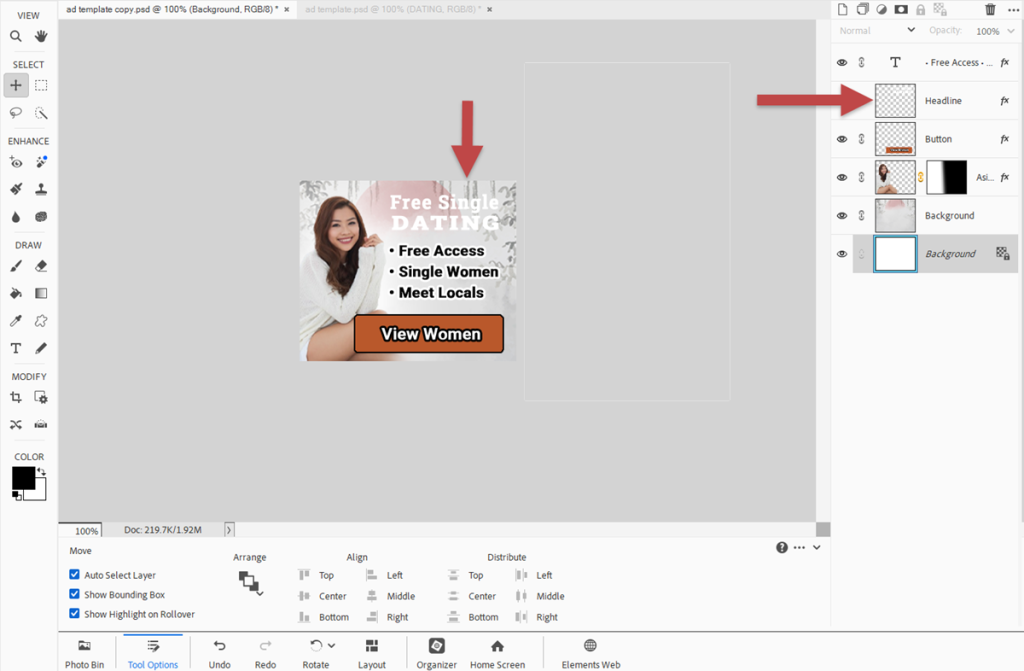
These elements are especially important in performance marketing banners, where clarity and urgency matter most.

Step 4: Optimize for Readability

Professional banner ads are not just about design -> readability is key for conversions.

  • Add text outlines to ensure legibility:
    • Use black outlines for white text.
    • Use white outlines for dark or black text.
  • Dim the background slightly if it competes with the text.

Example:

  • Use a black outline for white text placed over a background image.
  • For black text use a white outline, as used for the bullets in this ad.
Professional Ads  easy to create

Additionally, you can also dim/darken the background image to help increase ad readability if needed.

Professional Ads  easy to create

Conclusion

And that’s it! In just 5–10 minutes, you can build a professional banner ad with only a few key design elements, perfect for any affiliate campaign, PPC ad, or media buying test.

Want to see the full process in action?
Watch the full step-by-step tutorial in the video below.

Patrick Hill

Guest Author: Patrick Hill

Patrick is an affiliate marketer with 8+ years marketing experience. He was certified at Meclabs Research Institute in 2019 for value proposition development and a Photoshop designer. He has experience working as a technical support manager at a CPA network, and loves to make graphic design and programming easy for average people.
Previous Post

Email Marketing Strategies: A Q&A with Teodor Mincu of MessengerOS

Next Post

How to Create NLP-Style Landing Pages Using custom ChatGPT

Mondiad Popunder ads tracking
Mondiad Popunder Ads: How to Run High-Volume Campaigns with CPV Lab Tracking
June 5th, 2026 by Guest
Lovable.dev landing pages
AI Landing Pages for Affiliate Marketing: How to Build, Prompt and Track with Lovable.dev and CPV Lab
May 18th, 2026 by Julia D.
Boost Conversions with Smart Mobile & Desktop Redirects in CPV Lab
Improving Landing Page Performance With Desktop & Mobile Redirects
September 22nd, 2025 by Patrick H
video ads
Video Ads: The Missing Piece in Your Affiliate Marketing Success
August 21st, 2025 by Guest
Follow us on Social Media
Instagram
X
Telegram
Facebook
Youtube
Linkedin

Latest Posts

Mondiad Popunder ads tracking

Mondiad Popunder Ads: How to Run High-Volume Campaigns with CPV Lab Tracking

9:28 am 05 Jun 2026
Postback URL Tracking

Postback URL Tracking: The Complete Guide for Affiliate Marketers

11:12 am 03 Jun 2026
Affiliate Campaign Optimization

Luke King on Affiliate Campaign Optimization, and What It Really Takes to Start: Part 2

6:44 pm 22 May 2026
Lovable.dev landing pages

AI Landing Pages for Affiliate Marketing: How to Build, Prompt and Track with Lovable.dev and CPV Lab

2:14 pm 18 May 2026
Telegram Ads

How to Track Telegram Ads for Affiliate Marketing

10:12 am 14 May 2026
Luke King- Afflift

Luke King on Building affLIFT and Staying Competitive in Affiliate Marketing: Part 1

10:40 am 30 Apr 2026
click loss in google ads

Click Loss in Google Ads: What’s Normal and How to Fix It

8:13 am 22 Apr 2026
Mobplus affiliate network review

Mobplus review: mVAS and lead gen offers for affiliate marketers

6:33 am 21 Apr 2026
Meta ads experts insights

Mastering Meta Ads: A Practical Guide for Performance Marketers

10:07 pm 02 Apr 2026
igaming affiliate network

iGaming affiliate networks: which ones are worth running and how to track them

4:20 am 23 Mar 2026
©2026 CPV Tracker Blog