When OpenAI launched ChatGPT Ads, we moved quite fast.
Not because we had a crystal ball about whether the channel would work for our users. But because we knew that if media buyers were going to test it – and they were going to test it – they would need proper tracking in place from day one. Running a new channel without a tracker is how you spend budget and learn nothing.
So we built the integration. And then we sat with the first users who connected CPV Lab and CPV One to ChatGPT Ads and watched what happened.
This article is about what we observed. Not a tutorial – we have the full setup documentation for that.
This is the picture of what ChatGPT Ads tracking actually looked like from our side when they started to be used in more countries, not just US.
Why We Built the Integration Before the Hype Peaked
There is a pattern we have seen before. A new ad channel launches. Media buyers start testing it immediately. Within weeks, the support questions start flooding in – “how do I track this?”, “where do my conversions go?”, “why does my dashboard show nothing?”
We saw it with TikTok Ads. We saw it with some Native Ads. We saw it with the early days of Meta CAPI.
With ChatGPT Ads, we wanted to be ahead of that curve. The channel is genuinely new – OpenAI’s infrastructure, their own click ID parameter called oppref, their own Conversions API. Not something you can just map to an existing integration and call it done.
The good news is that ChatGPT Ads follows the same structure as other modern ad platforms.
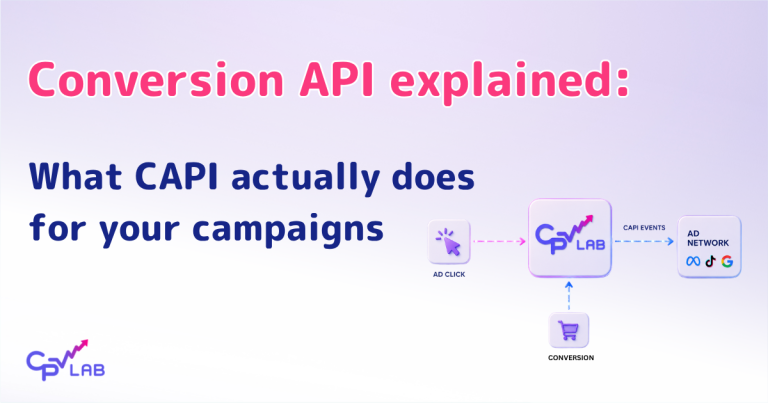
Once you understand that oppref works exactly like fbclid in Facebook or gclid in Google – a unique click identifier that connects the click to the conversion – the rest of the architecture makes sense. Click captured, conversion recorded, CAPI fires server-side, cost pulled via API. Same closed loop, different platform.
The setup we built supports all three layers:
- Click tracking via the
opprefparameter - Conversion reporting back to OpenAI via ChatGPT CAPI
- Automatic cost synchronization via the OpenAI Ads API
What we did not anticipate was which specific parts would trip people up.
What Worked Smoothly
Let us start with the good news.
Importing the traffic source was frictionless. ChatGPT Ads is pre-configured in the CPV Lab and CPV One Traffic Sources Catalog. Users import it in one click. The oppref External ID token is already set up correctly. No manual configuration needed.
This matters more than it sounds. With every new ad platform, the first question is always: do I need to manually set up the tokens? With ChatGPT, the answer is no. That removes a whole category of potential errors before they happen.
The CAPI event structure felt familiar. Media buyers who had already set up Facebook CAPI or TikTok CAPI in CPV Lab adapted to ChatGPT CAPI quickly. The concept is identical – Pixel ID, API Access Token, event name, revenue. The credentials come from a different place in the ChatGPT Ads interface, but the logic is the same.
Cost synchronization worked reliably. Once users connected the ChatGPT Ads API Key in CPV Lab, spend data started pulling automatically. For CPV One users this was completely hands-off. For CPV Lab self-hosted users, the Cron job setup added one extra step, but nothing unusual.
Where People Got Stuck
Now for the more interesting part.
The CAPI Event Names
This was the most common friction point and it surprised us a little because the event names are not complicated. ChatGPT Ads CAPI uses standard names – purchase, lead, sign_up, add_to_cart. Simple enough.
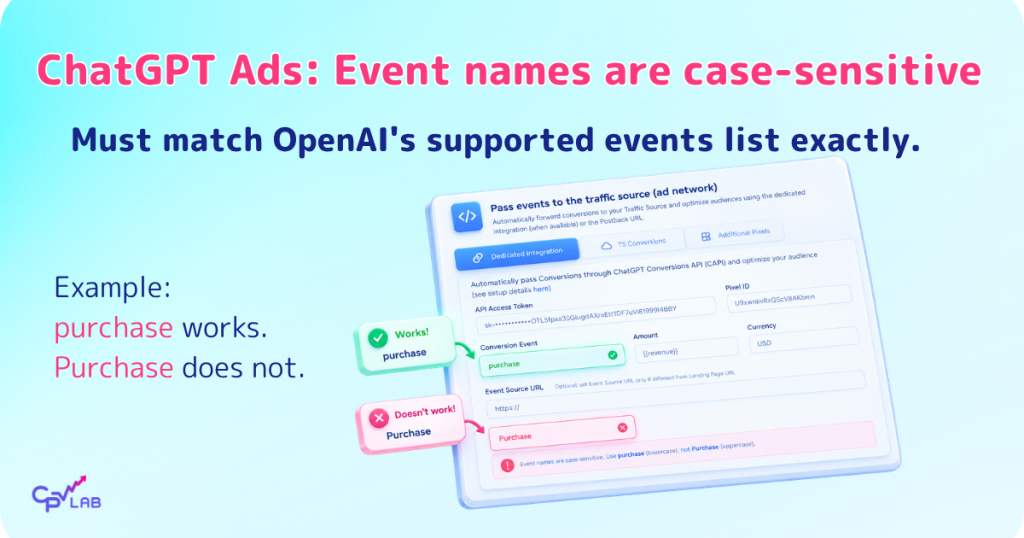
But in practice, users were entering variations. Purchase with a capital P. Lead_gen instead of lead. conversion as a custom attempt. None of these work because ChatGPT’s API validates against a specific list of supported event names.
The result: CAPI appeared to be configured. Conversions were recording in CPV Lab. But no events were showing up in the ChatGPT Ads Conversions dashboard. The Postback Log in CPV Lab showed errors that, once you knew what to look for, pointed directly to the event name mismatch.
The fix is simple: use lowercase, use the exact event name from OpenAI’s supported events list. For most campaigns this means purchase for sales and lead for lead gen. But the mismatch is easy to miss if you do not know to check it.
The Landing Page Query Parameters Conflict
This one is more subtle and caused some confusion before we identified the pattern.
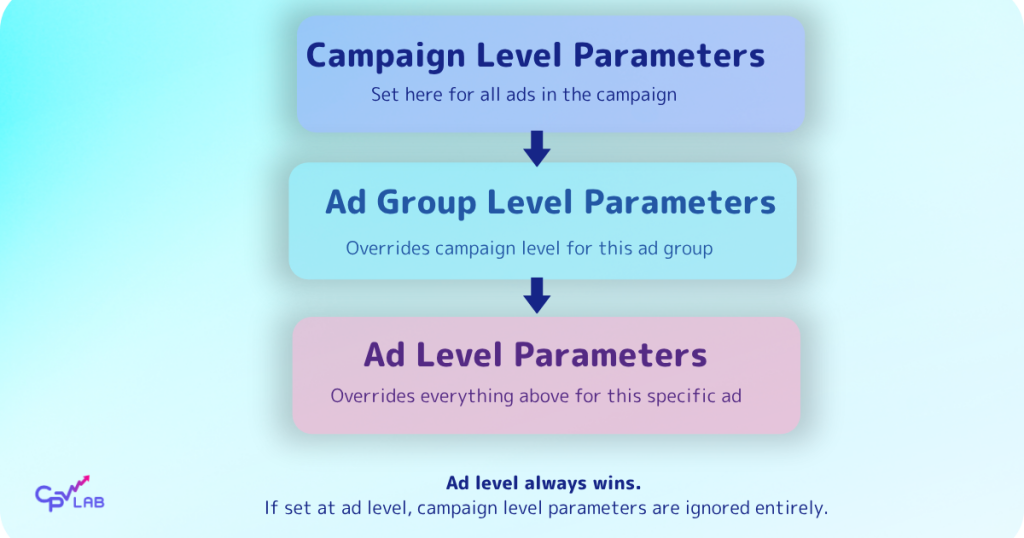
ChatGPT Ads lets you set Landing Page Query Parameters at three levels: campaign level, ad group level, and ad level.
This is actually useful – it means you can set global tracking parameters at the campaign level and then override specific ones at the ad level if needed.
But here is where people got caught: if you set parameters at campaign level AND again at ad level, the ad level settings overwrite the campaign level settings completely.
Not merge – overwrite.
So if your campaign level has ad={ad_id}&adgr={ad_group_id}&campid={campaign_id} and your ad level only has campid={campaign_id}, the ad level takes over and you lose the ad_id and ad_group_id data entirely.
We saw this happen with users who set parameters at campaign level during setup, then went back to the ad level to adjust something and added parameters there without realizing the campaign level ones would be ignored.
The result in CPV Lab: campaign ID was recording correctly but ad group ID and ad ID were missing from the data. The campaign-level data was gone.
Our recommendation: Set your Landing Page Query Parameters at campaign level only. Unless you have a specific reason to override at ad group or ad level, keep it simple and keep everything in one place.
Missing Ad Names in Reports
This one is not a user error – it is a current limitation we want to be transparent about.
When CPV Lab captures ChatGPT Ads data, we receive the campaign ID, ad group ID, and ad ID from the URL parameters. These IDs appear in your reports and you can use them to break down performance by campaign, ad group, and ad.
What we do not yet have are the names. So your report might show a campaign ID like 123456789 rather than the campaign name you gave it in ChatGPT Ads. Same for ad group names and ad names.
This is something we are actively working on. The goal is to pull names via the API so your reports show “Summer 2025 – Lead Gen – Finance” instead of a string of numbers. It is on our roadmap and will be updated.
For now, the workaround is to note down your campaign IDs and names in a simple reference document so you can cross-reference your CPV Lab reports. Not ideal but workable until we have the names pulling automatically.
What This Tells Us About ChatGPT Ads as a Channel
Beyond the technical setup, these last weeks of supporting ChatGPT Ads users gave us a broader impression of the channel itself.
The tracking infrastructure is solid. OpenAI built ChatGPT Ads with server-side tracking in mind from the start. CAPI works reliably. The oppref click ID passes correctly. The API for cost data is clean and well-documented. This is not a channel where you are fighting the platform to get data out.
It is still early. Some users reported limited impression volume, especially in niche B2B categories. ChatGPT Ads only shows to users on the Free and Go plans – not Pro or Team subscribers. That limits reach in some segments. The channel works differently from Google Search or Meta – it is more contextual, less intent-based. Expectations need to be calibrated accordingly.
Tracking matters more here, not less. Because ChatGPT Ads is new and unfamiliar, the temptation is to run it loosely and “see what happens.” We would argue the opposite. Precisely because it is new, you need clean data from day one. You need to know your real CPC, your real conversion rate, your real ROI against other channels. That is the only way to make a fair assessment.
The media buyers who will get the most out of ChatGPT Ads early are the ones who treat it with the same tracking discipline they apply to Google or Meta. Not more relaxed because it is in beta – more rigorous.
What We Would Tell Someone Setting Up ChatGPT Ads Tracking for the First Time
Based on the time of working with users on this integration, here is what we wish everyone knew before they started:
Use lowercase for CAPI event names. Always. Check the supported events list before you type anything into the Event Name field.
Set Landing Page Query Parameters at campaign level only unless you have a specific reason to override at ad group or ad level. If you do set them at multiple levels, understand that the most specific level wins and the others are ignored.
Do not add oppref manually to your Landing Page Query Parameters. ChatGPT Ads appends it automatically. Adding it manually creates a duplicate that can break attribution.
Test the full tracking flow before you spend a single euro. Use the Campaign URL from CPV Lab, open it in an incognito window, complete a test conversion, and verify both the click and conversion appear in CPV Lab and that a CAPI event shows in ChatGPT Ads. This takes five minutes and saves significant frustration later.
Note your campaign IDs. Until we have ad names pulling automatically from the API, keep a reference document matching your CPV Lab campaign IDs to your ChatGPT Ads campaign names. You will thank yourself when you are reading reports.
The Full Setup
If you want the complete step-by-step setup for ChatGPT Ads tracking in CPV Lab or CPV One, including all three integration layers, it is all in the documentation:
And if you are still deciding whether ChatGPT Ads is worth testing for your campaigns, we are putting together a first impressions article based on real campaign data from early adopters. We will publish that shortly.
ChatGPT Ads is a new channel. The media buyers who build proper tracking infrastructure now will have a real advantage over those who figure it out later. If you want to track every click, send conversions back to OpenAI via CAPI, and see your real ROI – CPV Lab and CPV One have everything you need, ready to go.
Frequently Asked Questions
❓ Does CPV Lab support ChatGPT Ads tracking? Yes. CPV Lab and CPV One both support full ChatGPT Ads integration including click tracking via the oppref parameter, server-side conversion reporting via ChatGPT CAPI, and automatic cost synchronization via the OpenAI Ads API. ChatGPT Ads is available as a pre-configured traffic source in the CPV Lab catalog – no manual token setup required.
❓ What is the oppref parameter in ChatGPT Ads? oppref is ChatGPT Ads’ unique click identifier, equivalent to fbclid in Facebook Ads or gclid in Google Ads. Every visitor who clicks a ChatGPT ad receives a unique oppref value in their destination URL. CPV Lab captures it automatically and passes it back to ChatGPT via CAPI when a conversion fires – so OpenAI can attribute the conversion to the correct ad click.
❓ Why are my CAPI events not showing in ChatGPT Ads? The most common cause is an incorrect event name in the CAPI configuration. ChatGPT Ads validates event names against a specific list and they must be lowercase and exact – purchase not Purchase, lead not Lead_Gen. Check the OpenAI supported events list and compare against what you have entered in CPV Lab. Also check the Postback Log in CPV Lab for error messages from the ChatGPT API.
❓ What happens if I set Landing Page Query Parameters at both campaign level and ad level in ChatGPT Ads? The ad level parameters overwrite the campaign level parameters completely for that ad. They do not merge. If your campaign level has three parameters and your ad level has one, only the one from the ad level is used. The recommendation is to set parameters at campaign level only unless you have a specific reason to override at a lower level.
❓ Can I see ad names in CPV Lab reports for ChatGPT Ads campaigns? Currently CPV Lab captures campaign IDs, ad group IDs, and ad IDs from the ChatGPT Ads URL parameters. Ad names, ad group names, and campaign names are not yet pulled from the API but this is on our roadmap. As a workaround, keep a reference document matching your ChatGPT Ads IDs to your campaign names.
❓ Does this work the same in CPV One and CPV Lab? Yes. The ChatGPT Ads integration is identical in both products. The only difference is the Cron job for cost synchronization – CPV One handles this automatically, while CPV Lab self-hosted users need to set up a Cron job to trigger hourly cost pulls.
❓ What is the difference between ChatGPT CAPI and ChatGPT Ads cost synchronization? They are two separate integrations working in opposite directions. ChatGPT CAPI sends conversion data from CPV Lab to OpenAI so the algorithm can optimize delivery. Cost synchronization pulls ad spend from ChatGPT Ads into CPV Lab so you can see accurate ROI. Both use different API credentials. You need both for a complete, closed-loop tracking setup.
Have questions about your specific ChatGPT Ads setup? Contact CPV Lab Support – we have been through the integration with many users already and can help you get it working quickly.
Author: Alex B – Tehnical Support Agent at CPV Lab and CPV One
Alex is a technical support manager at CPV One & CPV Lab ad tracker. He has 5+ years experience in digital marketing and affiliate marketing, both as running campaigns and tech support for other ad tech companies, like Mondiad. As part of the support team at CPV Lab, Alex helps customers with campaign setup, campaign tracking and optimization. He likes to play paddle and hiking in his free time.