
Snapchat Ads Conversions API (CAPI) Integration with CPV Lab | CPV One
The Snapchat Ads Conversions API (CAPI) lets CPV Lab | CPV One send conversion data directly to Snapchat - server to server.
No browser pixel is required. When a conversion is recorded in CPV Lab or CPV One, the tracker automatically fires a CAPI event to Snapchat with the conversion details.
Snapchat uses these CAPI signals to optimize ad delivery, improve audience targeting, and find more users likely to convert on your campaigns.
💡 The centralized CAPI Integrations flow described in this guide is available in CPV One and CPV Lab Version 14+. If you are on an older version of CPV Lab, CAPI is configured directly in the campaign setup page (step 3 below are done on the campaign setup page). We recommend upgrading to Version 14.
Who This Is For
👤 Affiliate media buyers and agencies: Use Snapchat CAPI to pass conversion events back to Snapchat for audience optimization and lookalike targeting. Snapchat's younger audience skews mobile-heavy - server-side tracking with CAPI recovers conversions that browser restrictions and in-app browsers would otherwise miss.
🏪 Ecommerce and DTC brands: Send purchase events with revenue data to fuel Snapchat's algorithm. Snapchat CAPI is especially impactful on iOS where the browser pixel is significantly limited.
What is Snapchat Ads CAPI?
Snapchat Ads CAPI (Conversions API) is a server-side conversion tracking integration provided by Snap Inc. for advertisers using Snapchat Ads. Instead of relying on a JavaScript pixel that fires in the visitor's browser, CAPI sends conversion data directly from CPV Lab's or CPV One's server to Snapchat's servers.
Why use Snapchat Ads CAPI instead of a browser pixel?
- Conversions are tracked even when the visitor uses an ad blocker
- Not affected by browser privacy restrictions or iOS privacy updates
- Snapchat's audience is heavily mobile - in-app browsers block pixels routinely
- More reliable attribution - Snapchat receives the exact
sc_click_idclick ID assigned to the visitor when they clicked the ad - Better optimization signal - Snapchat's algorithm uses server-side data to improve bidding and audience targeting
Snapchat Ads CAPI works on the same principle as Facebook Conversions API and TikTok Events API. The key difference is the click ID parameter: Snapchat uses sc_click_id, Facebook uses fbclid, and TikTok uses ttclid.
Before You Start
- A Snapchat Ads campaign already set up in CPV Lab | CPV One with Snapchat as the traffic source
- An active Snapchat Ads Manager (opens new window) account
- Conversion tracking already configured - your affiliate network's postback URL or your own tracking pixel must be set up in CPV Lab before CAPI can forward events to Snapchat
Step 1 - Get Your Pixel ID from Snapchat Ads
The Pixel ID identifies which Snapchat pixel receives the conversion events from CPV Lab or CPV One.
- Log in to your Snapchat Ads Manager account.
- Go to Events Manager from the main menu.
- Go to Pixels
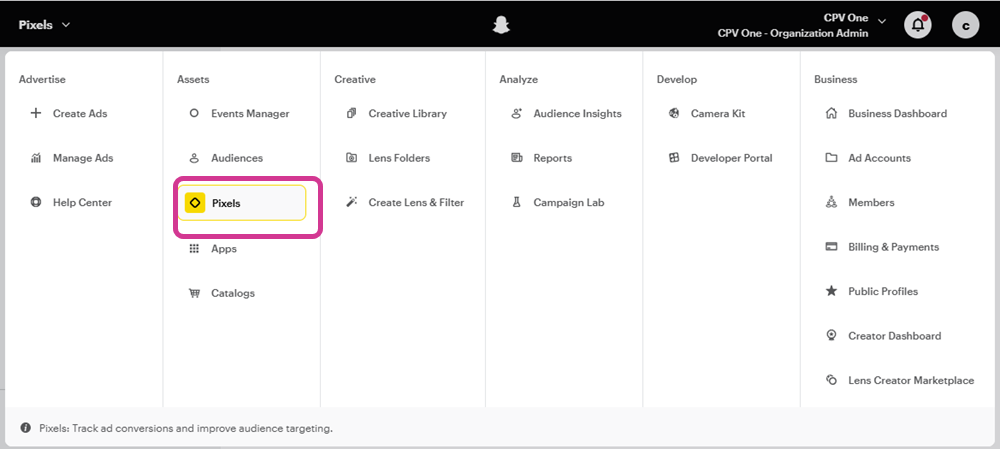
- Click on Create Pixel and give your Pixel a name
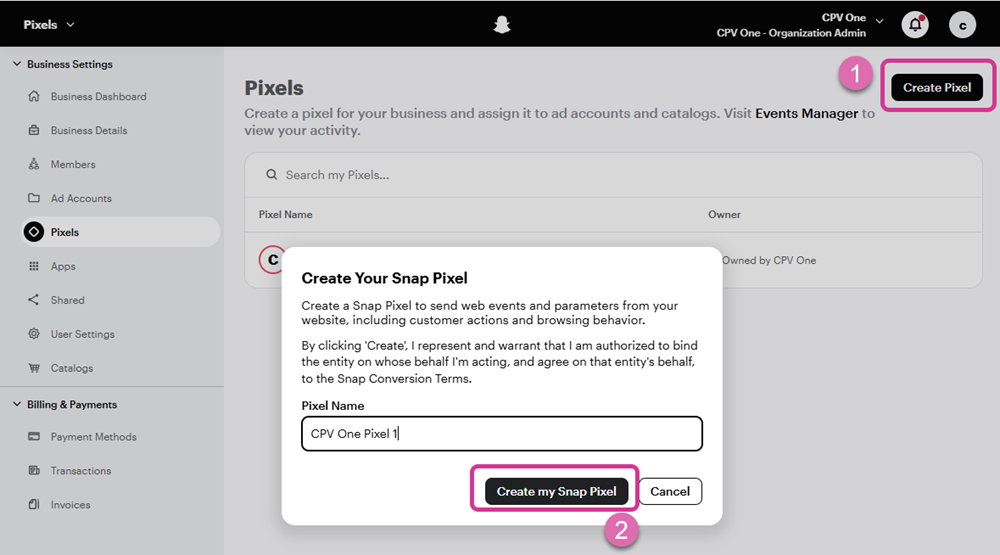
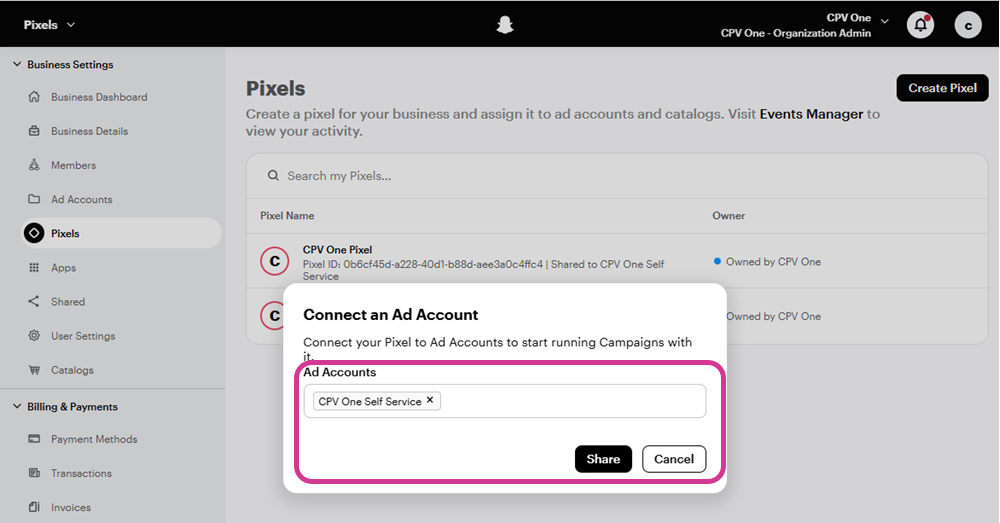
- Select an Ad account for the pixel
- Choose Manual Setup
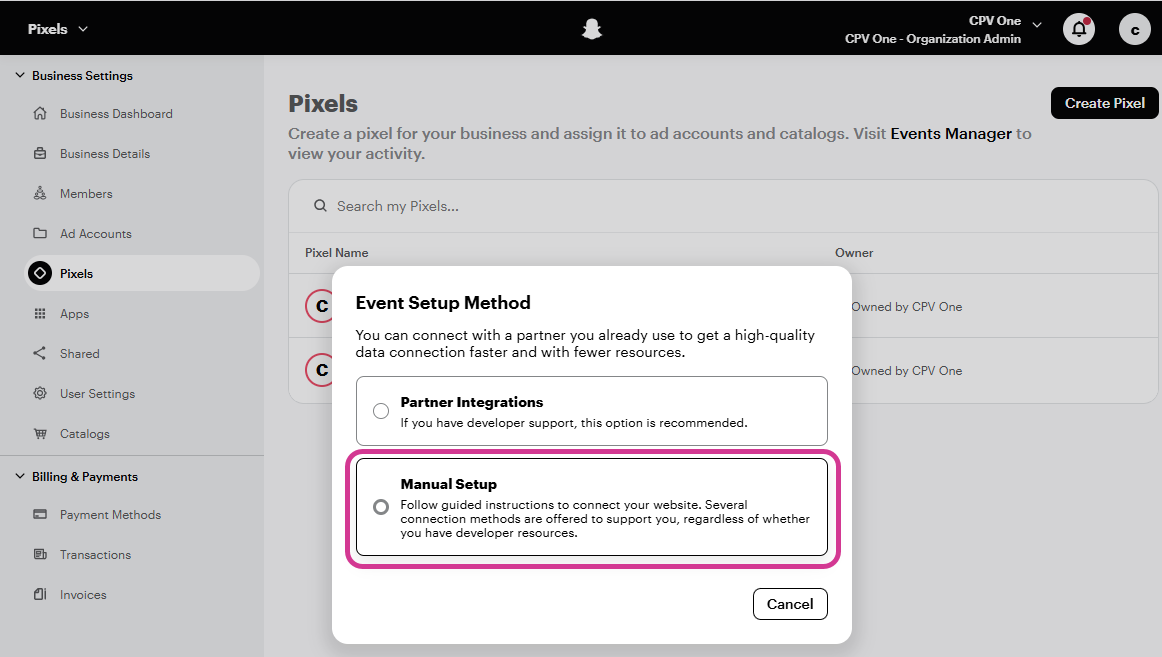
- Choose Conversion API and then Manual Setup
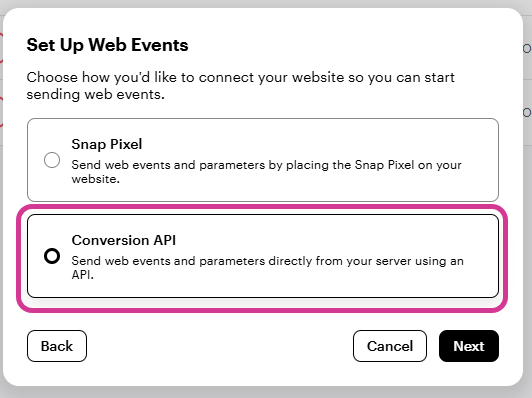
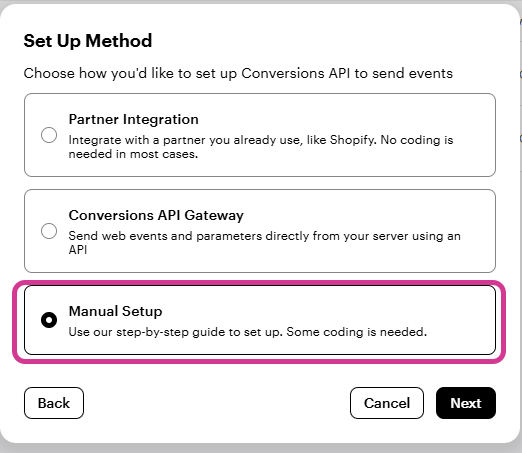
- Click Next until you get to the API token
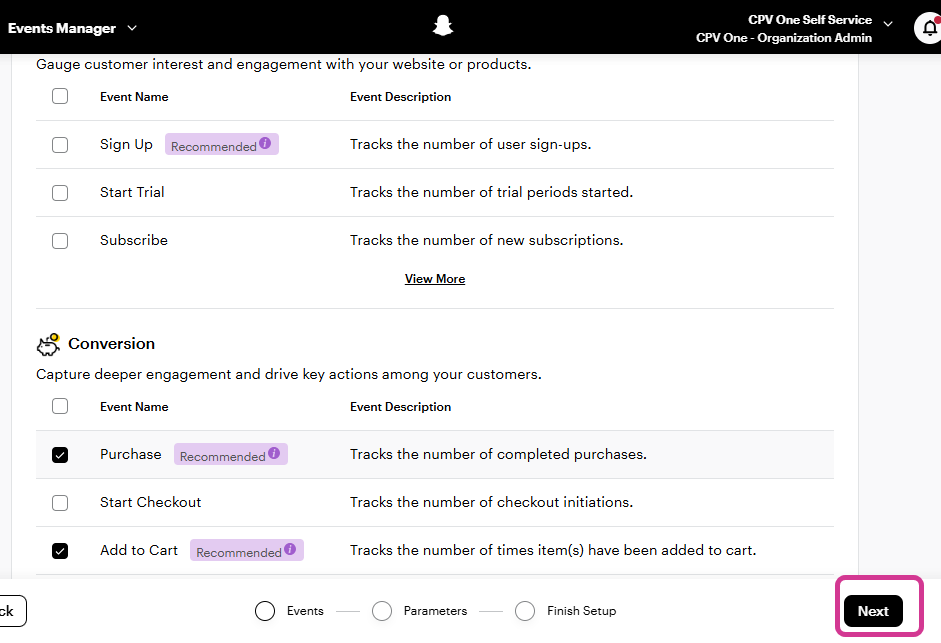
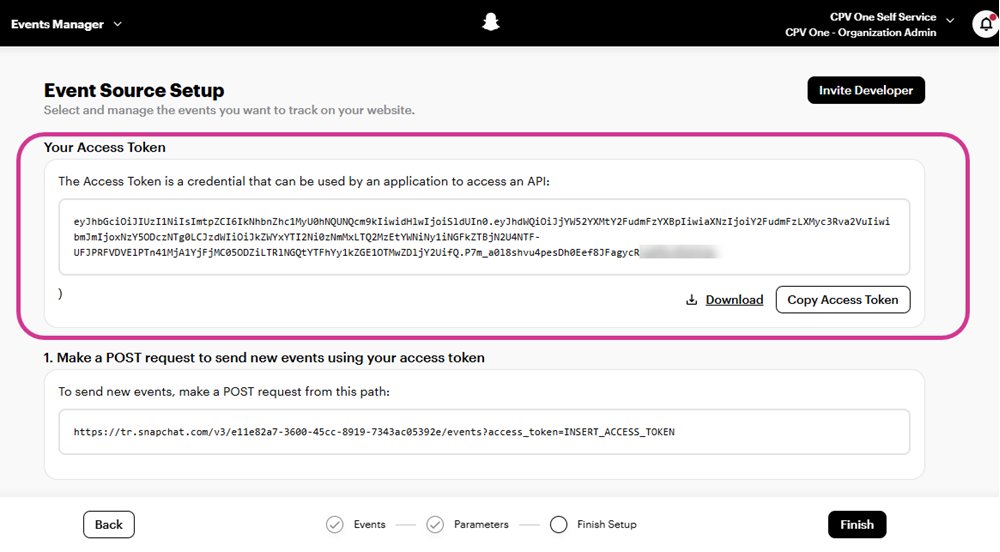
- Copy the Your Access Topen and click Finish
- Select the newly creatd pixel from the left menu and copy your Pixel ID
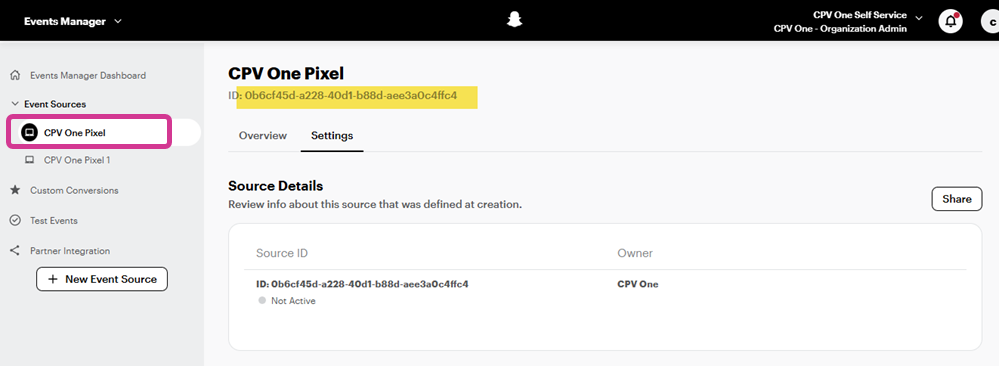
💡 Save the Pixel ID and Access Token in a secure place. You will need it in Step 3.
--
Step 2 - Create the Integration in CPV One or CPV Lab
- Go to Sources - CAPI Integrations.
- In the Quick Add section, click the Snapchat card.
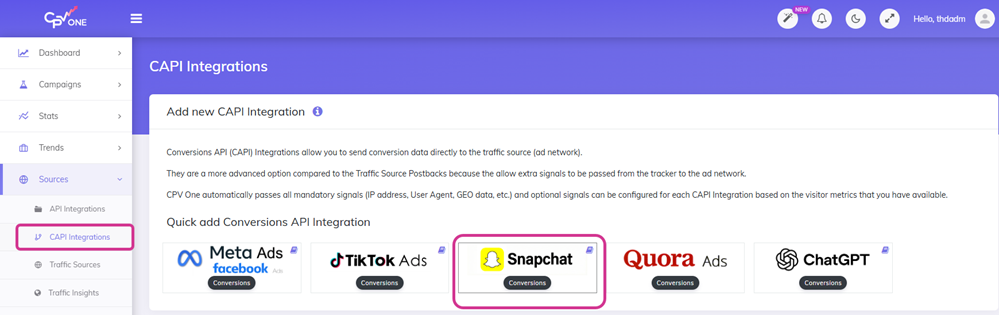
- The Add Snapchat CAPI Integration form opens.
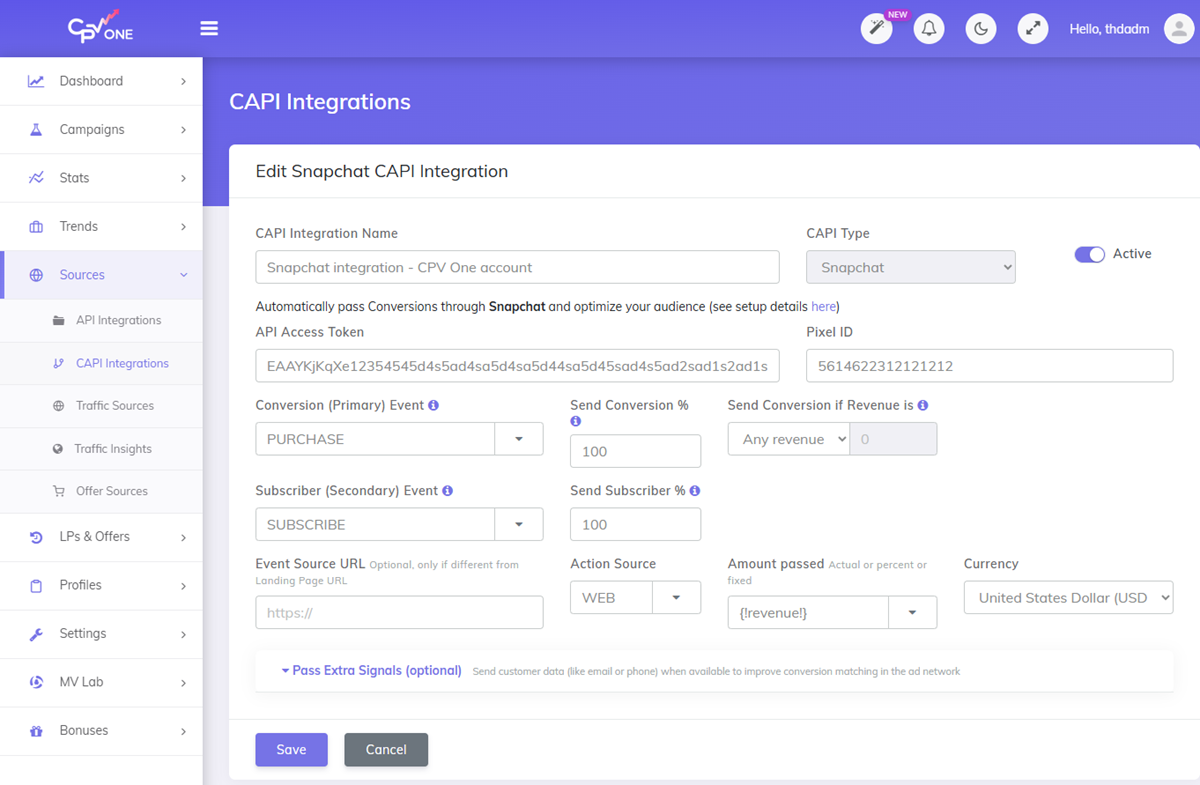
- Fill in the fields:
CAPI Integration Name - A name you will recognize in campaign setup. Examples:
- Snapchat CAPI - Main Pixel
- Snap Ads CAPI - Purchase Events
- Snapchat CAPI - Lead Gen
CAPI Type - Pre-set to Snapchat.
Active - Toggle on.
API Access Token - Paste the token from Step 2.
Pixel ID - Paste the Pixel ID from Step 1.
Conversion (Primary) Event - Select the event that matches your campaign goal (see event name table below).
Send Conversion % - Default 100.
Subscriber (Secondary) Event - Optional. Use this to also fire a Snapchat event when a subscriber/opt-in is recorded in CPV One or CPV Lab, separate from the primary conversion.
Event Source URL - Optional. Only fill this in if your conversions come from a URL different from your campaign's landing page URL. Leave blank in most cases.
Action Source - Select WEB for standard web-based campaigns. Other options:
WEB- conversions happen in a browser (default for most campaigns)MOBILE_APP- conversions happen inside a mobile appOFFLINE- conversions happen offline
Amount passed - Default {!revenue!} passes the actual conversion revenue.
Currency - Match your Snapchat Ads account currency. Use the 3-letter ISO code (USD, EUR, GBP, etc.).
Snapchat Ads CAPI Event Names
Snapchat Ads uses uppercase event names. Select the event that matches your campaign goal from the dropdown:
| Campaign goal | Snapchat event name |
|---|---|
| Purchase / sale | PURCHASE |
| Subscribe | SUBSCRIBE |
| Sign up / registration | SIGN_UP |
| Add to cart | ADD_CART |
| Start checkout | START_CHECKOUT |
| Add billing info | ADD_BILLING |
| Start trial | START_TRIAL |
| Save / bookmark | SAVE |
| Search | SEARCH |
| View content | VIEW_CONTENT |
| Page view | PAGE_VIEW |
💡 Affiliate media buyers: Use
SIGN_UPfor cost-per-lead offers andPURCHASEfor cost-per-sale offers.
💡 Ecommerce brands: Use
PURCHASEfor completed orders,START_CHECKOUTfor checkout page visits, andADD_CARTfor cart additions.
Step 4 - Pass Extra Signals (Optional)
Click Pass Extra Signals (optional) to expand and configure additional customer data fields.
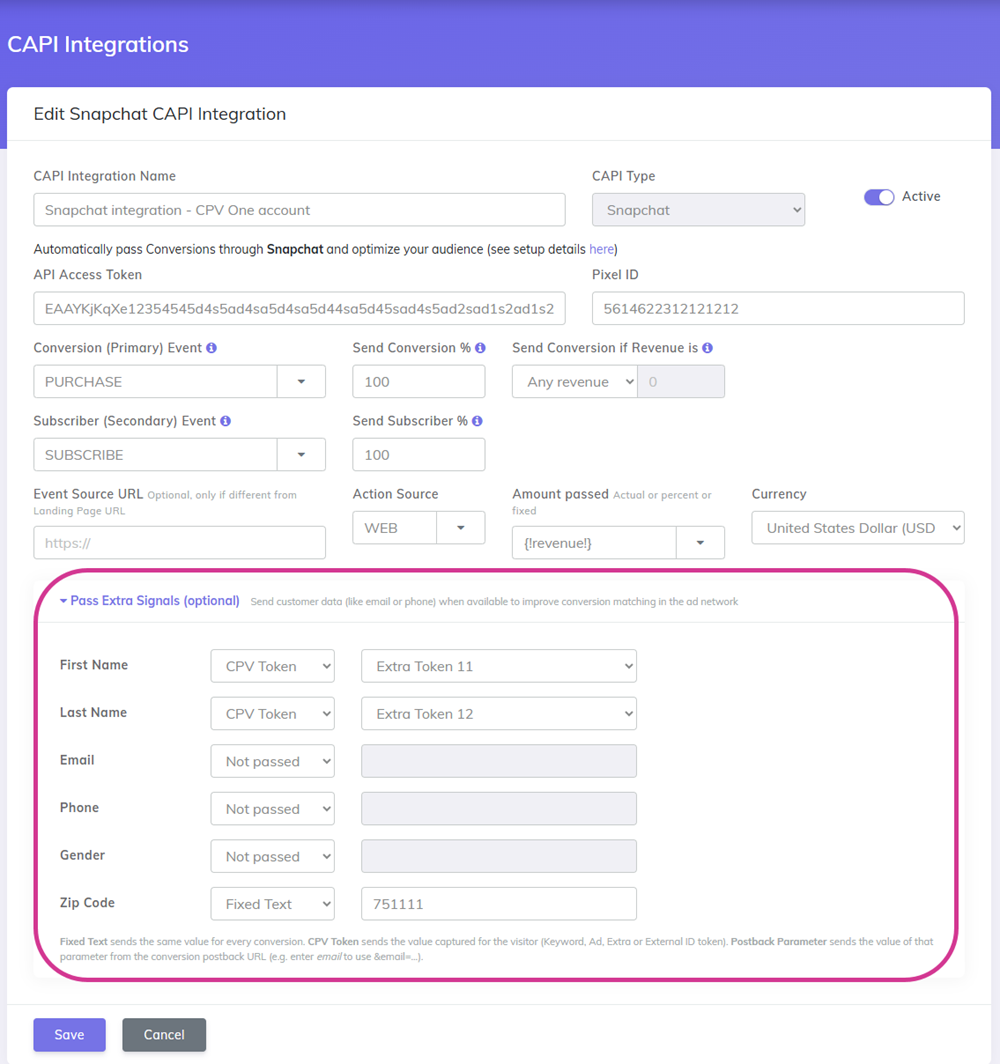
Snapchat uses hashed customer data (email, phone, name) to match server-side conversion events to user profiles. Better matching improves campaign attribution and optimization.
💡 Affiliate media buyers: If your offer network passes back email or other user data in the conversion postback, use Postback Parameter to map those values to the corresponding signal fields.
💡 Ecommerce/DTC brands: If you capture email or phone during checkout and store it in CPV One Extra Tokens, map those tokens here using CPV Token.
Click Save when done.
Step 5 - Assign the Integration to a Campaign
- Open or create a Snapchat Ads campaign in CPV One or CPV Lab.
- Make sure the campaign is set up to capture
sc_click_id. - Make sure you capture User Agent from Data Options for your campaign

- Scroll to Pass events to the traffic source (ad network).
- Click the Dedicated Integration tab.
- Select your Snapchat CAPI integration from the dropdown.
- Save the campaign.
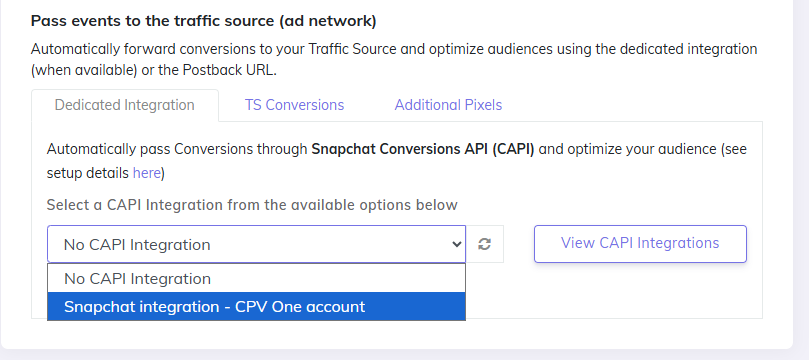
✅ CPV One or CPV Lab will now fire a Snapchat CAPI event for every conversion recorded in this campaign.
Step 6 - Verify CAPI Events Are Being Sent
In CPV One or CPV Lab:
Go to Settings - Postback Log after a test conversion. Look for entries with "type":"snapchatapi". Each successful entry should show "message":"OK" - this confirms Snapchat accepted the CAPI event.
❌ Seeing an error instead of OK?
- Invalid token: The API Access Token is wrong or expired. Regenerate it in Snapchat Events Manager (Step 2) and update it in the integration.
- Invalid Pixel ID: Check the value matches exactly what appears in Snapchat Events Manager (Step 1).
- Missing click ID: The
ScCidparameter was not captured. Check your campaign URL in Snapchat Ads still includes theScCidparameter.
In Snapchat Ads Manager:
Go to Events Manager and open your pixel. Check the Activity tab for recent conversion events. The event name you configured (e.g. PURCHASE) should appear with a count and a recent timestamp.
⚠️ There is typically a delay of a few minutes between when CPV Lab or CPV One sends the CAPI event and when it appears in Snapchat. This is normal and does not affect tracking accuracy.
Troubleshooting
No CAPI entries appearing in the Postback Log.
- The campaign has not received a conversion yet since CAPI was configured. Trigger a test conversion and check again.
- Confirm your affiliate network is firing the CPV Lab or CPV One postback URL correctly.
- Check the API Access Token and Pixel ID are saved in the integration.
Postback Log shows errors.
- Authentication failed: The API Access Token is incorrect. Regenerate it in Snapchat Events Manager and re-enter it in the integration.
- Pixel not found: The Pixel ID does not match. Copy it again directly from the Snapchat Events Manager page.
Conversions appear in CPV Lab but not in Snapchat Ads.
- Check the Postback Log for the CAPI entry. If it shows OK, Snapchat received the event - wait a few minutes and refresh the Events Manager page.
- If the log shows an error, fix the issue described and wait for the next conversion.
Frequently Asked Questions
What is ScCid and does CPV One or CPV Lab capture it automatically? ScCid is the Snapchat click ID appended to your ad URL when someone clicks a Snapchat ad. CPV One and CPV Lab capture it automatically when the visitor lands on your tracked URL. It is passed with every CAPI event for accurate conversion attribution back to the original ad click.
Can I use Snapchat CAPI without a landing page?
Yes. Direct link campaigns work with Snapchat CAPI as long as the sc_click_id click ID is captured in the campaign URL. The CAPI event fires when CPV Lab or CPV One receives the conversion postback from your affiliate network.
Do I need separate integrations for different Snapchat Ads campaigns? Only if you want to fire different event types from different campaigns. If all your campaigns send to the same pixel and fire the same event, one integration covers all of them.
Why is CAPI especially important for Snapchat? Snapchat's audience is predominantly mobile, and many users open links in Snapchat's in-app browser. In-app browsers regularly block JavaScript pixels from firing, which means conversions tracked by a browser pixel alone can be significantly undercounted. CAPI sends data directly from the server and is not affected by in-app browser restrictions.
You may also find useful: